
Introduction
For small businesses, agencies, and corporate sites, WordPress 6.9’s refined block editor and design tools enable professional websites without developer costs. The pattern system and style variations create consistent branding across pages while maintaining flexibility for specific business needs.
Business websites demand reliability—VeeroTech delivers 99.9% uptime, daily automated backups, and professional support that understands business-critical needs. WordPress 6.9’s performance enhancements work with VeeroTech’s infrastructure to ensure fast load times for clients, investors, and partners, projecting competence and credibility essential for business success.
Business-Critical Features in WordPress 6.9
Brand Consistency with Global Styles and Patterns
WordPress 6.9 builds on Global Styles, allowing businesses to define colors, typography, and spacing once for site-wide consistency.
Your brand guide—specific Pantone colors, fonts, spacing rules—translates directly into WordPress. Anyone creating new pages automatically uses approved styles, eliminating design drift without constant oversight.
Implementation: Define brand colors in Appearance → Editor → Styles → Colors, set typography (font families, sizes, line heights), create patterns for service boxes, team member cards, and testimonial blocks.
Pattern rendering relies on database queries. VeeroTech’s Object Cache stores rendered patterns, ensuring new pages load instantly rather than regenerating layouts with each request.
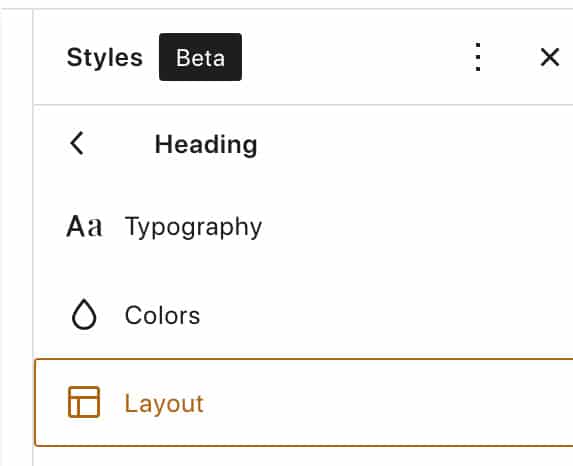
Define your brand identity once and maintain consistency across all pages.
Form Integration and Lead Generation
Modern form blocks with WordPress 6.9 provide smooth client-side validation, reducing failed submissions that cost businesses potential leads.
Forms submit via AJAX without page reloads, provide clear error messaging, and integrate easily with email marketing platforms. VeeroTech reliability ensures form submissions save immediately to the database with automated backups—no lead is ever lost.
Professional Imagery and Media Presentation
WordPress 6.9’s media enhancements create polished visual presentations that project professionalism.
Gallery blocks include hover effects, built-in lightbox functionality for click-to-expand viewing, video backgrounds for dynamic hero sections, and image aspect ratio locking that prevents distortion.
High-resolution images can slow sites significantly. With support of plugins, automatic WebP conversion and CDN distribution ensure professional imagery maintains both aesthetics and speed.
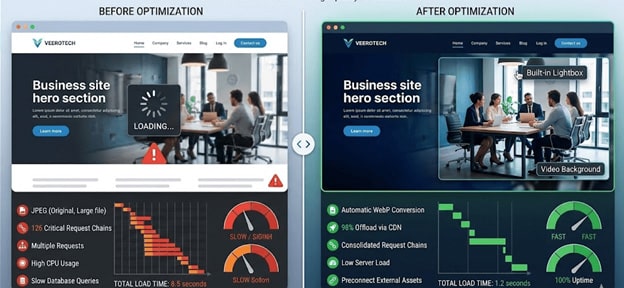
Maintain professional image quality while optimizing for performance.
Client Area and Private Content
WordPress role-based permissions make client portals and private content secure and manageable.
Use cases: Law firms share case documents, consultants provide retainer client resources, agencies show project progress to stakeholders—all secured without exposing information publicly.
Create restricted pages, use block-level permissions to hide pricing for non-logged-in visitors, or display custom content by user role—all without complex plugins.
VeeroTech’s SSL certificates, server-level security, and automated malware scanning protect sensitive information, ensuring compliance with data protection expectations.
Business Website Performance Benchmarks
Target Metrics:
- Page Load Time: Under 2 seconds desktop, 3 seconds mobile
- Time to Interactive: Under 3 seconds
- Uptime:9%+ (VeeroTech guarantee)
- Mobile PageSpeed Score: 80+ on Google PageSpeed Insights
How WordPress 6.9 + VeeroTech Achieves This
WordPress 6.9 reduces CSS/JavaScript payloads for faster paint times. VeeroTech’s NVMe storage delivers sub-100ms response times, Redis Object Cache eliminates database bottlenecks.
Business Website Maintenance Strategy
Weekly Tasks:
- Review form submissions and respond to leads promptly
- Check Google Search Console for crawl errors
- Verify backup completion in VeeroTech dashboard
- Update content (blog posts, case studies)
Monthly Tasks:
- Update WordPress, plugins, themes via staging first
- Review analytics, adjust content strategy
- Optimize database using VeeroTech’s one-click tool
- Fix broken links and 404 errors
Quarterly Tasks:
- Conduct security audits, review user accounts
- Create a custom full backups to external locations
- Perform content audit, update services/team photos
- Run performance benchmarks vs previous quarter
VeeroTech Support for Business Sites
Responsive support for all customers, professional migration assistance, proactive monitoring, and security alerts
Business Website Checklist
- Configure Schema.org structured data
- Set up contact forms with spam protection
- VeeroTech automated backups (daily)
- Install SSL certificate (free with VeeroTech)
- Create privacy policy/terms of service pages
- Configure Google Analytics 4
- Set up professional email via VeeroTech
- Test site across devices/browsers
- Create 301 redirects for old URLs
- Submit sitemap to Google Search Console
FAQ
Is WordPress 6.9 suitable for professional business websites?
Absolutely. WordPress 6.9 powers sites from sole proprietorships to Fortune 500 companies. The block editor provides professional design capabilities without coding; VeeroTech ensures enterprise-grade reliability.
How does VeeroTech’s uptime guarantee protect my business?
VeeroTech maintains 99.9% uptime through redundant infrastructure and proactive monitoring. Your website remains accessible to clients 24/7.
Can I move my existing business website to WordPress 6.9 on VeeroTech?
Yes. VeeroTech provides free migration service, ensuring minimal to zero downtime while preserving content, SEO rankings, and functionality.
What happens if my business site gets hacked on VeeroTech?
VeeroTech’s security includes malware scanning, firewall protection, intrusion detection. Daily clean backups enable quick restoration; support identifies/prevents recurrence.
If you have any web hosting questions please feel free to reach out to us. We're happy to help.