
Introduction
For bloggers, journalists, and digital publishers, WordPress 6.9 delivers workflow improvements that accelerate content production. The new block-level Notes system enables contextual editorial feedback, refined editor controls improve block manipulation, and enhanced media handling streamlines image workflows.
Publishers running on VeeroTech benefit from infrastructure designed for content-heavy sites: unlimited bandwidth for viral articles, Redis caching for comment-heavy posts, and staging environments for editorial review before publication. This combination ensures your content reaches readers quickly, regardless of traffic volume.
Publishing Workflow Enhancements
Editorial Notes System for Content Teams
WordPress 6.9’s new Notes feature allows editors to attach threaded feedback directly to specific blocks, eliminating the need for tools like Google Docs comments or Slack threads.
Editorial workflow streamlines: writers draft articles in WordPress, editors leave contextual notes like “Add statistics to this paragraph” or “Fact-check this claim,” writers address notes inline, and editors mark notes as “Resolved” when satisfied.
This keeps content in one place, eliminating context-switching between WordPress, Google Docs, and communication tools. Editorial teams generate significant autosave and revision data – often 50+ revisions per article. VeeroTech’s hosting environment includes regular database optimization, keeping tables defragmented and queries fast — so editor performance stays smooth even as revision history grows.
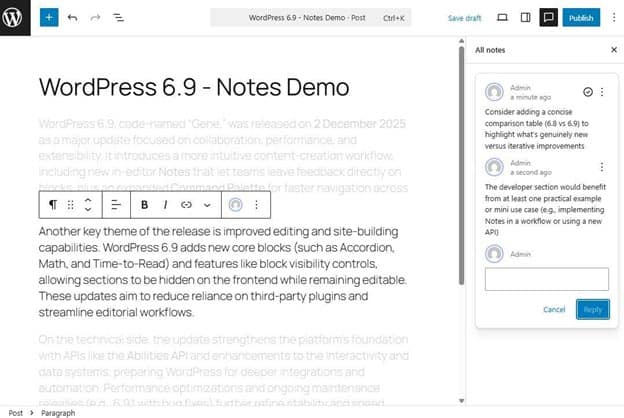
Leave contextual feedback directly on blocks without external tools.
Improved Media Library & Image Optimization
WordPress 6.9 continues improving media library performance with enhanced thumbnail generation and responsive image handling.
Upload high-resolution photos from press events or product launches, and WordPress automatically generates optimized sizes for different breakpoints. Built-in PHP image modules handles the CPU-intensive work without slowing down the admin interface.
Thumbnail generation now happens more efficiently, allowing writers to continue working while images process. VeeroTech’s NVMe storage handles the multiple file writes – original plus thumbnail sizes – without I/O bottlenecks.
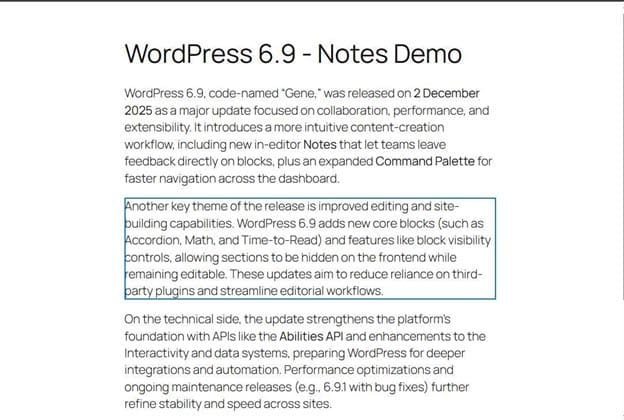

Minimize distractions to focus on writing without interface clutter.
Distraction-Free Writing Mode Refinements
The refined spotlight and distraction-free modes help long-form writers focus by minimizing interface distractions.
Long-form journalists writing 3,000+ word pieces benefit from reduced visual clutter. Toggle spotlight mode to highlight only the current block.
Keyboard shortcuts:
- Ctrl/Cmd + Shift + \ => Toggle distraction-free mode
- Ctrl/Cmd + Alt + O => Open command palette
- / + block name => Quick block insertion
Pattern Libraries for Consistent Design
Publishers can create pattern libraries – pre-designed block layouts for common content types like author bios, call-to-action sections, related articles, and newsletter signups.
Writers drag in the “Related Articles” pattern instead of rebuilding layouts. Design stays consistent, production speed increases. VeeroTech workflow: build patterns in staging, test with real content, sync to production. Object Cache speeds up pattern rendering.
Content Performance on VeeroTech
Traffic Spike Handling
When an article goes viral—hitting Reddit’s front page or trending on social media—traffic jumps dramatically within minutes.
VeeroTech with LiteSpeed web server environment where customers can use plugins like LSCWP to generate full-page cache, serving requests directly from cache storage. These plugins handle asset optimization and delivery, with an optional supported CDN add-on distributing images from edge locations, while ample resources keep the database responsive for comments and admin activity.
Real-world scenario: A lifestyle blog hits Reddit’s front page—80,000 visitors in 6 hours. With VeeroTech, A combination of LiteSpeed and caching plugins configured, most requests are served from cached pages, keeping the site fast and responsive throughout the surge
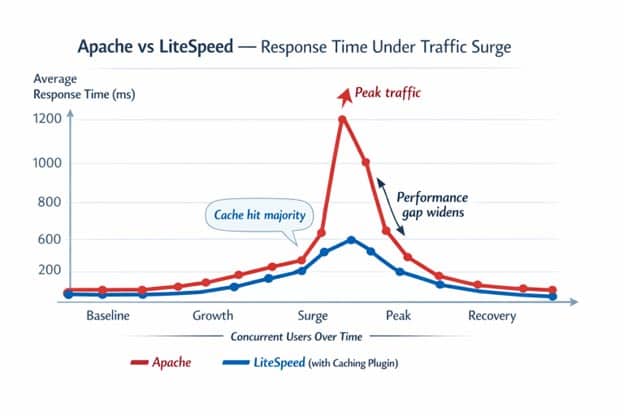
How caching and infrastructure handle sudden traffic surges.
SEO and Performance Benefits for Publishers
WordPress 6.9’s performance improvements help Core Web Vitals through better resource handling.
- LCP benefits from optimized CSS loading for hero images
- INP improves through responsive comment forms and sharing buttons
- CLS reduces with better image dimension handling
VeeroTech delivers fast Time to First Byte (TTFB). Google’s crawler sees consistent fast response times—a positive ranking signal.
Publisher Optimization Checklist
- Configure Redis Object Cache for comment queries
- Set up automatic image compression on upload
- Implement lazy loading for in-article images
- Create pattern library for common content blocks
- Configure editorial roles (Author, Editor, Contributor) with proper permissions
- Schedule automated database optimization weekly
- Test article templates on staging before deploying to production
FAQ
How does WordPress 6.9 improve writing experience for bloggers?
WordPress 6.9 refines the editor with smoother block manipulation, improved keyboard shortcuts, distraction-free modes, and the Notes system for streamlined editorial feedback – all without leaving WordPress.
Can multiple writers work on the same article simultaneously in WordPress 6.9?
WordPress 6.9 shows when another user is editing and prevents conflicting saves. The Notes system enables effective asynchronous collaboration. Real-time co-editing like Google Docs is planned for future releases.
Will WordPress 6.9 help my blog load faster on mobile?
Yes. Reduced CSS and JavaScript payloads benefit mobile users on slower connections. Articles with multiple blocks load noticeably faster on phones.
Also Read: Unleashing Speed: How WordPress 6.9’s Performance Boost Transforms Your Site
How does VeeroTech hosting prevent my site from crashing when an article goes viral?
VeeroTech with LiteSpeed web server and suitable plugins combines full-page caching, CDN integration, and script optimization. Cached pages are served without database queries, handling 100x normal traffic seamlessly.
If you have any web hosting questions please feel free to reach out to us. We're happy to help.