
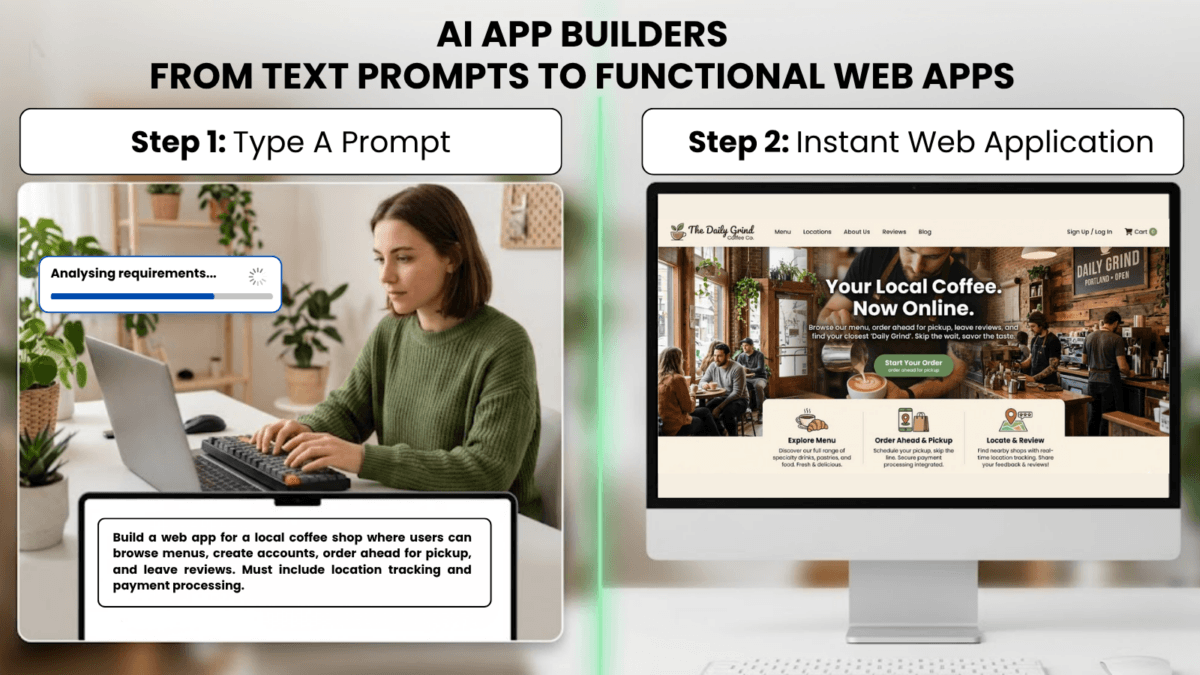
The No-Code Revolution Has Evolved!
You don’t need to know JavaScript anymore. You don’t need to understand React components, API endpoints, or database schemas. In 2026, you can describe your app in plain English, and AI will build it for you – complete with authentication, payment processing, and responsive design.
Welcome to the era of Vibe Coding.
Platforms like Lovable.dev, Bolt.new, and Chef.convex.dev have transformed app development from a months-long coding marathon into a conversation with AI. According to Stack Overflow’s 2024 Developer Survey, 76% of developers now use AI coding tools, with 83% using them primarily for code generation [1].
This guide will show you how these tools work, what they’re actually building under the hood, and why understanding your app’s infrastructure matters – especially when it’s time to deploy to production hosting like VeeroTech’s VPS solutions.
What Are AI App Builders?
AI App Builder: An AI App Builder is a platform that uses Large Language Models (LLMs) to generate complete application code from natural language descriptions. Unlike traditional no-code tools with limited templates, AI builders can create custom logic, unique designs, and complex workflows on demand.
AI app builders are prompt-to-production platforms that leverage models like GPT-4, Claude, and specialized coding LLMs to generate:
- Frontend interfaces (React, Next.js, Tailwind CSS)
- Backend logic (Node.js, TypeScript, API routes)
- Database schemas (PostgreSQL, MongoDB, Convex)
- Authentication systems (OAuth, JWT, session management)
- Payment integrations (Stripe, PayPal)
- Deployment configurations (Docker, Vercel, Netlify)
The Transformation: From Weeks to Minutes
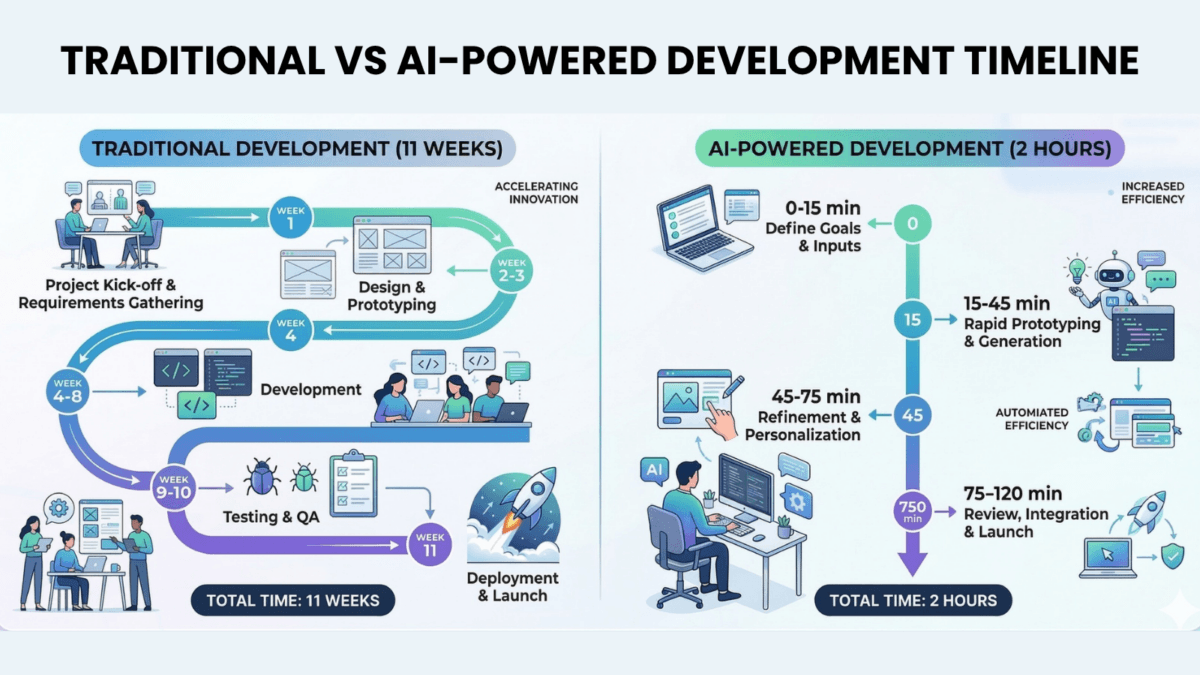
Traditional development timeline for a basic SaaS app:
- Planning & wireframes: 1-2 weeks
- Frontend development: 3-4 weeks
- Backend & database: 2-3 weeks
- Testing & debugging: 2 weeks
- Total: 8-11 weeks
AI app builder timeline:
- Initial prompt: 5 minutes
- AI generation: 2-3 minutes
- Refinement iterations: 30-60 minutes
- Total: Under 2 hours
The Big Three: Lovable.dev, Bolt.new, and Chef.convex.dev
1. Lovable.dev (Formerly GPT Engineer)
Best For: Non-technical founders building SaaS products and web applications
How It Works:
- Describe your app in the chat interface: “Build a project management tool with kanban boards, user roles, and Stripe integration”
- Lovable generates a complete React/Next.js application
- Preview instantly in browser
- Iterate with follow-up prompts: “Add email notifications when tasks are assigned”
- Export code or deploy directly
What It Generates Under the Hood:
- Framework: Next.js 14+ (React-based)
- Language: TypeScript
- Styling: Tailwind CSS
- Backend: Next.js API routes (Node.js)
- Database: Usually Supabase or PostgreSQL
- Authentication: NextAuth.js or Supabase Auth
2. Bolt.new (by StackBlitz)
Best For: Rapid prototyping and full-stack applications with instant preview
How It Works:
- Start with a prompt or template
- Bolt generates code in a live development environment
- See changes instantly – no refresh needed
- Edit AI-generated code directly in browser
- Download project or connect to GitHub
What It Generates:
- Framework Options: React, Vue, Svelte, Astro
- Language: JavaScript or TypeScript
- Backend: Node.js with Express or framework-specific APIs
- Unique Feature: WebContainer technology (Node.js runs in your browser)
- Package Manager: npm packages installed automatically
Technical Distinction:
What is a WebContainer?: A WebContainer is a browser-based Node.js runtime that lets you run server code without an actual server. Think of it as a “virtual computer” running inside your browser tab. While powerful for development, production apps need real servers like VeeroTech VPS hosting.
Bolt’s Power Move: You can ask it to “Add a Redis cache layer” or “Implement JWT refresh tokens”, and it will generate production-grade security patterns – something most no-code tools can’t do.
3. Chef.convex.dev (by Convex)
Best For: Real-time applications (chat apps, collaboration tools, live dashboards)
How It Works:
- Describe your data model and interactions
- Chef generates a Convex backend automatically
- Creates React frontend components
- Real-time sync happens automatically (no WebSocket code needed)
- Deploy with one click to Convex hosting
What It Generates:
- Frontend: React with Convex React hooks
- Backend: Convex database + serverless functions
- Language: TypeScript
- Unique Feature: Automatic real-time data synchronization
- Database: Convex (proprietary, similar to Firebase)
The Real-Time Advantage: Traditional real-time apps require complex WebSocket management, state synchronization, and conflict resolution. Convex handles all of this automatically.
Example Prompt: “Build a multiplayer whiteboard where users see each other’s cursors in real-time”
What Chef Generates:
- Cursor position tracking functions
- Real-time user presence detection
- Collaborative drawing state management
- Conflict-free updates (CRDT-like behavior)
- All in ~200 lines of code
What These AI Builders Are Actually Creating
The Technology Stack (What You Need to Know)
When you prompt these AI builders, they’re generating applications built on these modern technologies:
1. Node.js
Node.js: A JavaScript runtime that lets you run JavaScript on servers (not just in browsers). Think of it as the “engine” that powers your app’s backend. It’s like having a full-time employee that never sleeps, handling user requests 24/7.
Why AI Builders Use It: Node.js is the standard for modern web applications. It’s fast, has a massive ecosystem (npm), and uses the same language (JavaScript) for both frontend and backend.
The Deployment Implication: Node.js apps need to “run” constantly on a server. They’re not like simple HTML websites you can just upload to any hosting. They require:
- Active server processes
- Process management (PM2, systemd)
- Memory and CPU allocation
- Specific Node.js version compatibility
2. React and Next.js
React: A JavaScript library for building user interfaces. Created by Facebook, it’s the most popular way to build modern web apps. Next.js is React’s “big brother” – it adds server-side features and makes apps faster.
Why AI Builders Love It: React is component-based, which means AI can generate modular, reusable pieces of code. Next.js adds server-side rendering (SSR), which makes apps load faster and rank better in search engines.
The Security Context: React applications can run in two modes:
- Client-side only (Static): Safe, can be hosted anywhere
- Server-side (Dynamic): Powerful but requires Node.js security hardening
We’ll explore this critical distinction in our upcoming article “The Static Shield: Deploy React Apps Without Node.js Vulnerabilities”.
3. TypeScript
TypeScript: JavaScript with “type checking” – it catches errors before your code runs. If JavaScript is like writing in pencil, TypeScript is like having an editor who checks your grammar as you type.
Why AI Uses It: AI-generated code is prone to subtle bugs. TypeScript acts as a safety net, catching type mismatches and logic errors automatically.
4. npm Packages
npm (Node Package Manager): A massive library of pre-built code modules. Think of it as an app store for developers – instead of building everything from scratch, you download and install packages. Your AI-built app likely uses 50-200 npm packages.
The Hidden Risk: AI builders automatically install npm packages to add features. But here’s the catch – you don’t see which packages are being used, and some may have security vulnerabilities.
According to Snyk’s 2024 State of Open Source Security report:
- 84% of developers use vulnerable dependencies [2]
- 3,000+ npm vulnerabilities disclosed in 2023
- Average time to fix: 49 days
Example Package Dependencies in a Typical Lovable App:
react: ^18.2.0
next: ^14.1.0
typescript: ^5.3.3
stripe: ^14.10.0
@supabase/supabase-js: ^2.38.4
zod: ^3.22.4
...and 180 more packages
Each of these packages can have vulnerabilities. This is the core issue we’ll address in our next articles “The Vibe Coding Security Debt: Hidden Vulnerabilities in AI-Generated Code” and “Critical Security Update: Node.js & React Vulnerabilities You Must Patch Now”.
The “Magic” Behind the Scenes: How AI Generates Code
Step 1: Understanding Your Intent
When you write a prompt like “Build a todo app with user authentication”, the AI:
- Parses your requirements
- Identifies necessary features (CRUD operations, auth system, database)
- Selects appropriate frameworks and libraries
- Creates a mental “blueprint” of the application architecture
Step 2: Code Generation
The AI generates code in layers:
- Database schema: User tables, todo tables, relationships
- Backend API routes: Create todo, update todo, delete todo
- Frontend components: TodoList, TodoItem, LoginForm
- Styling: Tailwind CSS classes for responsive design
- Integration: Connecting all pieces together
Step 3: Dependency Installation
The AI automatically adds npm packages to package.json:
{
  "dependencies": {
    "next": "^14.1.0",
    "react": "^18.2.0",
    "bcrypt": "^5.1.1",
    "jsonwebtoken": "^9.0.2"
  }
}
Critical Point: You never explicitly choose these packages. The AI selects them based on what it thinks is “best practice” as of its training data. This is where supply chain vulnerabilities enter (more in our upcoming article “The Vibe Coding Security Debt: Hidden Vulnerabilities in AI-Generated Code”).
The Vibe Coder Phenomenon: Why This Matters
Vibe Coding is a term that emerged in 2024-2025 to describe developers who build apps through AI assistance without deeply understanding the underlying code. It’s not a criticism – it’s a democratization of technology.
GitHub Copilot Statistics (2024):
- 1.3+ million active users [3]
- 46% code acceptance rate (developers accept nearly half of AI suggestions)
- Billions of lines of code generated per month
The Empowerment
- Founders can validate ideas without hiring developers
- Small businesses can afford custom software
- Iteration speed increases 10-100x
- Creative people can build tools for their specific needs
The Blind Spot
When you generate an app with AI, you receive:
- ✅ Working code
- ✅ Beautiful UI
- ✅ Functional features
- ❌ Security understanding
- ❌ Infrastructure knowledge
- ❌ Deployment best practices
Research Finding: According to a Stanford/NYU study (2022), 40% of AI-generated code contains security vulnerabilities including SQL injection, hardcoded credentials, and weak encryption [4].
What You’re Actually Building: The Full Stack Explained
When AI generates your app, it creates multiple layers:
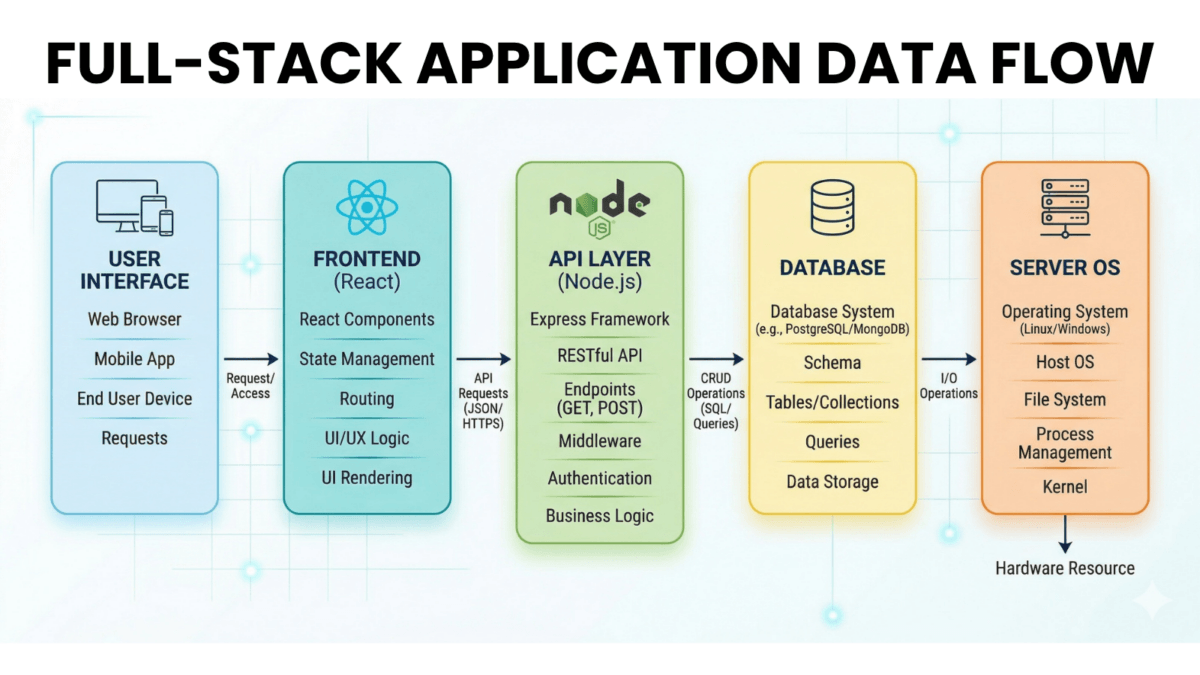
Layer 1: The Frontend (What Users See)
- React components
- Styling (Tailwind, CSS)
- Client-side JavaScript
Hosting Requirement: Can be static files (HTML/CSS/JS) or server-rendered (requires Node.js)
Layer 2: The API Layer (Business Logic)
- Node.js server
- API endpoints (/api/users, /api/products)
- Authentication logic
- Payment processing
Hosting Requirement: Requires active Node.js server process
Layer 3: The Database
- User data
- Application state
- File uploads
Hosting Requirement: Database server (PostgreSQL, MySQL, MongoDB) or managed service (Supabase, Convex)
Layer 4: The Server Infrastructure
- Operating system (Ubuntu, Debian)
- Node.js runtime
- Process manager
- Reverse proxy (Nginx)
Hosting Requirement: VPS or dedicated server with root access
This is why traditional shared hosting won’t work for most AI-generated apps. They need the full stack. This is where VeeroTech’s VPS hosting becomes essential – you get complete control over all four layers.
Why “Preview” Isn’t Deployment
All three AI builders have a “Preview” or “Run” button. You click it, and your app works perfectly. So why can’t you just share that URL?
The Preview Environment Is Temporary
- Lovable: Preview URLs expire after 7 days of inactivity
- Bolt: WebContainer runs in your browser – close the tab, app stops
- Chef: Free tier has limitations and downtime
It’s Not Optimized for Production
- No custom domain
- No CDN (slow loading globally)
- No SSL certificate management
- No backups or disaster recovery
- Limited compute resources
- Shared infrastructure (performance varies)
The Data Privacy Issue
Your app’s database is hosted on the builder’s infrastructure. For MVP testing, that’s fine. For production apps with customer data? That’s a compliance risk.
Regulations to Consider:
- GDPR (EU): Requires data processing agreements with third parties
- CCPA (California): Requires disclosure of data sharing
- HIPAA (Healthcare): Prohibits most third-party data hosting without BAAs
When to Use Each AI Builder
Choose Lovable.dev If:
- ✅ You’re building a SaaS product or web application
- ✅ You need complex business logic and database interactions
- ✅ You want a “traditional” Next.js stack
- ✅ You plan to deploy to Vercel or VPS eventually
Not Ideal For: Real-time collaboration tools, WebSocket-heavy apps
Choose Bolt.new If:
- ✅ You want instant feedback during development
- ✅ You’re comfortable editing code directly
- ✅ You need multi-framework support (React, Vue, Svelte)
- ✅ You want to prototype rapidly before committing to infrastructure
Not Ideal For: Apps requiring specific database systems, heavy backend processing
Choose Chef.convex.dev If:
- ✅ You’re building real-time applications (chat, collaboration, live updates)
- ✅ You want automatic data synchronization without WebSocket code
- ✅ You’re okay with Convex’s proprietary database
- ✅ You prioritize speed over infrastructure flexibility
Not Ideal For: Apps requiring SQL databases, complex data migrations, or specific hosting requirements
The Transition to Professional Hosting: What Comes Next
You’ve built your app. It works in preview. Now what?
The journey from “AI-generated prototype” to “production application” involves:
- Code Export: Downloading your generated code
- Environment Setup: Configuring Node.js, installing dependencies
- Database Migration: Moving from preview database to production
- Server Configuration: Setting up VPS, configuring Nginx
- Domain & SSL: Connecting your custom domain, enabling HTTPS
- Security Hardening: Updating packages, configuring firewalls
- Monitoring: Setting up uptime checks, error tracking
This is the topic of our next article: From Sandbox to Production.
But before we get there, let’s address a critical question:
Do You Even Need Node.js? The Static Site Alternative
Here’s something most Vibe Coders don’t realize: many AI-generated apps don’t actually need to run on Node.js servers.
If your app:
- Doesn’t need server-side rendering
- Doesn’t process payments server-side
- Doesn’t handle sensitive data server-side
- Uses external APIs (Stripe, Supabase) for backend logic
You can export it as a static site and host it on traditional shared hosting like VeeroTech’s cPanel hosting.
This approach:
- ✅ Eliminates Node.js vulnerabilities
- ✅ Reduces hosting costs (70%+ cheaper)
- ✅ Improves loading speed (served from CDN)
- ✅ Simplifies deployment (just upload files)
We’ll cover this “Static Shield” strategy in detail in a later article “The Static Shield: Deploy React Apps Without Node.js Vulnerabilities”.
Key Takeaways
What You Learned
- AI app builders like Lovable, Bolt, and Chef let you create production-quality apps through conversation
- 76% of developers now use AI coding tools (Stack Overflow 2024)
- These tools generate Node.js/TypeScript applications with complex dependency trees
- 84% of developers use vulnerable dependencies (Snyk 2024 Report)
- The preview environment is not suitable for production use
- Your AI-generated app is a full-stack application requiring proper server infrastructure
- Vibe Coding empowers non-technical founders but creates invisible security and infrastructure challenges
What’s Next
In our next article “From Sandbox to Production: Moving Your AI-Built App to Veerotech VPS”, we’ll walk through the transition from AI builder preview environments to professional hosting on VeeroTech VPS – covering code export, server setup, and domain configuration.
In the article “The Vibe Coding Security Debt: Hidden Vulnerabilities in AI-Generated Code”, we’ll expose the security risks that come with AI-generated code, including real npm supply chain attacks and why apps built 3+ months ago are likely vulnerable today.
Have Questions?
Comment below or contact our 24/7 support team – we help you with your AI app deployment.
Sources
[1] Stack Overflow. (2024). “2024 Developer Survey.” Retrieved from https://survey.stackoverflow.co/2024/ [2] Snyk. (2024). “State of Open Source Security Report.” Retrieved from https://snyk.io/reports/open-source-security/ [3] GitHub. (2024). “GitHub Copilot now has a free tier.” GitHub Blog. Retrieved from https://github.blog/2024-01-25-github-copilot-now-has-a-free-tier/ [4] Sandoval, G., et al. (2022). “Lost at C: A User Study on the Security Implications of Large Language Model Code Assistants.” arXiv. Retrieved from https://arxiv.org/abs/2211.03622If you have any web hosting questions please feel free to reach out to us. We're happy to help.