
Introduction
WordPress 6.9’s performance improvements benefit WooCommerce stores through faster block rendering and optimized resource loading. Modern WooCommerce blocks can leverage these enhancements for smoother shopping experiences when paired with proper caching and hosting optimization.
Combined with VeeroTech’s WordPress-optimized hosting – featuring dedicated Redis object caching, high PHP worker limits, and enterprise AMD EPYC hardware – WooCommerce stores gain the foundation for handling both everyday traffic and peak sales periods.
Product Block Performance & Dynamic Pricing
WooCommerce product blocks benefit from WordPress 6.9’s general performance improvements including optimized CSS loading. Interactive features like quantity selectors and variation pricing work smoothly when combined with proper caching.
Real-world impact:
When a customer selects “Size: Large” or changes quantity from 1 to 5, modern blocks provide responsive updates. This creates a smoother shopping experience.
Interactive WooCommerce blocks can use client-side JavaScript for simple interactions, while complex pricing and inventory checks benefit from server-side caching like VeeroTech’s Redis object cache – storing calculated prices for popular variants and reducing response times significantly.
Checkout Block Optimization
Checkout pages benefit from WordPress 6.9’s general script optimization and resource prioritization improvements, creating smoother payment flows when paired with caching.
Studies show a 1-second checkout improvement can increase conversions significantly. WordPress 6.9’s performance enhancements help create faster initial page loads when combined with server-side caching and CDN delivery.
VeeroTech’s support for CDN integration offers geographically distributed servers that reduce latency for international customers. Customers connecting from distant locations experience fast response times due to optimized routing and edge caching.
Cart & Mini-Cart Interactivity
Modern cart and mini-cart blocks provide smooth quantity updates and item management. These interactive elements perform best with object caching to handle the frequent database writes they generate.
Customers can add products, adjust quantities, and apply coupons in the mini-cart overlay without interrupting their browsing flow. This seamless experience reduces the cognitive load associated with managing a shopping cart.
Database consideration:
Every cart update writes to the database. During Black Friday traffic spikes, this generates thousands of writes per minute. VeeroTech’s high-IOPS NVMe storage handles these bursts without degradation, ensuring consistent performance even under extreme load.
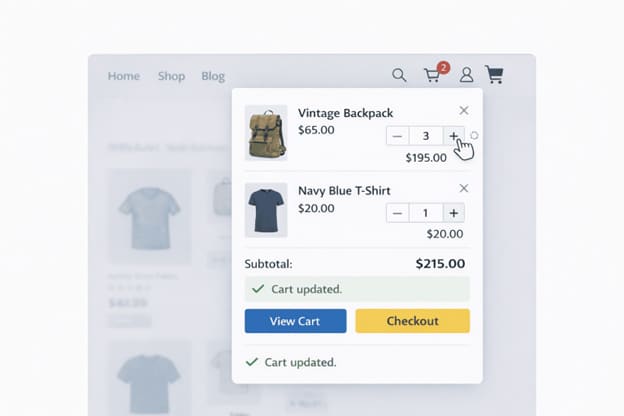
Update cart quantities smoothly without full page navigation.
Product Filtering Without Plugins
WooCommerce product filters perform best with server-side caching. Redis stores filter results so the first customer triggers a database query, but everyone else gets cached results instantly.
Filters generate REST API calls that Redis caches effectively. The first customer to filter “Price: $50-$100” causes a database query, but subsequent customers receive the cached result in milliseconds. This dramatically improves the browsing experience for category pages with multiple filter options.
VeeroTech’s persistent Redis connections reduce connection overhead compared to per-request connections, delivering consistently fast response times for filtered product queries.
WooCommerce + VeeroTech Optimization Stack
Server-Level Optimizations
Object Cache (Redis)
Stores product data, cart contents, and customer sessions in memory for instant retrieval. This is the single most impactful optimization for WooCommerce performance.
Full Page Cache
Serves cached HTML for non-logged-in users browsing product pages, drastically reducing server load during high-traffic periods.
Image Optimization
With help of plugins like LiteSpeed Cache for WordPress, automatic WebP conversion and lazy loading for product galleries, ensuring high-quality visuals without compromising load times.
CDN Integration
Distributes product images and static assets globally, reducing latency regardless of customer location.
WordPress 6.9 Settings for WooCommerce
Enable WooCommerce Blocks (cart/checkout) for better performance with modern themes. Block-based cart/checkout benefits from WordPress 6.9’s general performance improvements, though shortcodes remain fully supported.
Consider enabling HPOS (High-Performance Order Storage) for stores with high order volume. This optional feature stores orders in custom tables instead of posts, improving query performance for large stores.
Enable background processing for order emails and webhooks to prevent these operations from blocking customer-facing requests during checkout.
Performance Checklist for Store Owners
- Enable Redis Object Cache via VeeroTech cPanel
- Switch to block-based cart and checkout
- Optimize product images (max 1200px width, WebP format)
- Reduce installed payment gateways to only those actively used
- Enable WooCommerce’s built-in REST API caching
- Test checkout flow with GTmetrix to verify sub-3-second load times
- Configure CDN integration for product image delivery
- Set up automated database optimization (weekly schedule)
Black Friday Readiness
WordPress 6.9 combined with VeeroTech provides the foundation for handling traffic surges that can overwhelm unprepared stores.
Stress Test Your Setup
Begin with VeeroTech’s staging environment to avoid impacting production traffic. Install a load testing plugin such as WP Test or Query Monitor to gather baseline metrics.
Simulate 500 concurrent users browsing products and monitor PHP worker usage and database query times. If PHP workers max out during testing, consider scaling your VeeroTech plan before the sales event.
Traffic Spike Features
VeeroTech’s AMD EPYC powered enterprise hardware ensuring your store remains responsive without manual intervention.
Background processes- order emails, inventory sync, webhook notifications – are queued to prevent overwhelming the server during peak traffic. This ensures checkout processes remain fast even when administrative tasks are backed up.
During extreme traffic events, enable “Cache Logged-in Users” temporarily to reduce server load. While this limits personalization, it prevents site crashes during the most critical sales windows.
FAQ
Will WordPress 6.9 make my WooCommerce store faster automatically?
WordPress 6.9 provides general performance improvements that benefit WooCommerce stores, particularly those using modern block themes and optimized caching. Block-based cart/checkout may see additional benefits from frontend optimizations.
How does Redis Object Cache help WooCommerce specifically?
WooCommerce generates complex database queries for product variations, pricing rules, and inventory checks. Redis caches these query results, reducing database load significantly. For customers, this means noticeably faster product pages.
Can VeeroTech hosting handle viral product launches or flash sales?
Yes. VeeroTech’s infrastructure offers planned temporary scaling that gives you additional PHP workers, vCPUs, and memory to handle the traffic spikes. For planned events such as product launches, contact VeeroTech support 48 hours in advance for pre-scaling.
Should I use a separate caching plugin with WooCommerce on WordPress 6.9?
Yes, but choose carefully. Use a cache plugin that understands WooCommerce’s dynamic content requirements. Avoid caching cart, checkout, or my-account pages. VeeroTech recommends plugins with WooCommerce-aware caching rules by default.
If you have any web hosting questions please feel free to reach out to us. We're happy to help.