In today’s competitive digital landscape, your website’s speed, security, and search engine performance directly impact your business growth. Many businesses start with shared hosting, but as traffic and expectations grow, performance issues begin to surface.
This is where Managed VPS (Virtual Private Server) hosting becomes a game-changer.
In this guide, we’ll explore how Managed VPS hosting can significantly improve your website’s speed, security, and SEO rankings, and why it’s a smart upgrade for growing businesses.
What is Managed VPS Hosting?
Managed VPS hosting is a solution where:
You get a dedicated portion of a server
The hosting provider (like VeeroTech) handles server management, updates, and security
This means:
No technical headaches
Better performance
Professional support
How Managed VPS Improves Website Speed?
1. Dedicated Resources
Unlike shared hosting, VPS gives you:
Dedicated RAM
CPU power
Storage
Result: Your website doesn’t slow down due to other users.
1. What is Managed VPS hosting?
Managed VPS hosting is a hosting solution where a provider like VeeroTech manages server setup, maintenance, updates, and security, allowing businesses to focus on their website instead of technical tasks.
2. How does Managed VPS improve website speed? Managed VPS provides dedicated resources such as CPU and RAM, optimized server configurations, and caching systems, resulting in faster load times and better performance compared to shared hosting.
3. Is Managed VPS hosting better for SEO?
Yes, Managed VPS improves SEO by enhancing page speed, uptime, and Core Web Vitals, which are important ranking factors for search engines like Google.
4. What is the difference between Managed VPS and Shared Hosting?
In shared hosting, resources are shared among multiple users, which can slow down performance. Managed VPS provides dedicated resources, better security, and improved performance, making it ideal for growing websites.
5. Is Managed VPS secure?
Yes, Managed VPS offers advanced security features such as firewalls, malware scanning, regular updates, and isolated environments to protect your website from threats.
6. When should I upgrade to Managed VPS hosting?
You should upgrade when your website experiences slow loading, increased traffic, security concerns, or when you need better performance and scalability.
7. Does Managed VPS require technical knowledge?
No, Managed VPS does not require technical expertise because the hosting provider handles server management, maintenance, and security.
8. Why choose VeeroTech for Managed VPS hosting? VeeroTech offers high-performance servers, strong security, expert support, and scalable hosting solutions designed to improve website speed, security, and SEO.
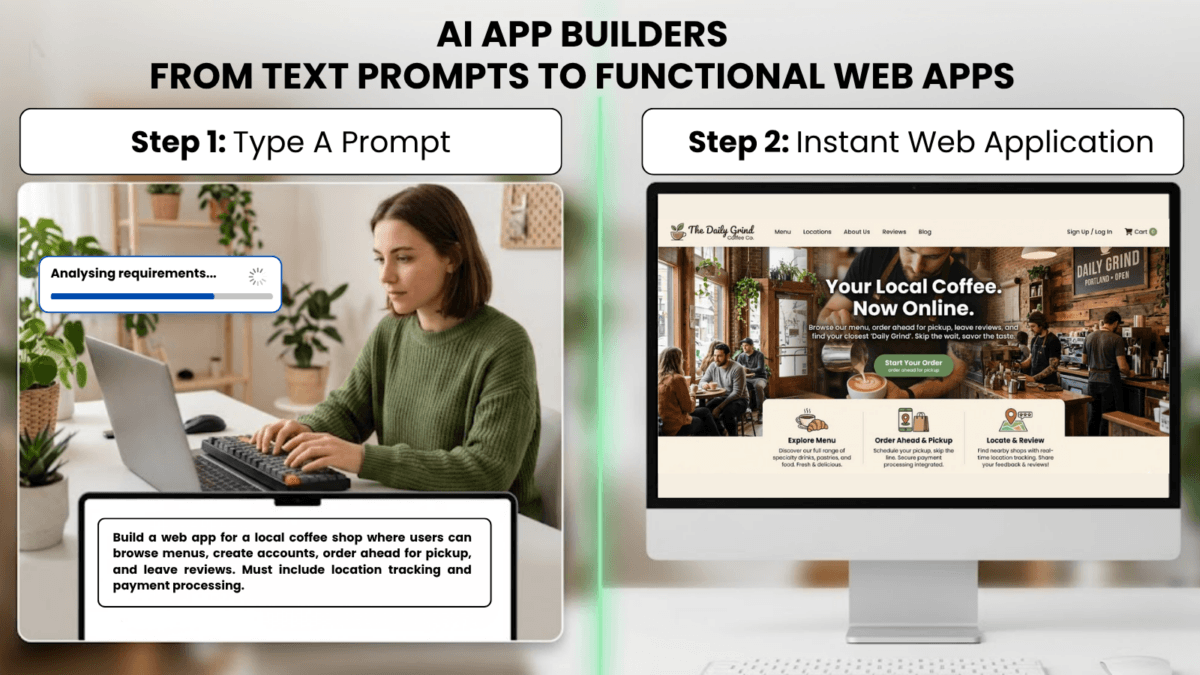
You don’t need to know JavaScript anymore. You don’t need to understand React components, API endpoints, or database schemas. In 2026, you can describe your app in plain English, and AI will build it for you – complete with authentication, payment processing, and responsive design.
Welcome to the era of Vibe Coding.
Platforms like Lovable.dev, Bolt.new, and Chef.convex.dev have transformed app development from a months-long coding marathon into a conversation with AI. According to Stack Overflow’s 2024 Developer Survey, 76% of developers now use AI coding tools, with 83% using them primarily for code generation [1].
This guide will show you how these tools work, what they’re actually building under the hood, and why understanding your app’s infrastructure matters – especially when it’s time to deploy to production hosting like VeeroTech’s VPS solutions.
What Are AI App Builders?
AI App Builder: An AI App Builder is a platform that uses Large Language Models (LLMs) to generate complete application code from natural language descriptions. Unlike traditional no-code tools with limited templates, AI builders can create custom logic, unique designs, and complex workflows on demand.
AI app builders are prompt-to-production platforms that leverage models like GPT-4, Claude, and specialized coding LLMs to generate:
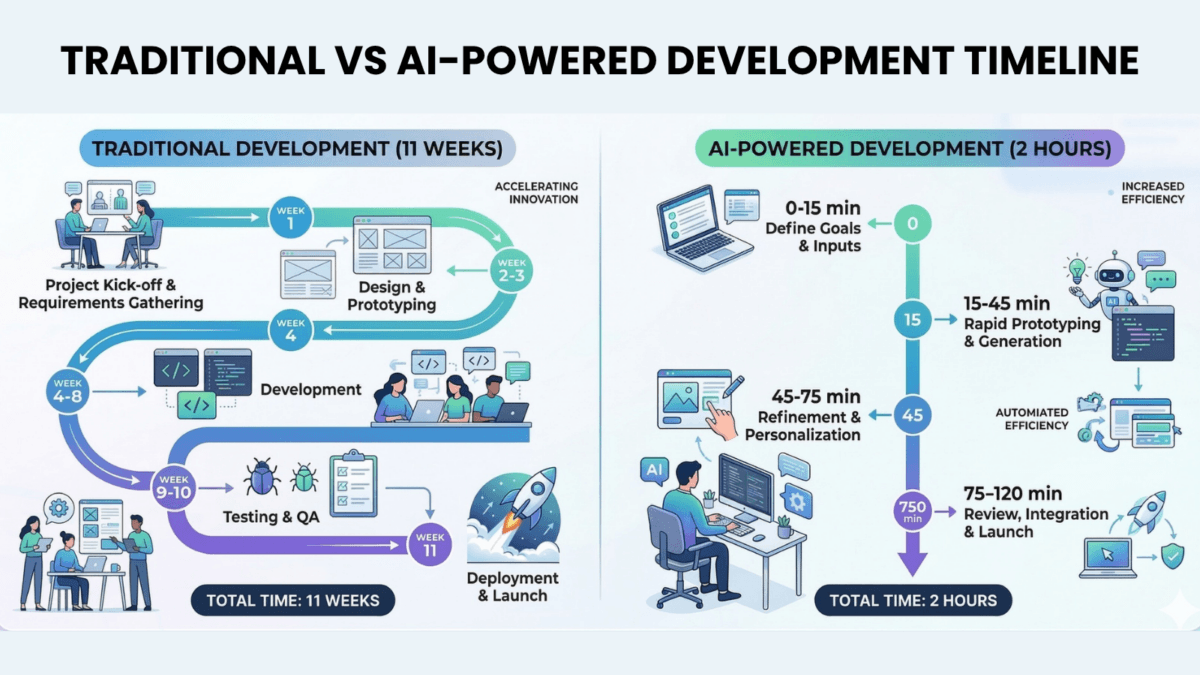
Traditional development timeline for a basic SaaS app:
Planning & wireframes: 1-2 weeks
Frontend development: 3-4 weeks
Backend & database: 2-3 weeks
Testing & debugging: 2 weeks
Total: 8-11 weeks
AI app builder timeline:
Initial prompt: 5 minutes
AI generation: 2-3 minutes
Refinement iterations: 30-60 minutes
Total: Under 2 hours
The Big Three: Lovable.dev, Bolt.new, and Chef.convex.dev
1. Lovable.dev (Formerly GPT Engineer)
Best For: Non-technical founders building SaaS products and web applications
How It Works:
Describe your app in the chat interface: “Build a project management tool with kanban boards, user roles, and Stripe integration”
Lovable generates a complete React/Next.js application
Preview instantly in browser
Iterate with follow-up prompts: “Add email notifications when tasks are assigned”
Export code or deploy directly
What It Generates Under the Hood:
Framework: Next.js 14+ (React-based)
Language: TypeScript
Styling: Tailwind CSS
Backend: Next.js API routes (Node.js)
Database: Usually Supabase or PostgreSQL
Authentication: NextAuth.js or Supabase Auth
⚠️ Important: Lovable apps run on Node.js servers. This means they require specialized hosting environments, not traditional shared hosting. We’ll cover deployment strategies in the next article “From Sandbox to Production: Moving Your AI-Built App to VeeroTech VPS”.
2. Bolt.new (by StackBlitz)
Best For: Rapid prototyping and full-stack applications with instant preview
How It Works:
Start with a prompt or template
Bolt generates code in a live development environment
See changes instantly – no refresh needed
Edit AI-generated code directly in browser
Download project or connect to GitHub
What It Generates:
Framework Options: React, Vue, Svelte, Astro
Language: JavaScript or TypeScript
Backend: Node.js with Express or framework-specific APIs
Unique Feature: WebContainer technology (Node.js runs in your browser)
What is a WebContainer?: A WebContainer is a browser-based Node.js runtime that lets you run server code without an actual server. Think of it as a “virtual computer” running inside your browser tab. While powerful for development, production apps need real servers like VeeroTech VPS hosting.
Bolt’s Power Move: You can ask it to “Add a Redis cache layer” or “Implement JWT refresh tokens”, and it will generate production-grade security patterns – something most no-code tools can’t do.
3. Chef.convex.dev (by Convex)
Best For: Real-time applications (chat apps, collaboration tools, live dashboards)
How It Works:
Describe your data model and interactions
Chef generates a Convex backend automatically
Creates React frontend components
Real-time sync happens automatically (no WebSocket code needed)
Deploy with one click to Convex hosting
What It Generates:
Frontend: React with Convex React hooks
Backend: Convex database + serverless functions
Language: TypeScript
Unique Feature: Automatic real-time data synchronization
Database: Convex (proprietary, similar to Firebase)
The Real-Time Advantage: Traditional real-time apps require complex WebSocket management, state synchronization, and conflict resolution. Convex handles all of this automatically.
Example Prompt:“Build a multiplayer whiteboard where users see each other’s cursors in real-time”
What Chef Generates:
Cursor position tracking functions
Real-time user presence detection
Collaborative drawing state management
Conflict-free updates (CRDT-like behavior)
All in ~200 lines of code
What These AI Builders Are Actually Creating
The Technology Stack (What You Need to Know)
When you prompt these AI builders, they’re generating applications built on these modern technologies:
1. Node.js
Node.js: A JavaScript runtime that lets you run JavaScript on servers (not just in browsers). Think of it as the “engine” that powers your app’s backend. It’s like having a full-time employee that never sleeps, handling user requests 24/7.
Why AI Builders Use It: Node.js is the standard for modern web applications. It’s fast, has a massive ecosystem (npm), and uses the same language (JavaScript) for both frontend and backend.
The Deployment Implication: Node.js apps need to “run” constantly on a server. They’re not like simple HTML websites you can just upload to any hosting. They require:
Active server processes
Process management (PM2, systemd)
Memory and CPU allocation
Specific Node.js version compatibility
2. React and Next.js
React: A JavaScript library for building user interfaces. Created by Facebook, it’s the most popular way to build modern web apps. Next.js is React’s “big brother” – it adds server-side features and makes apps faster.
Why AI Builders Love It: React is component-based, which means AI can generate modular, reusable pieces of code. Next.js adds server-side rendering (SSR), which makes apps load faster and rank better in search engines.
The Security Context: React applications can run in two modes:
Client-side only (Static): Safe, can be hosted anywhere
Server-side (Dynamic): Powerful but requires Node.js security hardening
We’ll explore this critical distinction in our upcoming article “The Static Shield: Deploy React Apps Without Node.js Vulnerabilities”.
3. TypeScript
TypeScript: JavaScript with “type checking” – it catches errors before your code runs. If JavaScript is like writing in pencil, TypeScript is like having an editor who checks your grammar as you type.
Why AI Uses It: AI-generated code is prone to subtle bugs. TypeScript acts as a safety net, catching type mismatches and logic errors automatically.
4. npm Packages
npm (Node Package Manager): A massive library of pre-built code modules. Think of it as an app store for developers – instead of building everything from scratch, you download and install packages. Your AI-built app likely uses 50-200 npm packages.
The Hidden Risk: AI builders automatically install npm packages to add features. But here’s the catch – you don’t see which packages are being used, and some may have security vulnerabilities.
According to Snyk’s 2024 State of Open Source Security report:
84% of developers use vulnerable dependencies[2]
3,000+ npm vulnerabilities disclosed in 2023
Average time to fix: 49 days
Example Package Dependencies in a Typical Lovable App:
Each of these packages can have vulnerabilities. This is the core issue we’ll address in our next articles “The Vibe Coding Security Debt: Hidden Vulnerabilities in AI-Generated Code” and “Critical Security Update: Node.js & React Vulnerabilities You Must Patch Now”.
The “Magic” Behind the Scenes: How AI Generates Code
Step 1: Understanding Your Intent
When you write a prompt like “Build a todo app with user authentication”, the AI:
Parses your requirements
Identifies necessary features (CRUD operations, auth system, database)
Selects appropriate frameworks and libraries
Creates a mental “blueprint” of the application architecture
Step 2: Code Generation
The AI generates code in layers:
Database schema: User tables, todo tables, relationships
Backend API routes: Create todo, update todo, delete todo
Critical Point: You never explicitly choose these packages. The AI selects them based on what it thinks is “best practice” as of its training data. This is where supply chain vulnerabilities enter (more in our upcoming article “The Vibe Coding Security Debt: Hidden Vulnerabilities in AI-Generated Code”).
The Vibe Coder Phenomenon: Why This Matters
Vibe Coding is a term that emerged in 2024-2025 to describe developers who build apps through AI assistance without deeply understanding the underlying code. It’s not a criticism – it’s a democratization of technology.
GitHub Copilot Statistics (2024):
1.3+ million active users[3]
46% code acceptance rate (developers accept nearly half of AI suggestions)
Billions of lines of code generated per month
The Empowerment
Founders can validate ideas without hiring developers
Small businesses can afford custom software
Iteration speed increases 10-100x
Creative people can build tools for their specific needs
The Blind Spot
When you generate an app with AI, you receive:
✅ Working code
✅ Beautiful UI
✅ Functional features
❌ Security understanding
❌ Infrastructure knowledge
❌ Deployment best practices
Research Finding: According to a Stanford/NYU study (2022), 40% of AI-generated code contains security vulnerabilities including SQL injection, hardcoded credentials, and weak encryption [4].
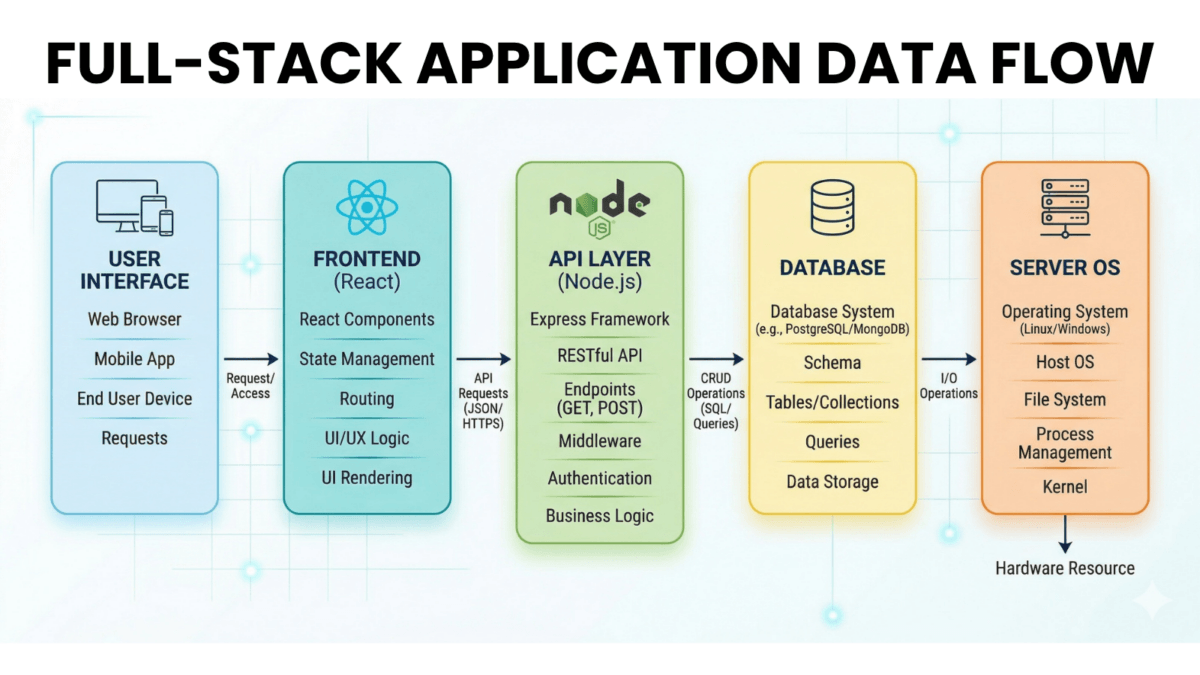
What You’re Actually Building: The Full Stack Explained
When AI generates your app, it creates multiple layers:
Layer 1: The Frontend (What Users See)
React components
Styling (Tailwind, CSS)
Client-side JavaScript
Hosting Requirement: Can be static files (HTML/CSS/JS) or server-rendered (requires Node.js)
Layer 2: The API Layer (Business Logic)
Node.js server
API endpoints (/api/users, /api/products)
Authentication logic
Payment processing
Hosting Requirement: Requires active Node.js server process
Layer 3: The Database
User data
Application state
File uploads
Hosting Requirement: Database server (PostgreSQL, MySQL, MongoDB) or managed service (Supabase, Convex)
Layer 4: The Server Infrastructure
Operating system (Ubuntu, Debian)
Node.js runtime
Process manager
Reverse proxy (Nginx)
Hosting Requirement: VPS or dedicated server with root access
This is why traditional shared hosting won’t work for most AI-generated apps. They need the full stack. This is where VeeroTech’s VPS hosting becomes essential – you get complete control over all four layers.
Why “Preview” Isn’t Deployment
All three AI builders have a “Preview” or “Run” button. You click it, and your app works perfectly. So why can’t you just share that URL?
The Preview Environment Is Temporary
Lovable: Preview URLs expire after 7 days of inactivity
Bolt: WebContainer runs in your browser – close the tab, app stops
Chef: Free tier has limitations and downtime
It’s Not Optimized for Production
No custom domain
No CDN (slow loading globally)
No SSL certificate management
No backups or disaster recovery
Limited compute resources
Shared infrastructure (performance varies)
The Data Privacy Issue
Your app’s database is hosted on the builder’s infrastructure. For MVP testing, that’s fine. For production apps with customer data? That’s a compliance risk.
Regulations to Consider:
GDPR (EU): Requires data processing agreements with third parties
CCPA (California): Requires disclosure of data sharing
HIPAA (Healthcare): Prohibits most third-party data hosting without BAAs
When to Use Each AI Builder
Choose Lovable.dev If:
✅ You’re building a SaaS product or web application
✅ You need complex business logic and database interactions
✅ You want a “traditional” Next.js stack
✅ You plan to deploy to Vercel or VPS eventually
Not Ideal For: Real-time collaboration tools, WebSocket-heavy apps
Choose Bolt.new If:
✅ You want instant feedback during development
✅ You’re comfortable editing code directly
✅ You need multi-framework support (React, Vue, Svelte)
✅ You want to prototype rapidly before committing to infrastructure
Not Ideal For: Apps requiring specific database systems, heavy backend processing
Choose Chef.convex.dev If:
✅ You’re building real-time applications (chat, collaboration, live updates)
✅ You want automatic data synchronization without WebSocket code
✅ You’re okay with Convex’s proprietary database
✅ You prioritize speed over infrastructure flexibility
Not Ideal For: Apps requiring SQL databases, complex data migrations, or specific hosting requirements
The Transition to Professional Hosting: What Comes Next
You’ve built your app. It works in preview. Now what?
The journey from “AI-generated prototype” to “production application” involves:
Monitoring: Setting up uptime checks, error tracking
This is the topic of our next article: From Sandbox to Production.
But before we get there, let’s address a critical question:
Do You Even Need Node.js? The Static Site Alternative
Here’s something most Vibe Coders don’t realize: many AI-generated apps don’t actually need to run on Node.js servers.
If your app:
Doesn’t need server-side rendering
Doesn’t process payments server-side
Doesn’t handle sensitive data server-side
Uses external APIs (Stripe, Supabase) for backend logic
You can export it as a static site and host it on traditional shared hosting like VeeroTech’s cPanel hosting.
This approach:
✅ Eliminates Node.js vulnerabilities
✅ Reduces hosting costs (70%+ cheaper)
✅ Improves loading speed (served from CDN)
✅ Simplifies deployment (just upload files)
We’ll cover this “Static Shield” strategy in detail in a later article “The Static Shield: Deploy React Apps Without Node.js Vulnerabilities”.
Key Takeaways
What You Learned
AI app builders like Lovable, Bolt, and Chef let you create production-quality apps through conversation
76% of developers now use AI coding tools (Stack Overflow 2024)
These tools generate Node.js/TypeScript applications with complex dependency trees
84% of developers use vulnerable dependencies (Snyk 2024 Report)
The preview environment is not suitable for production use
Your AI-generated app is a full-stack application requiring proper server infrastructure
Vibe Coding empowers non-technical founders but creates invisible security and infrastructure challenges
What’s Next
In our next article “From Sandbox to Production: Moving Your AI-Built App to Veerotech VPS”, we’ll walk through the transition from AI builder preview environments to professional hosting on VeeroTech VPS – covering code export, server setup, and domain configuration.
In the article “The Vibe Coding Security Debt: Hidden Vulnerabilities in AI-Generated Code”, we’ll expose the security risks that come with AI-generated code, including real npm supply chain attacks and why apps built 3+ months ago are likely vulnerable today.
Have Questions?
Comment below or contact our 24/7 support team – we help you with your AI app deployment.
Sources
[1] Stack Overflow. (2024). “2024 Developer Survey.” Retrieved from https://survey.stackoverflow.co/2024/
[2] Snyk. (2024). “State of Open Source Security Report.” Retrieved from https://snyk.io/reports/open-source-security/
[3] GitHub. (2024). “GitHub Copilot now has a free tier.” GitHub Blog. Retrieved from https://github.blog/2024-01-25-github-copilot-now-has-a-free-tier/
[4] Sandoval, G., et al. (2022). “Lost at C: A User Study on the Security Implications of Large Language Model Code Assistants.” arXiv. Retrieved from https://arxiv.org/abs/2211.03622
The holidays have always been our favorite time of year at VeeroTech -not just because of the twinkling lights or festive spirit, but because it gives us a moment to pause and reflect on what truly matters: the people who make this journey possible.
For 15 years, we’ve had the privilege of building and growing alongside an incredible community. We’ve watched simple ideas evolve into thriving businesses. We’ve seen passion projects turn into full-time careers. We’ve worked through late-night launches, traffic spikes, migrations, and those inevitable “please help me fix this” moments at 2 AM. And honestly? We wouldn’t have it any other way.
You’re not just part of our story – you help shape it. And this holiday season, we want to say thank you in the way we know best: by continuing to make reliable, honest hosting more accessible for everyone who trusts VeeroTech.
Our 2025 Holiday Campaign: December 20 – January 5
From December 20, 2025, through January 5, 2026, we’re rolling out big holiday savings. Whether you’re just starting out, ready to commit long-term, or looking to upgrade, we’ve got something special waiting for you.
The 2025 Holiday Offers:
1. Annual Plans: Get 4 Months FREE
Coupon Code:HOLIDAY4
This is our flagship holiday offer, and it’s as straightforward as it gets: purchase any annual Shared Hosting, WordPress Hosting or Semi-Dedicated Hosting plans, and get 4 months absolutely free.
Here’s the math:
Pay for 12 months
Get 16 months of hosting
That’s 33% more hosting time at no extra cost
Why you’d love this offer: We know committing to a full year can feel like a big step, especially if you’re switching hosts or launching something new. This deal makes that leap a little easier and a lot more rewarding.
Choose your plan (we recommend starting with our Startup Plan from the Shared Hosting or the Managed WordPress Hosting best suited for most users)
Select Annual Billing at checkout
Enter code HOLIDAY4 in the coupon field
Watch those extra 4 months get added to your order
Perfect for: Established websites, businesses planning for long-term growth, anyone tired of renewal price hikes with other hosts.
2. Monthly Plans: 20% OFF First 3 Months
Coupon Code:HOLIDAY20M
We get it – not everyone is ready to commit to a full year. Maybe you’re testing the waters. Maybe you want to see if we’re the right fit. Maybe you just prefer the flexibility of month-to-month billing.
That’s why we created this offer specifically for our monthly plans.
Here’s what you get:
20% discount on your first month
20% discount on your second month
20% discount on your third month
Then regular monthly pricing kicks in (which is still fair and transparent, by the way)
Why you’d love this offer: It gives you three full months to experience VeeroTech without a long-term commitment. We think once you experience our speed, support, and reliability, you’ll want to stick around. But if not? No hard feelings.
Select your preferred plan from Shared Hosting, WordPress Hosting or Semi-Dedicated Hosting options
Choose Monthly Billing at checkout
Enter code HOLIDAY20M
Enjoy your discounted first three months
Perfect for: New website owners, people switching from another host and wanting to test first, side projects and experiments.
3. Upgrade Incentive: 3 Months FREE
Already hosting with VeeroTech? Outgrowing your current plan? This one’s for you.
When you upgrade to a higher-tier plan during our holiday campaign, we’ll reward your growth:
For Annual Plans :
Upgrade to any higher plan (choose from Shared Hosting, WordPress Hosting or Semi-Dedicated Hosting)
Get 3 months free extension added to your subscription
Equivalent to 25% off your upgrade
For Monthly Plans :
Upgrade to any higher plan (choose from Shared Hosting, WordPress Hosting or Semi-Dedicated Hosting)
Get 25% off for your first three months on the new tier
Why you’d love this offer: We love watching our customers grow. When your website is ready for more resources, more speed, or more power, we want to make that transition as smooth and affordable as possible.
Out team will help you with the upgrade and will apply the offer
Perfect for: Growing businesses, high-traffic sites needing more resources, eCommerce stores scaling up for the new year.
Exclusive New Year Mega Deals: Our Biggest Offer (Jan 1-2, 2026 ONLY)
But wait – we saved the best for last.
On January 1 and 2, 2026, we’re have something truly special: our New Year Mega Deal: 6 Months FREE + 10% OFF on Next Renewal
Coupon Code:NYMEGA26 applicable ONLY on January 1-2, 2026
This is our biggest offer of the entire holiday season, and it’s only available for 48 hours.
Here’s what you get:
Buy 1 year of hosting (Shared Hosting, WordPress Hosting or Semi-Dedicated Hosting plans)
Get 6 months FREE (that’s 18 months for the price of 12)
PLUS get 10% off on your next renewal
The math on this is incredible:
50% more hosting time upfront
Continued savings on next renewal
The best value we offer all year
Why this is special: Most hosting companies lure you in with a cheap first year, then hit you with massive price increases on renewal. We don’t do that. Our regular pricing is already fair and transparent. But with NYMEGA26, you get 6 extra months PLUS an additional 10% renewal discount for next year. It’s our way of starting 2026 off right.
How to use it:
Wait until January 1 or 2, 2026 (mark your calendar!)
Important: This offer vanishes at midnight on January 2nd. No extensions. No exceptions.
Why VeeroTech Is Different
Honest Pricing, Always Our renewal price is our regular price. What you see is what you get. No bait-and-switch tactics.
Real Human Support, 24/7/365 When you open a ticket, you’re talking to a real person who genuinely cares about solving your problem. Most responses come within minutes, not hours.
15 Years of Reliability Since 2010, we’ve been doing this one thing really well: providing fast, secure, reliable hosting that just works.
NVMe Speed, Enterprise Hardware We don’t cut corners on infrastructure. Your website runs on the same enterprise-grade hardware used by Fortune 500 companies.
No Surprise Fees Free SSL. Free migration. Free backups. Free malware scanning. We include what others charge extra for.
How to Choose the Right Offer
New to VeeroTech and ready to commit? → Use HOLIDAY4 for 4 free months on 1 year hosting.
Want to test us out first? → Use HOLIDAY20M for 20% off monthly billing for 1st three months.
Already with us and need more power? → Use UPGRADE3M or UPGRADE3M20 to get extra 3 months on annual billing or 25% off for 1st three month when you upgrade.
Want the absolute best deal? → Wait for NYMEGA26 on Jan 1-2 and get 6 months free extension on annal plans.
A Note of Gratitude
As we wrap up 2025, we want to say something simple but deeply felt: thank you.
Thank you for trusting us. Thank you for your patience when things go wrong. Thank you for your kind words when things go right. Thank you for growing with us, for recommending us to friends, for being part of the VeeroTech family.
Fifteen years is a long time in the hosting world, and we don’t take it for granted. Every website we host represents someone’s dream, someone’s business, someone’s creative expression. That responsibility is something we hold sacred.
So, this holiday season, as you’re deciding where to host your website or whether to upgrade your current plan, know that you’re not just getting a hosting account. You’re getting a partner who’s been doing this right for 15 years and plans to be here for 15 more.
Ready to get started? Head over to our offer page and use the coupon code that fits your needs. We can’t wait to welcome you home – or welcome you to your next level of growth.
Happy holidays from all of us at VeeroTech. Here’s to an incredible 2026—together. 🎄
Security often feels like a moving target; just when you think you’ve locked every door, a new window of opportunity opens for cyber attackers. While keeping WordPress updated is non-negotiable, experienced site administrators know that relying solely on software patches is a gamble. Real peace of mind comes from a defense-in-depth strategy – one where your application and server infrastructure work together to form a cohesive security framework.
WordPress 6.9 strengthens security through architectural improvements that reduce attack surfaces and reinforce permission boundaries. These updates operate at the code level, but robust site security demands a layered approach. When WordPress 6.9’s hardened core is paired with VeeroTech’s server-level protections – including a Web Application Firewall (WAF), isolated environments, and automated malware scanning – you gain a defense-in-depth framework that stops threats before they ever reach your application.
Understanding where these protections live – and how they reinforce one another – starts with a closer look at what changed inside WordPress 6.9 itself.
Security Architecture: What Changed
Rather than relying on a single security mechanism, WordPress 6.9 introduces targeted improvements that harden multiple layers of the application stack.
1) Block-Level Permission Boundaries
WordPress 6.9 continues to tighten how permissions are evaluated for sensitive operations, including those triggered through blocks and the editor. Combined with existing server-side capability checks, this reduces the risk that lower-privileged users can trigger actions they should not access.
This application-level hardening is more effective when paired with account-level isolation on the server. With per-account isolation (for example, PHP-FPM pools and filesystem controls), a compromise in one hosting account is much less likely to impact other accounts on the same server.
How multiple security layers work together to protect your site
2) REST API Hardening & Rate Limiting
WordPress 6.9 builds on previous REST API protections, and many sites also benefit from better sanitization and permission controls in the code that powers their endpoints. Combined with good permission callbacks and nonces, this limits the amount of data an attacker can gather by probing your API.
On the infrastructure side, server-level rate limiting and Web Application Firewalls help throttle suspicious REST API traffic. Even if a valid endpoint is discovered, throttling and pattern-based blocking make brute-force and enumeration attempts far less practical.
3) Sanitization Improvements for Dynamic Blocks
WordPress 6.9 ships with enhanced HTML API security hardening, improving how HTML and dynamic content are parsed and sanitized before output. This particularly benefits dynamic blocks and user-generated content, reducing exposure to cross-site scripting (XSS) and similar injection attacks.
To benefit fully, block plugins should be updated so their code aligns with WordPress 6.9’s stricter sanitization behavior and the underlying HTML API changes.
How WordPress 6.9 processes user data safely.
Caption: How WordPress 6.9 processes user data safely.
4) File Upload & Media Library Controls
WordPress 6.9 introduces stricter MIME type validation and file extension checks, closing long-standing loopholes that allowed malicious files to masquerade as legitimate media uploads.
At the server level, malware scanners such as ClamAV can inspect uploaded files for known malicious signatures. If a suspicious file slips past application-level checks, server-side scanning can quarantine it before it is served from your hosting account.
Security Checklist for WordPress 6.9
Update all plugins and themes within 48 hours of the WordPress upgrade
Enable VeeroTech’s WAF in Active Protection mode
Review user roles and remove unused administrator accounts
Enable two-factor authentication for all admin users
Schedule weekly malware scans via the VeeroTech dashboard
Test backup restoration on a staging environment
FAQ
Does WordPress 6.9 include a built-in firewall?
No. WordPress 6.9 focuses on hardening application-level code. It does not include a Web Application Firewall, which must be implemented at the server level.
Should I still use a security plugin with WordPress 6.9?
Yes. Core improvements provide a strong foundation, but security plugins add features such as login protection, file integrity monitoring, and activity logging.
How does VeeroTech’s account isolation protect my site?
Each hosting account operates in an isolated environment. If another site on the same server is compromised, attackers cannot access your files, databases, or processes.
What’s the most important step after updating to WordPress 6.9?
Updating all plugins and themes. Outdated extensions remain the most common entry point for attacks.
Search has changed. Instead of scanning endless blue links, users are increasingly turning to AI-powered generative engines like ChatGPT, Perplexity, and Google’s AI Overviews to get direct, conversational answers. This shift means traditional SEO tactics aren’t enough. Welcome to the era of Generative Engine Optimization (GEO) — the new SEO for AI.
In this GEO guide, we’ll break down what it is, why it matters, and how you can optimize your content for AI-driven discovery.
What Is Generative Engine Optimization (GEO)?
Generative Engine Optimization (GEO) is the practice of tailoring your content so that AI models — not just search engines — can easily understand, summarize, and present it as part of their generated answers.
Unlike traditional SEO, which optimizes for ranking in Google’s SERPs, GEO ensures your content is:
Structured in a way that AI can process.
Clear enough to be quoted or summarized directly.
Credible and authoritative, so it becomes the preferred source.
In short, SEO helps you rank in search engines, while GEO enables you to appear in AI answers.
Why GEO Matters
AI is the new search front page
More people are asking ChatGPT, Perplexity, and Gemini for answers instead of Googling. If your content isn’t optimized for generative engines, you risk being invisible.
Engagement over clicks
Traditional SEO drove clicks. GEO drives mentions, citations, and authority within AI answers — new ways for brands to build visibility.
Early-mover advantage
GEO is still new. Those who adapt now can establish dominance before the space gets crowded.
GEO vs. SEO: Key Differences
SEO
GEO
Optimizes for keywords & rankings in Google/Bing
Optimizes for inclusion in AI-generated answers
Relies on backlinks & domain authority
Relies on clarity, structure, and trustworthiness
Click-focused
Answer-focused
Content tailored for algorithms
Content tailored for AI comprehension
GEO Guide: How to Optimize for Generative Engines
Here’s a step-by-step GEO guide to future-proof your content.
1. Start With Clear, Direct Answers
AI engines reward clarity. Begin your articles with a short, straightforward answer to the main question before expanding.
Example:
“Generative Engine Optimization (GEO) is the process of making content more accessible and useful for AI-driven engines like ChatGPT and Perplexity, ensuring it can be cited or summarized in their responses.”
2. Structure Content for AI Parsing
Use headings (H2, H3) logically.
Add bullet points and numbered lists for easy extraction.
Include FAQs with natural-language questions.
3. Prioritize Credibility and Accuracy
AI engines prefer trustworthy sources. Build credibility by:
Citing authoritative data (studies, surveys, reports).
Including author bios and credentials.
Keeping content regularly updated.
4. Optimize for Semantic Relevance
Instead of stuffing keywords, focus on semantic depth:
Related terms (AI search, conversational answers, generative engines).
Variations of your main keywords are naturally embedded.
5. Use Structured Data
Leverage schema markup for:
FAQs
How-To guides
Definitions
This makes it easier for AI to extract and repurpose your content.
6. Target Conversational Queries
AI engines thrive on natural language. Optimize for phrases like:
“What is generative engine optimization?”
“How do I implement a GEO strategy?”
“GEO vs SEO differences”
7. Balance Depth with Simplicity
AI engines prefer content that’s both in-depth and easy to summarize. Avoid jargon-heavy paragraphs without clear takeaways.
Example of GEO in Action
If someone asks ChatGPT: “What is Generative Engine Optimization GEO?”
Well-optimized content would allow the engine to respond:
“Generative Engine Optimization (GEO) is the process of optimizing content so that AI-powered engines can understand, summarize, and cite it in their generated answers. Unlike SEO, which focuses on search engine rankings, GEO focuses on inclusion in AI answers.”
Notice how that snippet is direct, clear, and citation-ready.
The Future of GEO
Generative AI will only become more embedded in search, research, and decision-making. Optimizing for it is no longer optional. Generative Engine Optimization is not replacing SEO, but complementing it — ensuring your content is visible in both traditional and AI-driven search.
At its core, GEO isn’t about gaming the system. It’s about writing clear, credible, and structured content that AI can trust. The brands that embrace it early will lead the next era of digital visibility.
Final Thoughts
If SEO helped brands survive in the age of Google, GEO will define who thrives in the age of AI.
Start small:
Refine your answers.
Add structure.
Write for clarity.
Follow this GEO guide, and your content won’t just rank — it will speak directly through the AI engines.