
Introduction
Have you ever sent an important business email only to discover that it landed in the recipient’s spam folder? Or perhaps your customers never received order confirmations, password reset links, invoices, or other essential messages.
Poor email deliverability can affect customer communication, business credibility, and marketing performance. One common reason is that receiving email servers cannot confidently verify whether a message genuinely comes from your domain.
This is where SPF, DKIM and DMARC become essential. These three email authentication protocols help receiving servers verify legitimate senders, identify suspicious messages, and reduce the risk of domain impersonation.
Whether you operate a business website, manage a WordPress store, or send newsletters to subscribers, understanding these protocols can help you build a more secure email system.
In this guide, we explain how SPF, DKIM and DMARC work, how to configure them, and how to improve email deliverability using practical email security best practices.
What Are SPF, DKIM and DMARC?
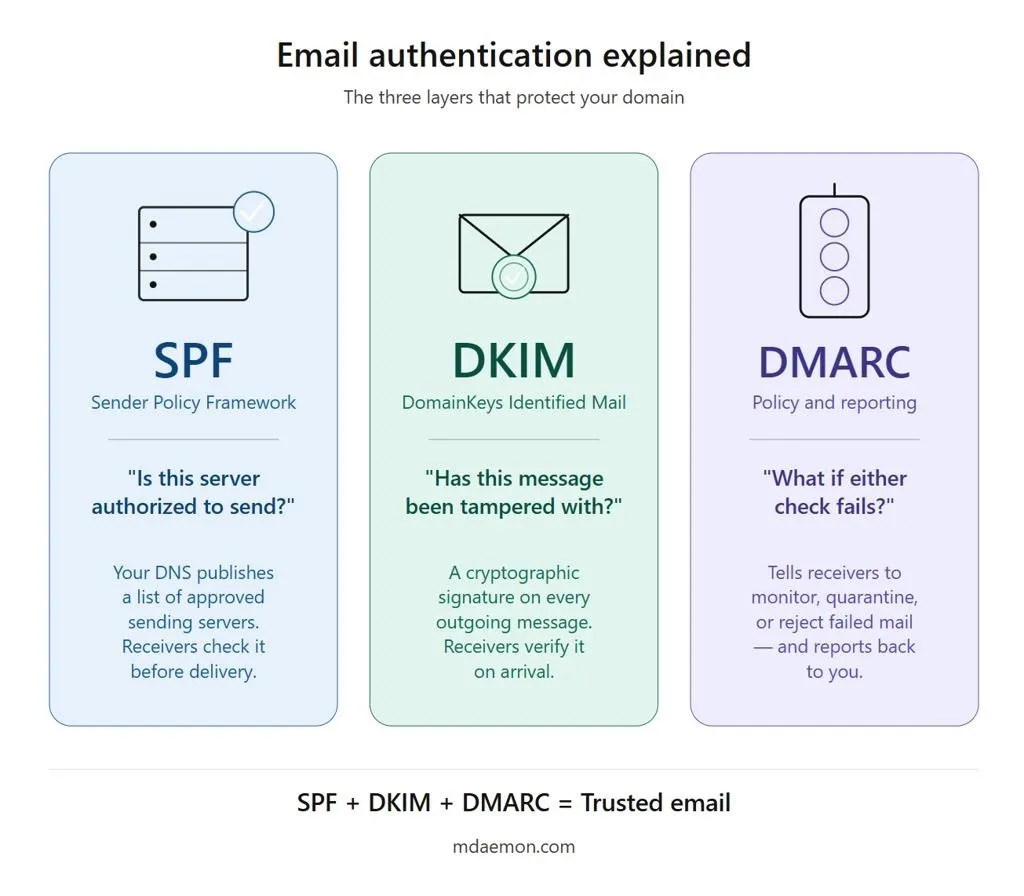
SPF, DKIM and DMARC are email authentication protocols that work together to verify email sources and protect domains against spoofing.
Spammers sometimes forge the sender address of a legitimate business to make fraudulent emails appear trustworthy. Without proper authentication, recipients may struggle to distinguish genuine messages from impersonation attempts.
Each protocol performs a different function:
- SPF (Sender Policy Framework): Identifies which servers are authorized to send email for a domain.
- DKIM (DomainKeys Identified Mail): Uses a digital signature to help verify that an email was authorized by the signing domain and that signed message content has not been altered.
- DMARC (Domain-based Message Authentication, Reporting and Conformance): Establishes a policy for handling messages that fail authentication and provides reporting capabilities.
Together, these email authentication protocols help protect your domain reputation and improve confidence in messages sent from your business.
Why Is Email Deliverability Important?
Email deliverability refers to the ability of your messages to reach recipients’ inboxes rather than being rejected, blocked, or placed in spam.
A successful email transmission does not automatically mean that a message will reach the inbox. Receiving providers also evaluate authentication, sender reputation, sending behavior, message quality, and recipient engagement.
Poor email deliverability can cause several problems:
- Customers miss order confirmations and important notifications.
- Password reset messages fail to reach users.
- Marketing campaigns generate fewer responses.
- Business emails may be flagged as suspicious.
- Attackers may impersonate your domain in phishing campaigns.
Google’s official sender guidelines recommend email authentication and explain that unauthenticated messages may be marked as spam or rejected. Bulk senders to Gmail must meet additional authentication requirements.
Implementing SPF, DKIM and DMARC is therefore an important step toward reliable business communication.
What Is an SPF Record?
How SPF Authentication Works
Sender Policy Framework (SPF) is a DNS-based authentication mechanism that specifies which mail servers are permitted to send email for a domain.
For example, suppose your business uses example.com and sends emails through its hosting server and a third-party email marketing platform. Your SPF record should account for the authorized sending infrastructure.
When a receiving mail server checks an incoming message, it evaluates the sending server against the SPF policy published in DNS.
If the sending server is authorized, the SPF check may pass. If it is not authorized, the check may fail.
Example of an SPF Record
An SPF record might look like this:
v=spf1 include:_spf.examplemail.com ip4:192.0.2.10 ~all
This example is illustrative. The IP address and provider domain must be replaced with the values supplied by your actual email service.
| SPF component | Meaning |
| v=spf1 | Identifies the SPF version |
| include: | References another domain’s SPF authorization rules |
| ip4: | Authorizes a specified IPv4 address |
| ~all | Marks other sources as soft failures |
The final mechanism determines how SPF treats sources not otherwise authorized. The correct policy depends on your sending environment.
How to Set Up an SPF Record
- Identify every service that sends email using your domain.
- Obtain the correct SPF configuration from your hosting provider and email platforms.
- Open your domain’s DNS management panel.
- Add or update the TXT record at the appropriate DNS name.
- Ensure there is only one SPF record for that name.
- Verify the record using an SPF lookup tool.
- Send a test email and inspect its authentication results.
Important: Do not create multiple SPF records for the same domain name. Combine the required mechanisms into one valid record, and remember that SPF has a DNS lookup limit of ten terms that trigger lookups.
What Is DKIM Authentication?
How DKIM Protects Your Emails
DKIM authentication adds a cryptographic signature to outgoing messages. The sending system signs selected message content using a private key, while the corresponding public key is published in DNS.
The receiving server retrieves the public key and uses it to verify the signature.
A successful DKIM check indicates that the signed portions of the message have not been changed in a way that invalidates the signature and that the signing domain controls the relevant key.
DKIM does not encrypt the message or guarantee that its contents are trustworthy. It helps establish message integrity and domain responsibility.
Example of a DKIM DNS Record
A DKIM public key record commonly uses a selector, such as default, to identify the key:
default._domainkey.example.com
A corresponding TXT record may contain data similar to:
v=DKIM1; k=rsa; p=PUBLIC_KEY_VALUE
The public key value is abbreviated here. Use the complete key generated or supplied by your email provider.
How to Configure DKIM Authentication
- Open your email service’s administrative settings.
- Find the domain authentication or DKIM section.
- Generate or obtain the DKIM key and selector.
- Add the specified DNS record to your domain.
- Allow DNS changes to propagate.
- Enable DKIM signing in the email service, if required.
- Send a test email and check its DKIM result.
If you use multiple email services, each service may require its own DKIM selector and configuration.
What Is a DMARC Policy?
How DMARC Works With SPF and DKIM
DMARC builds on SPF and DKIM by checking whether an authenticated domain aligns with the domain shown in the visible From address.
This alignment is important because a message could pass SPF or DKIM for a different domain while still displaying a forged sender address.
For DMARC to pass, at least one of the following must pass and align with the visible From domain:
- SPF authentication and alignment.
- DKIM authentication and alignment.
DMARC also allows domain owners to request a specific treatment for messages that fail the policy and to receive reports from participating email providers.
Example of a DMARC Record
A monitoring-only DMARC record can look like this:
v=DMARC1; p=none; rua=mailto:dmarc-reports@example.com
Replace the example domain and reporting address with your own values.
| DMARC component | Purpose |
| v=DMARC1 | Identifies the DMARC version |
| p=none | Monitors authentication without requesting quarantine or rejection |
| rua= | Specifies an address for aggregate reports |
Understanding DMARC Policies
| Policy | What it does | When to consider it |
| p=none | Requests monitoring without enforcement | Initial deployment and investigation |
| p=quarantine | Requests suspicious messages be treated as potentially fraudulent | After reviewing legitimate senders and reports |
| p=reject | Requests rejection of messages that fail DMARC | Once authorized sending sources and alignment are verified |
Receiving providers determine their actual handling based on their systems and policies. A DMARC policy is not an absolute guarantee that every failing message will be treated identically.
How to Implement DMARC Safely
Start with monitoring to discover which systems send email on behalf of your domain. Review aggregate reports to identify legitimate services, misconfigured systems, and unauthorized senders.
Correct SPF and DKIM issues before moving toward quarantine or rejection. Increase enforcement gradually and monitor the results.
Moving straight to p=reject without auditing your sending services can block legitimate invoices, customer notifications, or marketing messages.
SPF vs. DKIM vs. DMARC: Key Differences
| Feature | SPF | DKIM | DMARC |
| Primary purpose | Authorizes sending servers | Verifies a cryptographic signature | Checks alignment and defines policy |
| DNS record type | TXT | TXT | TXT |
| Helps prevent spoofing | Yes | Yes | Yes |
| Provides reporting | No built-in DMARC reports | No built-in DMARC reports | Yes, when reporting is configured |
| Requires alignment with visible From domain | Not by itself | Not by itself | Yes, through SPF or DKIM |
| Best use | Identify authorized senders | Verify signed message integrity | Coordinate authentication and enforcement |
The three protocols complement one another. SPF alone is not sufficient for every email scenario, and DKIM alone does not establish a complete domain-level anti-spoofing policy.
How to Improve Email Deliverability With SPF, DKIM and DMARC
Correctly configuring email authentication is a foundation, but deliverability also depends on how you send messages and maintain your domain reputation.
1. Authenticate Every Sending Service
List all services that send messages from your domain, including business email, website contact forms, ecommerce notifications, newsletters, and customer relationship management systems.
Ensure each service is configured correctly for SPF, DKIM, and DMARC alignment where applicable.
2. Monitor Email Authentication Results
Send test messages to accounts you control and inspect the full message headers. Look for results such as:
spf=pass
dkim=pass
dmarc=pass
These results are useful diagnostic signals, but they do not guarantee inbox placement.
3. Maintain a Good Sender Reputation
Send email only to people who have a legitimate reason to receive it. Remove invalid addresses, honor unsubscribe requests, and avoid sudden increases in sending volume.
Monitor complaints, bounces, and engagement. For Gmail recipients, eligible senders can use Google Postmaster Tools to review relevant reputation and delivery information.
4. Use Accurate DNS and Mail Server Settings
Check that your mail server’s forward and reverse DNS configuration is correct where applicable. Use secure mail transport, and make sure your hosting or email provider has configured the necessary infrastructure.
5. Separate Marketing and Transactional Email
Where practical, use distinct sending subdomains or infrastructure for newsletters and transactional messages.
For example, a business might use news.example.com for promotional campaigns and notify.example.com for order notifications. Configure authentication for each domain or subdomain according to the providers involved.
This separation can help with operational management, although it does not automatically guarantee better deliverability.
6. Review Authentication After Changes
Recheck your DNS records whenever you migrate hosting, change email providers, add a marketing platform, or update your sending infrastructure.
A configuration that worked previously may no longer cover every authorized sender after a migration.
Common Email Authentication Mistakes to Avoid
Even well-managed websites can experience email delivery problems because of small configuration errors.
- Multiple SPF records: Publish one valid SPF policy per DNS name.
- Missing email services: Include all authorized senders in the SPF configuration.
- Incorrect DKIM selectors: Verify that the DNS selector matches the one used by your email provider.
- Premature DMARC enforcement: Audit legitimate sending sources before enforcing quarantine or rejection.
- Ignoring reports: Review DMARC reports to uncover misconfigurations and unauthorized senders.
- Assuming authentication guarantees delivery: Authentication does not replace sound sending practices, appropriate content, or good reputation management.
Regularly reviewing these areas makes it easier to prevent email spoofing and maintain reliable business communications.
Email Security Best Practices for Businesses
A secure email setup should include more than DNS records.
Consider these additional measures:
- Enable multifactor authentication for email administrator accounts.
- Use strong passwords and restrict access to DNS management.
- Keep website software, plugins, and server applications updated.
- Configure website contact forms to use an authorized SMTP service.
- Avoid sending bulk campaigns to purchased or unverified lists.
- Review suspicious messages and report suspected phishing attempts.
- Maintain backups and documented DNS settings for recovery.
- Reassess authentication whenever your email infrastructure changes.
For websites that rely on customer communication, these steps can reduce operational risks and support a more trustworthy email environment.
How Web Hosting Affects Email Deliverability
Your hosting environment can influence the reliability of website-generated messages, including contact form submissions, registration emails, and ecommerce notifications.
For example, a WordPress website may use PHP’s default mail mechanism or a configured SMTP provider. If the sending source is not authorized or the message lacks valid authentication, receiving servers may treat it as suspicious.
VeeroTech provides hosting services with features such as cPanel, email accounts, and spam protection on applicable plans. The right setup depends on your website, mail volume, and email provider.
Consider these related VeeroTech resources:
- Shared Hosting – for websites that need hosting with cPanel and email account features.
- Managed VPS Hosting – for businesses needing managed server resources and administration.
- Managed WordPress Hosting – for WordPress websites requiring managed hosting and site maintenance.
Hosting alone does not guarantee inbox placement. You should still configure SPF, DKIM, and DMARC correctly and follow your email provider’s sending requirements.
Conclusion: Strengthen Email Deliverability With the Right Authentication
SPF, DKIM and DMARC form an important foundation for secure, trustworthy email communication. SPF identifies authorized senders, DKIM verifies message signatures, and DMARC helps protect the visible sender identity through alignment, policy, and reporting.
To improve email deliverability, begin by auditing your sending services, configuring the appropriate DNS records, testing authentication, and monitoring DMARC reports. Combine these technical controls with good sending practices, secure accounts, and regular maintenance.
Whether you’re running a business website, an online store, or a growing WordPress platform, a reliable hosting environment can help support your website and email workflows.
Looking for reliable hosting for your business website? Explore VeeroTech Shared Hosting, Managed VPS Hosting, or Managed WordPress Hosting to find a solution that fits your technical needs.
Frequently Asked Questions
1. What are SPF, DKIM and DMARC used for?
SPF identifies authorized sending servers, DKIM verifies a cryptographic email signature, and DMARC checks authentication alignment and specifies how receiving providers should handle failing messages. Together, they help reduce spoofing and improve trust in legitimate email.
2. Do I need SPF, DKIM and DMARC for my business domain?
Yes, configuring all three is a strong email security best practice. Gmail recommends using SPF, DKIM, and DMARC, and bulk senders to Gmail must meet additional authentication requirements. Exact requirements can vary by receiving provider and sending volume.
3. Can SPF, DKIM and DMARC guarantee that emails reach the inbox?
No. They help authenticate email and reduce spoofing, but inbox placement also depends on sender reputation, recipient engagement, content quality, sending practices, and receiving-provider filtering.
4. How long does it take for SPF, DKIM and DMARC changes to work?
DNS changes may become visible within minutes or take longer, depending on TTL values, caching, and provider configuration. After making changes, verify the records and test messages rather than assuming authentication is active immediately.
5. Which DMARC policy should I use first?
A monitoring policy such as p=none is commonly used during initial deployment. Review reports, correct legitimate sending issues, and then consider quarantine or rejection when your configuration is ready for enforcement.
If you have any web hosting questions please feel free to reach out to us. We're happy to help.