
A slow WordPress website can affect almost every part of your online business. Visitors may leave before your page loads, customers may abandon their shopping carts, and search engines may evaluate your website’s performance through page experience signals. Whether you operate a business website, blog, online store, or service platform, WordPress website speed optimization should be a priority.
Many website owners install a caching plugin but overlook the performance benefits of server-level caching and object caching. This is where LiteSpeed Cache + Redis can work together to improve how WordPress delivers content and handles repeated database requests.
LiteSpeed Cache helps reduce the time required to generate and deliver web pages, while Redis Object Cache stores frequently accessed data in memory. When configured correctly, these technologies can reduce unnecessary processing and improve website responsiveness.
In this guide, you’ll learn how LiteSpeed Cache for WordPress and Redis work, their differences, practical setup considerations, and how to choose hosting that supports WordPress performance optimization.
Suggested blog image: WordPress performance optimization and modern hosting infrastructure.
What Is LiteSpeed Cache + Redis?
LiteSpeed Cache + Redis refers to using two complementary caching technologies within a WordPress hosting environment.
- LiteSpeed Cache: A caching and optimization solution designed for the LiteSpeed Web Server, with a WordPress plugin that supports page caching and additional optimization features.
- Redis: An in-memory data store that can be used by WordPress as an object cache to retain frequently accessed database results and other cacheable data.
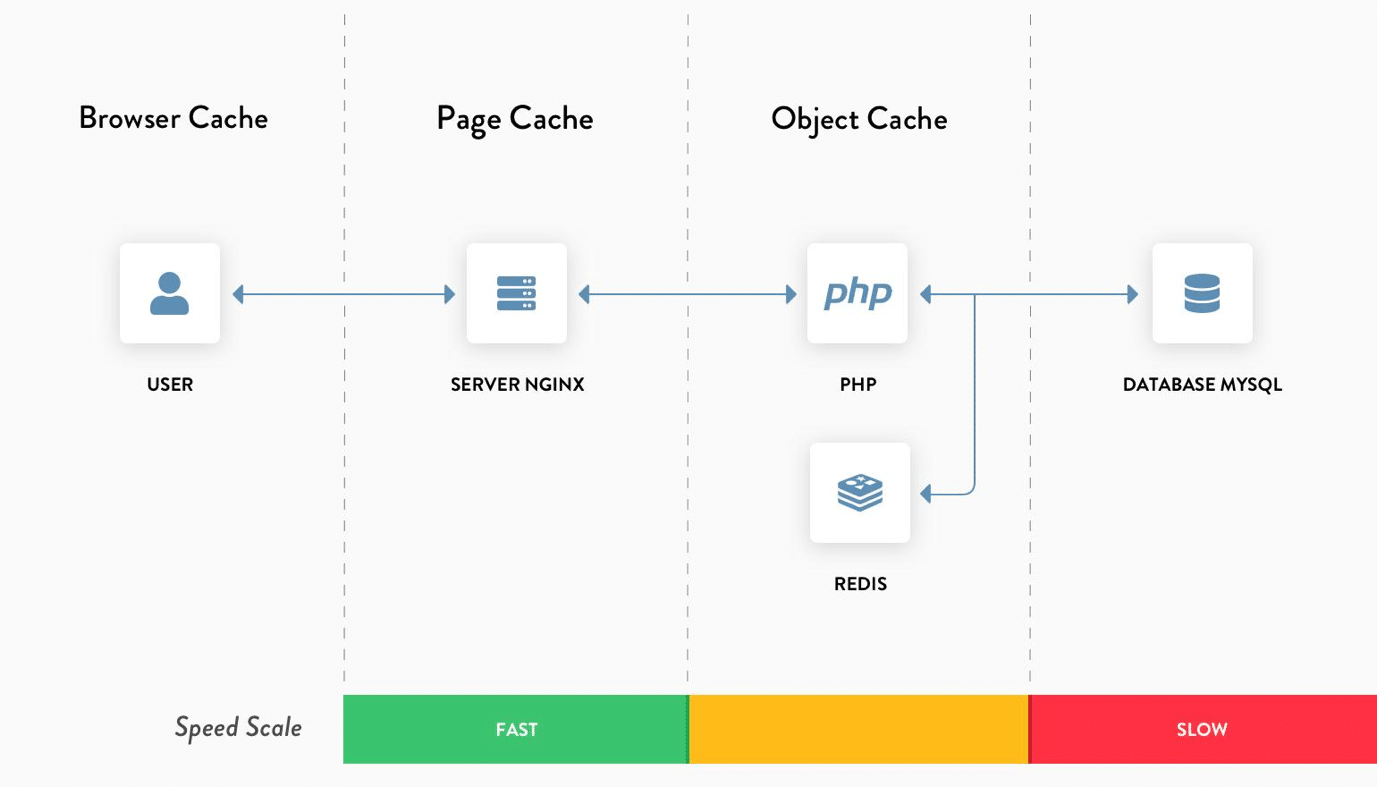
These systems address different performance requirements. LiteSpeed Cache can serve cached page responses without running the full WordPress request process each time. Redis Object Cache can reduce repeated database work when WordPress needs dynamic data.
Using both can form part of a broader WordPress Performance Optimization strategy. However, results depend on website configuration, server resources, plugins, database efficiency, and the type of content being delivered.
How LiteSpeed Cache for WordPress Works
What Is LiteSpeed Cache?
LiteSpeed Cache is a caching solution that integrates with the LiteSpeed Web Server. The LiteSpeed Cache for WordPress plugin, commonly known as LSCWP, provides caching and optimization features designed for WordPress websites.
One of its key features is WordPress Page Caching. When a page is eligible for caching, a generated response can be stored and delivered to later visitors without repeating the complete PHP and database processing for every request.
This can reduce server workload and improve response times for cacheable pages.
Benefits of LiteSpeed Cache Plugin
The LiteSpeed Cache Plugin offers features such as:
- Full-page caching for eligible WordPress content.
- Browser and cache management options.
- Image optimization and other performance features, depending on configuration.
- Integration with LiteSpeed server caching.
- Cache purging when content changes.
Page caching is particularly useful for websites with repeated visits to the same pages, including blogs, company websites, landing pages, and content-driven websites.
Important: Page caching does not mean every request can be served from cache. Logged-in users, personalized content, and certain dynamic pages may require different handling.
What Is Redis Object Cache in WordPress?
Redis is an in-memory data store that can be used to store information for quick retrieval. In WordPress, Redis Object Cache can cache frequently requested objects, including results generated through WordPress’s object caching system.
How WordPress Redis Cache Works
When WordPress needs data from the database, the application may first check whether the relevant information is available in the object cache.
A simplified process looks like this:
- WordPress requests data, such as an option or query result.
- The object cache checks whether the data is already stored.
- If the cached object is available and valid, it can be returned without another database query.
- If the object is missing, WordPress retrieves the information and may store it in Redis for later requests.
This can reduce repeated database operations, especially on websites with complex plugins, frequent queries, or dynamic functionality.
Redis is not a replacement for a database. It acts as a caching layer and requires appropriate configuration, memory allocation, and cache invalidation.
LiteSpeed Cache + Redis: How They Work Together
The main difference between LiteSpeed Cache and Redis is the type of data they cache.
|
Feature |
LiteSpeed Cache |
Redis Object Cache |
|
Primary role |
Page and performance caching |
Object and data caching |
|
Caching level |
HTTP/page response and related optimization |
Application object level |
|
Main benefit |
Reduces repeated page generation |
Reduces repeated data retrieval |
|
WordPress integration |
LiteSpeed Cache plugin |
Redis-compatible object cache integration |
|
Useful for |
Public, cacheable pages |
Dynamic database-backed requests |
|
Dependency |
LiteSpeed server features for full integration |
Redis service and compatible WordPress configuration |
Example: A WordPress Website Request
Imagine a visitor opens a WordPress blog article.
Without effective caching:
The server may need to process PHP, load WordPress, execute plugin code, query the database, and generate an HTML response.
With LiteSpeed Page Caching:
An eligible cached page may be delivered directly, avoiding much of the repeated processing.
With Redis Object Cache:
When WordPress still needs to execute dynamic code, cached objects can reduce the number of repeated database lookups.
The two technologies can complement each other, but Redis does not automatically make every page faster when a valid full-page cache already handles the request.
Key Benefits of LiteSpeed Cache Redis Setup
1. Improved WordPress Website Speed
A properly configured cache can reduce processing time for repeated requests. LiteSpeed Page Caching may help deliver public pages more efficiently, while Redis can speed up repeated object retrieval.
Actual performance improvements vary depending on server hardware, cache hit rates, page complexity, and traffic patterns.
2. Reduced Database Workload
Database Optimization WordPress strategies often include reducing unnecessary queries, improving indexes, reviewing plugins, and using object caching where appropriate.
Redis may help by retaining frequently accessed objects in memory. It does not automatically optimize poorly written queries or fix database design problems.
3. Better Performance for Dynamic Websites
Websites with membership systems, ecommerce features, dashboards, or complex plugins may benefit from object caching.
Although many pages may not be fully cacheable, Redis can still help reduce repeated data retrieval for supported operations. Personalized requests must be tested carefully to avoid serving incorrect or outdated information.
4. Better Hosting Resource Efficiency
When caching reduces repeated processing, server resources may be used more efficiently. This can be useful for growing websites where PHP workers, CPU, memory, and database capacity are important considerations.
Caching is one part of a broader strategy. Adequate hosting resources and properly configured software remain essential.
LiteSpeed Cache Redis Setup: Step-by-Step Guide
Before starting, check whether your hosting provider supports Redis and whether the Redis service is enabled for your account.
VeeroTech provides a knowledge base guide for configuring Redis Object Cache in WordPress.
Related VeeroTech Guide
How to configure Redis Object Cache in WordPress
Step 1: Verify Redis Availability
Confirm the following with your hosting provider or server administrator:
- Redis is installed and enabled.
- Your account has access to the Redis service.
- The appropriate socket path or port is available.
- Memory limits and access permissions are configured.
On supported cPanel environments, Redis settings may be available through a Redis Manager interface.
Step 2: Install or Configure LiteSpeed Cache
If your website runs on LiteSpeed Web Server, install the official LiteSpeed Cache for WordPress plugin through the WordPress admin dashboard.
Navigate to the plugin’s cache settings and review the available options. Follow the documentation for your hosting environment before enabling advanced settings.
Step 3: Enable Object Caching
Depending on the plugin version and setup, object cache settings can be accessed through the LiteSpeed Cache plugin’s cache configuration.
For a Redis-based configuration, you typically need to:
- Open the WordPress admin dashboard.
- Navigate to LiteSpeed Cache settings.
- Locate the Object Cache section.
- Enable Object Cache.
- Select Redis if supported by the available configuration.
- Enter the required connection details.
- Save and test the connection.
The precise settings depend on your hosting environment. Do not copy connection details from another server.
Step 4: Verify the Cache
After configuration, check whether the object cache connection is working. Review the plugin status and server-side Redis monitoring where available.
Test your website with logged-out and logged-in sessions. Clear relevant caches after changes and confirm that pages, shopping carts, forms, and user-specific content work correctly.
Best Practices for WordPress Performance Optimization
Combine Caching With Image Optimization
Large images can increase page weight and affect loading performance. Use appropriately sized images, modern formats when supported, and lazy loading where suitable.
Caching cannot fully compensate for oversized images, excessive scripts, or inefficient page layouts.
Review Plugins and Themes
Poorly optimized plugins may increase PHP processing time or database queries. Regularly review plugins, remove unused software, and keep themes and plugins updated.
Monitor Core Web Vitals
Google’s Core Web Vitals provide performance metrics related to loading, responsiveness, and visual stability. Use tools such as PageSpeed Insights and Search Console to identify issues.
Do not focus only on a single speed score. Review real user experience, server response, page structure, and mobile performance.
Choose Fast WordPress Hosting
Hosting infrastructure influences website performance. Look for features such as:
- LiteSpeed Web Server support.
- NVMe storage.
- Redis availability.
- Sufficient CPU and RAM.
- PHP version support.
- Monitoring and technical support.
VeeroTech offers hosting options that include LiteSpeed LS Cache and Redis features across selected plans.
Explore VeeroTech Web Hosting
LiteSpeed Cache + Redis: Common Use Cases
|
Website type |
Potential benefit |
|
Business website |
Faster delivery of frequently visited pages |
|
WordPress blog |
Page caching for public articles |
|
Ecommerce website |
Object caching for supported dynamic operations |
|
Membership website |
Reduced repeated object retrieval where compatible |
|
High-traffic content site |
Reduced repeated processing for cacheable requests |
The suitability of each caching layer depends on the website’s functionality and cache configuration.
Common Mistakes to Avoid
Using Multiple Page Caching Plugins
Running multiple overlapping page caching systems can create conflicts, inconsistent cache behavior, or unnecessary complexity. Use a compatible caching setup and test changes before deploying them.
Assuming Redis Replaces Page Caching
Redis Object Cache and page caching serve different purposes. Installing Redis alone does not guarantee that your website’s HTML pages will be delivered faster.
Ignoring Cache Invalidation
When content changes, cached content must be updated or purged appropriately. Incorrect cache settings can cause visitors to see outdated information.
Enabling Settings Without Testing
Optimization settings can interact with themes, plugins, JavaScript, and ecommerce functions. Test key website functionality after making changes.
Is Redis Necessary for Every WordPress Website?
Not every WordPress website needs Redis.
A small, mostly static website with effective full-page caching may see limited additional benefits from object caching. On the other hand, a website with complex queries, dynamic content, or a high volume of database-backed requests may benefit more.
Before enabling Redis, assess your website’s database workload, server resources, and performance bottlenecks. Use measured results rather than assuming that every optimization feature improves every website.
Conclusion
LiteSpeed Cache + Redis can be a valuable part of a comprehensive WordPress website speed optimization strategy. LiteSpeed Cache helps reduce repeated page generation for eligible content, while Redis Object Cache can reduce repeated database retrieval for supported application objects.
However, caching works best when combined with reliable hosting, optimized images, efficient plugins, suitable PHP configuration, and ongoing performance monitoring.
If you’re looking for Fast WordPress Hosting with LiteSpeed Web Server and Redis support, VeeroTech offers hosting solutions designed for different website requirements.
Ready to improve your WordPress website performance? Explore VeeroTech hosting plans and choose a hosting environment built to support your website’s growth.
Power Your WordPress Website With VeeroTech
Fast hosting infrastructure, LiteSpeed Web Server support, Redis availability, and hosting options for growing websites.
Explore WordPress Hosting View Hosting Plans
FAQs
1. What is LiteSpeed Cache + Redis?
LiteSpeed Cache + Redis is a combination of page caching and object caching technologies. LiteSpeed Cache can cache eligible web pages, while Redis stores supported application objects in memory to reduce repeated database retrieval.
2. Does Redis make WordPress faster?
Redis can improve performance for certain WordPress workloads by reducing repeated database lookups. The benefit depends on website configuration, cache hit rates, server resources, and application behavior.
3. Can I use LiteSpeed Cache without Redis?
Yes. LiteSpeed Cache can be used for supported caching and optimization features without Redis. Redis is an additional object caching option, not a mandatory requirement for every WordPress website.
4. How do I configure Redis Object Cache in WordPress?
First, verify that Redis is available on your hosting account. Then configure the supported WordPress caching integration with the correct connection details. Test the connection and confirm that your website’s dynamic features continue to work properly.
5. Is LiteSpeed Cache better than Redis?
LiteSpeed Cache and Redis perform different roles, so they should not be treated as direct replacements. LiteSpeed Cache focuses on page caching and related optimization, while Redis provides an object caching layer. The appropriate setup depends on your website’s requirements.
If you have any web hosting questions please feel free to reach out to us. We're happy to help.