
Introduction
The constant challenge for WordPress developers has always been balancing feature richness with raw performance. For years, building complex, dynamic interfaces meant accepting heavy custom JavaScript payloads—often at the expense of Lighthouse scores and real-world load times. WordPress 6.9 represents a meaningful shift away from that trade-off.
WordPress 6.9 builds on the Interactivity API and Block Bindings introduced in earlier releases and adds refinements and native performance hints that allow developers to build sophisticated interfaces without unnecessary bloat. These APIs deliver their full impact when paired with a high-performance hosting environment.
On VeeroTech’s infrastructure—powered by AMD EPYC CPUs, persistent Redis object caching, and HTTP/2—these capabilities enable blocks that are expressive, scalable, and exceptionally fast.
Developer-Focused Features
1. Interactivity API: Client-Side State Without Framework Overhead
The Interactivity API provides a declarative approach to client-side state management without requiring heavy JavaScript frameworks. Developers define interactive behavior using HTML directives that WordPress hydrates on the client.
Code example:
<div data-wp-interactive="myNamespace">
  <button data-wp-on--click="actions.toggleState">
    <span data-wp-text="state.buttonLabel"></span>
  </button>
</div>
Because this approach typically ships less JavaScript than a full framework, performance gains can be significant—especially on optimized hosting stacks. VeeroTech’s Brotli compression further minimizes payload size, often delivering the runtime in just a few KBs over the wire.
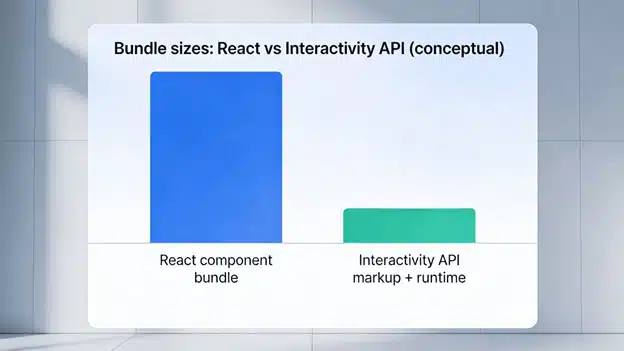
How the Interactivity API reduces JavaScript payload compared to framework-heavy approaches.
2. Block Bindings: Connect Blocks to Any Data Source
The Block Bindings API, introduced in WordPress 6.5 and expanded in 6.9, allows block attributes to connect directly to custom fields, user metadata, or external APIs—without embedding custom data-fetching logic into each block. This removes a long-standing tension between content flexibility and long-term maintainability.
A common use case is a Team Member block that automatically reflects updates from a custom post type. When content changes in one place, every instance of the block updates automatically across the site.
These dynamic, data-bound blocks generate database queries that benefit directly from VeeroTech’s optimized MySQL configuration and persistent Redis connections, keeping response times consistently low.
Code example:
register_block_bindings_source('my-custom-source', [
  'label' => 'Custom Data',
  'get_value_callback' => function($source_args) {
    return get_post_meta($source_args['post_id'], 'custom_field', true);
  }
]);
3. Performance APIs: Fetchpriority and Speculative Loading
WordPress 6.9 exposes browser-native performance hints such as fetchpriority for images and scripts, and improves how scripts are loaded and prioritized. These signals help browsers prioritize critical resources—like above-the-fold images—while deferring assets that are not immediately needed.
Fetchpriority for images:
wp_image(['fetchpriority' => 'high']); // LCP image
wp_image(['fetchpriority' => 'low']);  // Below-the-fold images
By allowing browsers to load what users see first instead of following a generic waterfall, these APIs can improve Core Web Vitals such as LCP and, indirectly, INP. VeeroTech’s HTTP/2 implementation ensures these priority signals are honored efficiently under real-world traffic conditions.
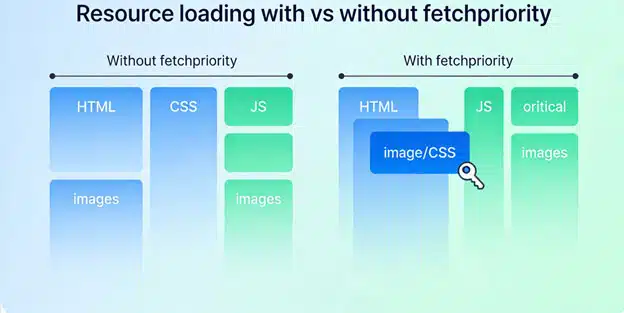
How priority hints reshape the browser loading waterfall
4. Font API: Optimized Web Font Loading
The Font API, introduced in earlier WordPress versions and refined in 6.9, standardizes how fonts are registered and delivered, applying best-practice loading strategies automatically. Developers register fonts once, and WordPress handles fallback, swap, and optional behaviors based on performance guidelines.
Typography-heavy sites benefit most from this approach, particularly when paired with VeeroTech’s CDN integration support, which serves font assets from edge locations closest to visitors.
Best Practices for Block Development
- Cache rendered block output using Object Cache
- Avoid complex queries inside render callbacks
- Use transients for data that does not change frequently
- Test blocks with Redis enabled to identify cacheable queries
- Monitor PHP worker usage during traffic spikes
Frequently Asked Questions
Do I need to use the Interactivity API to build blocks in WordPress 6.9?
No. The Interactivity API is optional and best suited for blocks that require client-side state management, such as filters, tabs, or accordions.
How does Redis Object Cache improve block performance?
Redis stores the results of expensive database queries in memory. When blocks request the same data repeatedly, Redis can serve cached responses much faster than hitting the database directly, often reducing query latency by several times.
Can I use the Font API with custom or self-hosted fonts?
Yes. The Font API works with Google Fonts, Adobe Fonts, and fully self-hosted font files, applying consistent performance optimization regardless of the source.
What’s the performance impact of Block Bindings compared to hardcoded content?
When properly cached, Block Bindings add minimal overhead. Initial queries are stored in Object Cache, allowing subsequent page loads to serve pre-rendered content efficiently.
If you have any web hosting questions please feel free to reach out to us. We're happy to help.
Our Guiding Principles