
Managing multiple websites from a single hosting account is one of the most efficient ways to scale your online presence. DirectAdmin makes this process remarkably simple through its dedicated domain management features. This article will help you add additional websites or domains to your account by using the “Domains” tool. By following this guide, you can host multiple independent sites under one roof, streamlining your administrative tasks and maximizing your hosting resources.
Quick Steps
- Log in to your DirectAdmin control panel
- Navigate to Account Manager > Domain Setup
- Click Add New in the top-right corner
- Enter your new domain name
- Configure limits and features
- Click Create to finish
Follow the step-by-step instructions below to add additional domains to your DirectAdmin interface.
Once you are logged into the DirectAdmin interface and on the Home screen, locate the Account Manager section. Within this category, click on the Domain Setup or Domains icon to access your site management dashboard.
In the Domain Setup interface, you will see a list of your existing domains. To initiate the process for a new website, locate and click the Add New button situated in the top-right corner of the page.
On the next screen, a form will appear to define the parameters of your new domain. Begin by filling in the Domain field with your desired address (e.g., example.com).
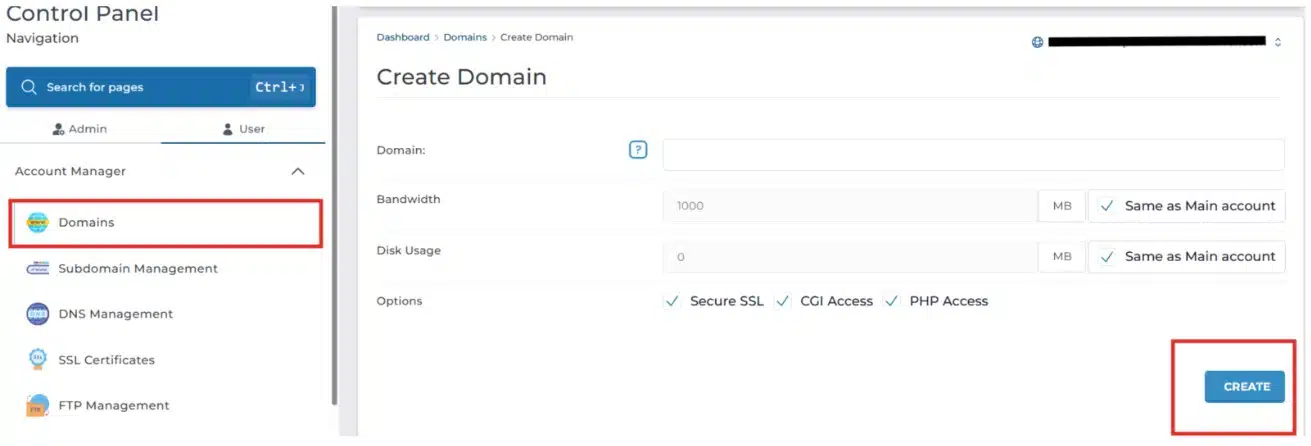
Add a New Domain in DirectAdmin
You will also have the option to customize the following:
-
Bandwidth & Disk Usage: You can set specific limits for this domain or simply check the box to make them the same as the main account.
-
Feature Toggles: Ensure options like Secure SSL, CGI, and PHP are enabled if your website requires them for security and functionality.
After configuring the domain settings to your preference, click the Create button at the bottom of the page. DirectAdmin will process the request and set up the necessary directory structure for your new website immediately.
Wrapping Up
Congratulations! You have successfully learned how to add a new domain in DirectAdmin. By utilizing the domain management features, you can now manage multiple web projects with ease and professional efficiency.
If you have any web hosting questions please feel free to reach out to us. We're happy to help.
Our Guiding Principles