
Choosing the right web hosting can be confusing, especially when your website starts growing. Shared hosting may be affordable when you are starting out, but increasing traffic, resource limitations, slow page loads, and limited server control can eventually become frustrating.
This is where VPS Hosting can make a difference.
VPS stands for Virtual Private Server. It provides a virtualized server environment with allocated resources such as CPU, RAM, and storage. Unlike traditional shared hosting, a VPS gives your website a more isolated environment and greater control over server configuration.
For beginners, VPS Hosting can sound technical. However, the basic idea is simple: you get many of the advantages of a dedicated server without having to rent an entire physical server.
According to AWS, VPS hosting provides a virtual machine with dedicated resources while the underlying physical infrastructure is managed by the hosting provider.
Whether you run a growing business website, an online store, WordPress website, web application, or multiple websites, understanding VPS Server Hosting can help you make a better hosting decision.
What Is VPS Hosting?
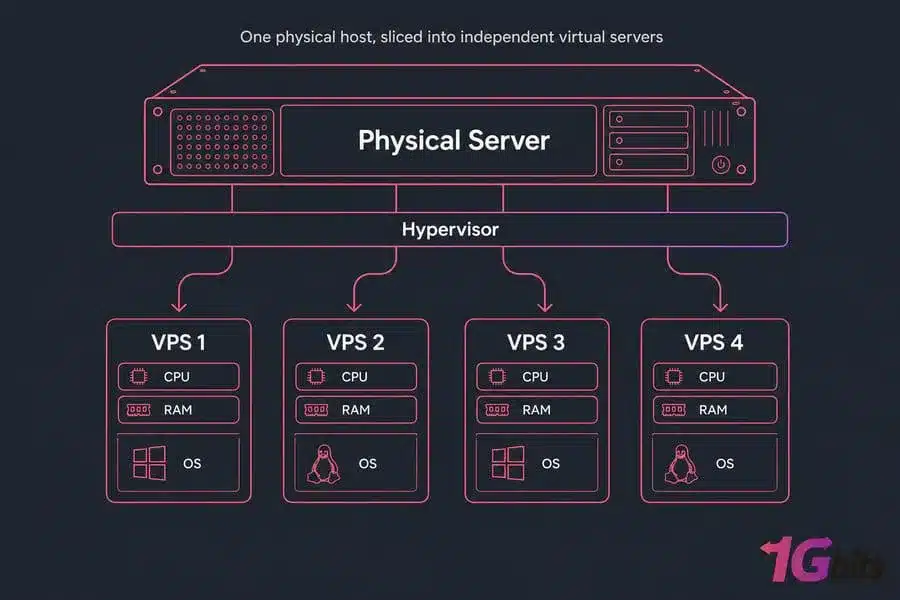
VPS Hosting is a web hosting solution where one physical server is divided into multiple independent virtual servers using virtualization technology.
Each virtual server operates as its own environment and receives allocated resources such as:
- CPU or vCPU
- RAM
- SSD or NVMe storage
- Bandwidth
- Operating system
- IP address
- Server configuration
This means a VPS behaves much like an independent server even though multiple virtual servers may exist on the same physical hardware.
In simple terms, think of a large apartment building. The building represents the physical server, while each individual apartment represents a VPS. You share the building’s infrastructure, but your apartment is separated from the others.
This makes Virtual Private Server Hosting a middle ground between shared hosting and dedicated server hosting.
How Does VPS Hosting Work?
Virtualization and the Hypervisor
A VPS uses virtualization technology to divide a physical server into separate virtual machines. A software layer called a hypervisor manages these virtual environments and allocates resources to each VPS.
Each VPS can have its own operating system, applications, files, and configurations.
This isolation is one of the major VPS Hosting Features because problems or resource usage in one virtual environment are less likely to directly affect another.
Dedicated Resources
Depending on the hosting provider and plan, VPS users receive allocated CPU, RAM, storage, and bandwidth.
This gives businesses greater resource predictability compared with traditional shared hosting.
Server Management
A VPS can be managed by either the customer or the hosting provider.
With Managed VPS Hosting, the provider handles many server administration tasks.
With Unmanaged VPS Hosting, the customer generally manages operating system updates, security configuration, software installation, backups, and server maintenance.
VPS Hosting Benefits
There are several important VPS Hosting Benefits for websites and businesses that have outgrown basic shared hosting.
1. Better Performance
A VPS provides allocated resources, helping websites handle more traffic and resource-intensive applications.
For growing websites, ecommerce stores, and applications, this can provide more predictable performance than a basic shared hosting environment.
2. Greater Server Control
VPS users generally have more control over their server environment. Depending on the plan, you may be able to configure software, operating systems, applications, and security settings.
3. Improved Isolation
Virtual environments are separated from each other. This can reduce the impact of resource-intensive activity on neighboring VPS environments.
4. Scalability
Scalable VPS Hosting allows you to increase resources as your website or application grows.
Instead of immediately moving to an expensive dedicated server, you can upgrade your VPS resources according to your requirements.
5. Better Security Options
A VPS allows greater control over firewalls, software, access permissions, security tools, and server configurations.
However, VPS hosting is not automatically secure simply because it is a VPS. Proper server hardening, updates, backups, strong passwords, monitoring, and security practices are still important.
6. Cost-Effective Alternative to Dedicated Hosting
A VPS can provide dedicated resource allocations and greater control without the cost of leasing an entire physical server.
This makes VPS Hosting for Small Businesses particularly attractive.
VPS Hosting Features to Look For
When comparing VPS plans, don’t focus only on the monthly price. Look at the complete feature set.
Important VPS Hosting Features include:
- vCPU allocation
- RAM
- NVMe or SSD storage
- Bandwidth
- Backup options
- DDoS protection
- Server monitoring
- Operating system choices
- Root access
- Control panel availability
- Security management
- Technical support
- Scalability
- Uptime commitment
For example, VeeroTech’s managed VPS plans include features such as pure NVMe SSD storage, daily backups, proactive security, 24/7 monitoring, guaranteed resources, and control panel options.
VPS Hosting vs Shared Hosting
One of the most common questions for beginners is VPS Hosting vs Shared Hosting. Both can host websites, but they are designed for different requirements.
|
Feature |
Shared Hosting |
VPS Hosting |
|
Resources |
Shared |
Allocated resources |
|
Performance |
Suitable for smaller websites |
Better for growing websites |
|
Server Control |
Limited |
Greater control |
|
Scalability |
Limited |
More scalable |
|
Customization |
Limited |
Higher customization |
|
Technical Knowledge |
Beginner-friendly |
Basic to advanced |
|
Isolation |
Lower |
Higher |
|
Cost |
Generally lower |
Generally higher |
|
Best For |
Small/basic websites |
Growing websites and applications |
Shared hosting is often suitable for new websites, blogs, portfolios, and small projects. VPS hosting becomes more attractive when your website requires additional resources, customization, or control.
VPS vs Dedicated Server: What’s the Difference?
VPS vs Dedicated Server is another important comparison.
With a VPS, you receive a virtual server environment running on physical infrastructure that is shared with other virtual machines.
With a dedicated server, you rent the entire physical server.
|
Feature |
VPS |
Dedicated Server |
|
Physical Hardware |
Shared |
Entire server |
|
Resources |
Allocated |
Entire server resources |
|
Performance |
High |
Very high |
|
Customization |
High |
Very high |
|
Scalability |
Relatively easy |
Hardware upgrades may be required |
|
Cost |
Lower |
Higher |
|
Best For |
Growing businesses |
Resource-intensive workloads |
AWS describes VPS hosting as a balance between affordability and performance, while dedicated servers provide access to the complete physical server and its resources.
Managed VPS Hosting vs Unmanaged VPS Hosting
What Is Managed VPS Hosting?
Managed VPS Hosting means the hosting provider takes responsibility for many server management tasks.
This can include:
- Server monitoring
- Operating system maintenance
- Security management
- Troubleshooting
- Backups
- Server configuration
- Software support
Managed VPS is particularly useful for business owners, agencies, developers, and website owners who don’t want to spend their time managing server infrastructure.
VeeroTech’s fully managed VPS service includes proactive monitoring, daily backups, security management, free migration, and server support.
What Is Unmanaged VPS Hosting?
Unmanaged VPS Hosting, also called self-managed or root VPS hosting, gives the customer much greater responsibility and control.
You may need to manage:
- Operating system updates
- Firewall configuration
- Server security
- Software installation
- Backups
- Performance optimization
- Troubleshooting
VeeroTech’s self-managed VPS plans provide full root access, KVM virtualization, OS choices, NVMe storage, and DDoS protection, while server management remains the customer’s responsibility.
Expert tip: Choose managed VPS if you don’t have server administration experience. Choose unmanaged VPS if you have the technical knowledge and want full root-level control.
Linux VPS Hosting vs Windows VPS Hosting
Linux VPS Hosting
Linux VPS Hosting is widely used for websites and applications because Linux distributions such as Ubuntu and Debian support many popular web technologies.
Linux VPS can be a good choice for:
- WordPress
- PHP websites
- MySQL/MariaDB applications
- Nginx
- Apache
- js applications
Windows VPS Hosting
Windows VPS Hosting may be more suitable when your application depends on Microsoft technologies such as Windows Server, ASP.NET, or other Windows-specific software.
The best operating system depends on your application’s technical requirements rather than simply choosing the most popular option.
Cloud VPS Hosting: What Does It Mean?
Cloud VPS Hosting combines VPS-style virtualization with cloud infrastructure.
Cloud-based VPS environments can be useful for websites and applications that need flexible infrastructure and scalability.
Cloud VPS solutions can support:
- Business applications
- Ecommerce websites
- Development environments
- Web applications
- Database applications
- High-traffic websites
Cloud VPS should not automatically be considered better than every traditional VPS. Compare the provider’s infrastructure, performance, redundancy, support, pricing, and scalability before choosing.
VPS Hosting Cost: How Much Does VPS Hosting Cost?
VPS Hosting Cost varies significantly depending on resources and management.
Factors that influence pricing include:
- RAM
- vCPU
- Storage type
- Bandwidth
- Operating system
- Control panel
- Managed support
- Backups
- Security services
- Data center location
For example, VeeroTech currently lists self-managed VPS plans starting at $4.95/month, while fully managed VPS plans start at $49.99/month. Pricing and plan availability can change, so always check the current plans before purchasing.
A lower-priced VPS may require more technical work from you, while managed VPS hosting generally costs more because server administration and support are included.
When to Use VPS Hosting
You should consider VPS hosting when:
- Your shared hosting plan is no longer sufficient.
- Website traffic is increasing.
- Your website needs more CPU or RAM.
- You need custom server configurations.
- You run an ecommerce website.
- You host multiple websites.
- You need greater server isolation.
- You run a web application.
- You need root access.
- Your business requires more predictable resources.
VPS Hosting for Websites is especially useful when a website has moved beyond the requirements of basic hosting but doesn’t yet need the entire capacity of a dedicated server.
VPS Hosting for WordPress
VPS Hosting for WordPress can be a good option for growing WordPress websites that require more resources and server control.
A VPS can be useful for:
- High-traffic WordPress websites
- Ecommerce stores
- Membership websites
- WooCommerce stores
- Large content websites
- Multiple WordPress installations
However, WordPress performance depends on more than hosting alone. Themes, plugins, databases, caching, images, PHP versions, and website configuration also influence performance.
Internal linking opportunity: Add a link here to your relevant Managed WordPress Hosting page and WordPress optimization guide.
How to Choose VPS Hosting
When deciding How to Choose VPS Hosting, consider these seven factors:
1. Determine Your Resource Requirements
Estimate your RAM, CPU, storage, and bandwidth requirements based on your website traffic and applications.
2. Choose Managed or Unmanaged
If you don’t have server administration expertise, managed VPS is usually easier.
3. Check Storage Technology
NVMe SSD storage can provide fast storage performance for supported workloads.
4. Look for Backups
Regular backups can help protect your website and server data.
5. Evaluate Security
Look for firewall options, monitoring, DDoS protection, security updates, and other protective measures.
6. Check Scalability
Choose a provider that allows you to increase resources as your website grows.
7. Consider Technical Support
For businesses, responsive technical support can be extremely valuable when server issues occur.
Practical VPS Hosting Tips for Beginners
If you’re new to VPS Hosting for Beginners, follow these basic practices:
- Keep your operating system and applications updated.
- Use strong passwords and secure authentication.
- Configure a firewall.
- Maintain regular backups.
- Monitor CPU, RAM, storage, and traffic.
- Remove unnecessary applications and services.
- Use SSL/TLS for websites.
- Choose a reputable hosting provider.
- Don’t purchase significantly more resources than you need.
- Upgrade resources when your workload consistently approaches your limits.
Best VPS Hosting: What Should You Look For?
The Best VPS Hosting isn’t necessarily the cheapest VPS or the plan with the highest specifications.
A good VPS provider should offer a combination of:
- Reliable infrastructure
- Appropriate resource allocation
- Strong security
- Good performance
- Backup options
- Scalability
- Responsive support
- Transparent pricing
- Suitable management options
For businesses without dedicated server expertise, a fully managed VPS can provide an easier experience because the provider handles many technical server responsibilities.
VeeroTech offers fully managed and self-managed VPS options, allowing customers to choose between hands-off server management and full root-level control.
Frequently Asked Questions
1. What is VPS Hosting?
VPS Hosting is a hosting service that provides a virtualized server with allocated resources such as CPU, RAM, storage, and bandwidth. It offers more control and isolation than traditional shared hosting.
2. Is VPS Hosting good for beginners?
Yes. VPS Hosting for Beginners can be a good choice, especially when using managed VPS hosting. Managed services reduce the amount of technical server administration required.
3. Is VPS better than shared hosting?
VPS hosting generally offers greater control, isolation, and allocated resources. However, shared hosting can be more appropriate for small websites with modest requirements.
4. How much does VPS Hosting cost?
The VPS Hosting Cost depends on resources, management, storage, bandwidth, operating system, and additional services. Entry-level self-managed plans can be inexpensive, while managed VPS plans generally cost more.
5. When should I move from shared hosting to VPS?
Consider VPS hosting when your website experiences increasing traffic, resource limitations, slow performance, server errors, or requires greater configuration and control.
Final Thoughts: Is VPS Hosting Right for You?
VPS Hosting offers an effective middle ground between shared hosting and dedicated servers. It provides allocated resources, greater control, improved isolation, and scalability without requiring you to rent an entire physical server.
For beginners, the most important decision is choosing between managed and unmanaged VPS hosting. If you want to focus on your website or business instead of server administration, Managed VPS Hosting can be a practical choice. If you have technical expertise and need root-level control, an unmanaged VPS may provide the flexibility you need.
As your website grows, the right VPS Server can provide the resources and control needed to support traffic, applications, ecommerce stores, WordPress websites, and business workloads.
Ready to Upgrade Your Hosting?
If your website has outgrown shared hosting, explore VeeroTech’s fully managed VPS hosting with NVMe storage, daily backups, proactive security, 24/7 monitoring, guaranteed resources, and expert server management.
If you have any web hosting questions please feel free to reach out to us. We're happy to help.