
Setting up a professional email address is a fundamental step in establishing your online presence. Whether you are launching a new business or managing a personal project, having a domain-specific email (like info@yourdomain.com) builds credibility and keeps your communications organized. If you are using DirectAdmin as your hosting control panel, creating a new mailbox is a seamless process. This guide will walk you through the steps to configure your email accounts efficiently, ensuring your communication channels are up and running in minutes.
Quick Steps
- Log in to your DirectAdmin panel
- Navigate to the Email Manager section
- Select Email Accounts
- Click the Create Account button
- Enter your credentials and mailbox limits
- Save your settings to finish
Follow the step-by-step instructions below to create email accounts in your DirectAdmin interface.
Upon logging in to your DirectAdmin dashboard, scroll to the Email Manager category. Look for the Email Accounts icon. This section is your central hub for managing all existing mailboxes and adding new ones to your domain.
Once you are in the Email Accounts interface, you will see a list of any current accounts. To start the setup for a new user, locate and click the Create Account button, usually found in the top right corner of the workspace.
A configuration form will appear. To ensure your new email functions correctly, fill in the following details:
-
Username: Enter the prefix you want (e.g., “info” or “support”). The domain suffix will be added automatically.
-
Password: Enter a secure password. We recommend using the built-in password generator to ensure high security.
-
Email Quota (MB): Define the maximum disk space this account can use. For example, entering
1024assigns 1GB of storage. -
Send Limit: This is an optional field that allows you to set a daily limit on outbound emails to prevent spam abuse.
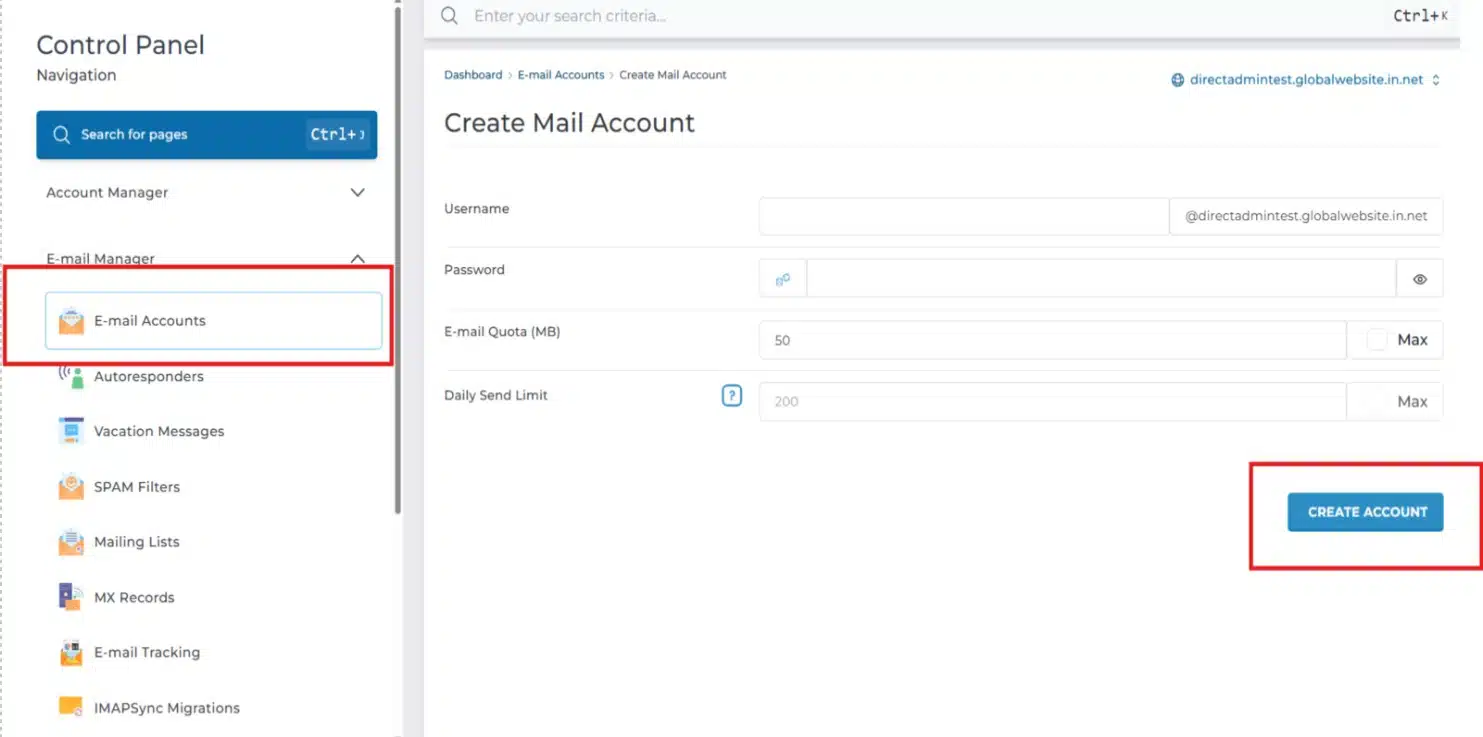
Creating Email Accounts in DirectAdmin
After you have filled in the necessary information, click the Create Account button at the bottom of the form to preserve your settings. DirectAdmin will then provide you with a summary of the account details and server settings, which you can use to configure your email on mobile devices or desktop clients like Outlook.
Wrapping Up
Congratulations! You have successfully learned how to create an email account in DirectAdmin. By mastering these simple steps, you can expand your professional reach and manage your digital correspondence with ease.
If you have any web hosting questions please feel free to reach out to us. We're happy to help.
Our Guiding Principles