
Category Archives: Shared Hosting

When Is Shared Hosting the Right Choice? Common Growth Challenges & When to Upgrade

Shared hosting remains one of the most popular web hosting solutions because it offers an affordable and easy way to launch a website. For bloggers, startups, small businesses, and personal websites, shared hosting provides all the essential resources needed to build an online presence without the complexity or cost of advanced hosting environments.

While shared hosting works exceptionally well for many websites, growing businesses may eventually encounter performance or resource limitations as traffic and website demands increase. Understanding these situations can help you optimize your website and determine when an upgrade may be beneficial.

Who Is Shared Hosting Best Suited For?

Shared hosting is an excellent choice for:

  • Personal blogs
  • Small business websites
  • Portfolio websites
  • Startup landing pages
  • Informational websites
  • Low to medium traffic websites
  • New WordPress websites

Benefits of Shared Hosting

  • Cost-effective hosting solution
  • Easy setup and management
  • No server administration required
  • Suitable for beginners
  • Includes essential hosting features
  • Reliable for websites with moderate traffic
  • Easy to scale to higher hosting plans when needed

Common Growth Challenges with Shared Hosting (and How to Handle Them)

As your website grows, you may occasionally experience some limitations that are common in any shared hosting environment. Fortunately, most can be managed through optimization or by upgrading when necessary.

1. Website Performance During Traffic Growth

As traffic increases, websites may require additional server resources to maintain optimal speed.

Best For:

  • New websites
  • Small businesses
  • Blogs with regular traffic

Recommended Actions:

  • Optimize images
  • Enable caching
  • Use a CDN
  • Remove unnecessary plugins
  • Upgrade to a higher-resource hosting plan if traffic continues to grow

2. Resource Usage Limits

Shared hosting plans allocate resources fairly across all users. As websites become more complex, they may approach these limits.

Best For:

  • Websites with predictable traffic patterns

Recommended Actions:

  • Optimize databases
  • Reduce resource-heavy plugins
  • Monitor usage
  • Upgrade when traffic and business requirements increase

3. Security Management

Shared hosting providers implement security measures, but website owners should still follow best practices.

Recommended Actions:

4. Downtime During Exceptional Traffic Spikes

Unexpected traffic surges can sometimes affect website performance.

Recommended Actions:

5. Growing Business Requirements

As businesses expand, websites often require more resources, customization, and flexibility.

Signs Your Website Is Growing Beyond Shared Hosting:

  • Consistent traffic growth
  • Resource-intensive applications
  • Increased ecommerce activity
  • Frequent resource limit notifications
  • Need for advanced server configurations

When Should You Upgrade?

Shared hosting is designed to support websites through their early and growth stages.

However, upgrading may be beneficial when:

  • Website traffic consistently increases
  • You need guaranteed resources
  • Performance becomes business-critical
  • You operate e-commerce stores with high transaction volumes
  • Your website runs resource-intensive applications

Rather than viewing this as a problem, it’s a positive sign that your website and business are growing successfully.

Final Thoughts

Shared hosting remains one of the best hosting solutions for individuals, startups, bloggers, and small businesses looking for an affordable, reliable, and easy-to-manage hosting environment.

For most websites, shared hosting provides everything needed to establish and grow an online presence. As your traffic and business requirements evolve, upgrading to VPS, cloud, or managed hosting becomes a natural next step to support continued growth.

The key is choosing a hosting provider that offers both reliable shared hosting today and scalable solutions for tomorrow.

Frequently Asked Questions

1. What is shared hosting?

Shared hosting is a web hosting service where multiple websites share the same server resources, making it one of the most affordable and beginner-friendly hosting options available.

2. Who should use shared hosting?

Shared hosting is ideal for personal blogs, startup websites, portfolio sites, small business websites, and low-to-medium traffic websites that do not require dedicated server resources.

3. What are the benefits of shared hosting?

Shared hosting offers affordable pricing, easy website management, beginner-friendly setup, included maintenance, and access to essential hosting features without requiring technical expertise.

4. Is shared hosting good for small businesses?

Yes. Shared hosting is an excellent choice for small businesses launching or growing their online presence. It provides reliable performance and cost-effective hosting for websites with moderate traffic.

5. Can I upgrade from shared hosting later?

Yes. Most hosting providers allow you to upgrade seamlessly to VPS, cloud hosting, or dedicated hosting as your website traffic and resource requirements increase.

6. How do I know if I’ve outgrown shared hosting?

You may benefit from an upgrade if your website experiences consistent traffic growth, slower performance during peak periods, resource limit notifications, or requires advanced server customization.

7. Is shared hosting secure?

Yes. Reputable hosting providers implement security measures such as firewalls, malware monitoring, and server protection. Website owners should also follow best practices like updating software, using strong passwords, and enabling SSL certificates.

8. What is the difference between shared hosting and VPS hosting?

Shared hosting shares server resources among multiple websites, making it affordable and easy to manage. VPS hosting provides dedicated resources, greater control, and enhanced scalability for growing websites.



How to Improve Website Speed on Shared Hosting

How to Improve Website Speed on Shared Hosting

Website speed is no longer just a convenience; it directly impacts user experience, search engine rankings, conversion rates, and business growth. If you’ve noticed that your website takes longer to load during peak hours or struggles to handle increased traffic, your hosting environment may be the root cause.

Many website owners start with shared hosting because it is affordable and easy to manage. However, as websites grow, increased traffic, larger databases, and additional applications may require performance optimization and additional hosting resources. Understanding Why Your Website is Slow on Shared Hosting can help you identify performance issues and determine whether it’s time to upgrade.

In this guide, we’ll explore the most common Shared Hosting Performance Issues, explain how shared hosting affects website performance, and discuss the best solutions to improve your website speed.

What Is Shared Hosting?

Shared hosting is a hosting environment where multiple websites share the same server resources, including CPU, RAM, storage, and bandwidth.

Shared hosting is designed to provide an affordable and reliable hosting environment for many websites. Performance can often be improved through website optimization and by selecting a hosting plan that matches your resource requirements.

Benefits of Shared Hosting

  • Low cost
  • Easy setup
  • Beginner-friendly
  • Suitable for small websites

Shared Hosting Considerations

  • Resource allocation is shared fairly across websites
  • Performance depends on website optimization
  • Security best practices should be followed
  • Growing websites may eventually require additional resources

These considerations can often be addressed through website optimization and by selecting a hosting plan that aligns with your website’s requirements.

How to Improve Website Speed on Shared Hosting

If you’re wondering, “Why is my website slow on shared hosting?”, several factors may be responsible.

1. Server Resource Limitations

One of the biggest Shared Hosting Limitations is resource allocation.

Because dozens or even hundreds of websites may share the same server, your website receives only a small portion of the available resources.

When neighboring websites consume excessive CPU or RAM, your site’s performance suffers.

Common symptoms include:

  • Slow page loading
  • Delayed server response
  • Random performance fluctuations
  • Increased downtime

These Server Resource Limitations are among the leading causes of a Website Slow on Shared Hosting.

2. Traffic Spikes Affect Performance

During significant traffic spikes, websites may require additional resources to maintain optimal performance.

If another website on the server experiences:

  • Viral traffic
  • Seasonal surges
  • Marketing campaigns
  • Bot attacks

Your site’s performance can decline dramatically.

This is particularly problematic for High Traffic Website Hosting requirements.

3. Hosting Infrastructure Quality Matters

Not all shared hosting environments are the same. Hosting providers that use modern NVMe storage, optimized server configurations, and responsible resource allocation typically deliver significantly better performance than budget providers that overcrowd servers.

Common Hosting Infrastructure Factors

Infrastructure Factor

Potential Impact

Server Resource Allocation

Performance Variation

CPU Availability

Processing Speed

Memory Allocation

Application Performance

Storage Technology

Page Load Times

Support Quality

Resolution Speed

While inexpensive hosting may save money initially, it often results in poor user experiences and lost revenue.

4. NVMe Storage Technology

Traditional HDD storage is significantly slower than modern NVMe storage.

Websites hosted on NVMe infrastructure generally experience:

  • Faster database queries
  • Improved file access
  • Lower latency
  • Better overall responsiveness

Choosing NVMe Hosting can greatly improve loading times even before upgrading hosting plans.

5. Database Bottlenecks

Dynamic websites such as WordPress, WooCommerce, Joomla, and Magento rely heavily on databases.

When databases become overloaded:

  • Pages load slowly
  • Search functions lag
  • Checkout processes become delayed

This contributes to overall Website Loading Speed issues.

6. Limited Scalability

As your website grows, shared hosting may no longer provide sufficient resources.

Signs include:

  • Increasing traffic
  • More plugins and applications
  • Larger databases
  • Growing eCommerce stores

These may indicate that your website could benefit from additional hosting resources.

How Shared Hosting Affects Website Performance

Many website owners focus on website design and content optimization while overlooking hosting infrastructure.

Shared Hosting Directly Impacts:

  • Page speed
  • SEO rankings
  • User engagement
  • Conversion rates
  • Uptime reliability

Google has confirmed that page experience and speed are ranking factors.

Poor hosting can negatively affect Website Speed and SEO, making it harder to compete in search results.

Hosting Options for Growing Websites

Hosting Type

Best For

Shared Hosting

Blogs, startups, small businesses

Managed WordPress Hosting

Growing WordPress sites

Semi-Dedicated Hosting

Resource-intensive websites

VPS Hosting

Advanced customization needs

Cloud Hosting

Enterprise scalability

How to Fix a Slow Website on Shared Hosting

Before upgrading, several optimization strategies can help improve performance.

Enable Website Caching

Caching reduces server workload by serving pre-generated pages.

Popular caching tools include:

  • LiteSpeed Cache
  • WP Rocket
  • W3 Total Cache

This is one of the easiest ways to achieve Website Speed Improvement.

Optimize Images

Large image files significantly affect loading times.

Best practices:

  • Compress images
  • Use WebP format
  • Implement lazy loading
  • Resize oversized images

Reduce Plugins

Too many plugins can increase database queries and resource consumption.

Regularly remove:

  • Unused plugins
  • Outdated extensions
  • Redundant functionality

Use a CDN

A Content Delivery Network (CDN) distributes content globally.

Benefits include:

  • Faster loading times
  • Reduced server load
  • Improved visitor experience

Cloudflare is a popular option.

Update Website Software

Always keep updated:

  • CMS platforms
  • Themes
  • Plugins
  • PHP versions

Newer software versions typically deliver better performance and security.

Improve Website Speed Without Changing Your Website

Many website owners assume they need a complete redesign to improve performance.

In reality, you can often Improve Website Speed Without Changing Your Website by:

Hosting-Level Improvements

  • Upgrading PHP
  • Enabling caching
  • Using NVMe-powered hosting
  • Activating CDN services
  • Optimizing databases

These improvements can produce noticeable gains without modifying site content.

When Your Website May Benefit from Additional Hosting Resources

Many websites first move from Shared Hosting to Managed WordPress Hosting or Semi-Dedicated Hosting before considering VPS Hosting.

A common growth path is:

Shared Hosting

Managed WordPress Hosting

Semi-Dedicated Hosting

VPS Hosting

Cloud Hosting

Eventually, optimization reaches its limits.

Signs You Need an Upgrade

Frequent Slowdowns

Performance drops despite optimization efforts.

Growing Traffic

Your website consistently attracts more visitors.

Resource Usage Warnings

Hosting providers notify you about excessive resource consumption.

Online Store Growth

WooCommerce and eCommerce websites often require more resources than shared hosting can provide.

Business-Critical Applications

Mission-critical websites need consistent performance.

These indicators suggest it’s time to Upgrade from Shared Hosting.

Choosing the Right Hosting Upgrade

Depending on your website’s requirements, Managed WordPress Hosting, Semi-Dedicated Hosting, VPS Hosting, or Cloud Hosting may provide additional resources and performance improvements.

Benefits of Higher-Performance Hosting Solutions

  • Expert server management
  • Security monitoring
  • Performance optimization
  • Automatic updates
  • Technical support

This allows website owners to focus on business growth rather than server administration.

At VeeroTech, we offer multiple hosting solutions based on your website’s resource requirements and growth stage.

For websites that need dedicated resources, enhanced security, and greater scalability, our Managed VPS Hosting solutions provide consistent performance and flexibility.

For WordPress websites seeking optimized performance without server management responsibilities, our Managed WordPress Hosting plans deliver a streamlined, high-performance environment.

If your website has outgrown traditional shared hosting but does not yet require a VPS, our Semi-Dedicated Hosting plans offer increased resources and improved performance while remaining easy to manage.

This allows businesses to choose the hosting solution that best fits their current needs and seamlessly upgrade as traffic and resource requirements grow.

Expert Recommendations for Website Performance Optimization

To maximize performance:

  1. Use NVMe hosting.
  2. Enable advanced caching.
  3. Minimize unnecessary plugins.
  4. Optimize databases regularly.
  5. Implement a CDN.
  6. Monitor server resource usage.
  7. Upgrade hosting before performance becomes a problem.

Proactive Website Performance Optimization prevents revenue loss and improves user satisfaction.

Experiencing slow website performance on shared hosting? Don’t let speed issues affect your rankings, conversions, and customer experience. Whether you need Managed WordPress Hosting, Semi-Dedicated Hosting, or Managed VPS Hosting, VeeroTech offers scalable solutions designed to match your website’s growth. Explore the right hosting plan and enjoy faster performance, enhanced security, and expert support.

Frequently Asked Questions

1. Why is my website slow on shared hosting?

Shared hosting places multiple websites on the same server. High resource usage from neighboring sites can cause slow performance.

2. How can I improve shared hosting speed?

Use caching, optimize images, reduce plugins, update software, and utilize a CDN.

3. When might my website benefit from additional hosting resources?

Websites experiencing sustained traffic growth, larger databases, increased ecommerce activity, or higher resource usage may benefit from additional hosting resources and performance-focused hosting plans.

4.What hosting option should I choose as my website grows?

Many websites benefit from Managed WordPress Hosting or Semi-Dedicated Hosting before moving to VPS or Cloud Hosting. The best option depends on traffic, applications, and performance requirements.


What Is Shared Hosting and Who Should Use It?

Introduction

If you’re just starting your online journey, choosing the right hosting plan can be confusing. One of the most common—and cost-effective—options available is shared hosting. But what is shared hosting, and is it right for your business?

In this guide, we’ll break down how shared hosting works, who it’s best suited for, and what to consider before choosing a plan.

What Is Shared Hosting and Who Should Use It?

Shared hosting is a web hosting solution where multiple websites reside on a single physical server and share its resources—such as CPU, RAM, storage, and bandwidth. It’s comparable to living in an apartment complex: each website (or tenant) has its own designated space but relies on shared infrastructure.

Shared hosting is typically managed by a hosting provider that handles the backend, including server maintenance, security updates, and uptime management. It is often the first step for individuals or businesses launching a new website, especially those with limited technical expertise.

How Does Shared Hosting Work?

In a shared hosting setup:

  • Your website is hosted on a server alongside many others—sometimes hundreds.
  • All websites share the same hardware resources, which keeps costs low.
  • You’ll manage your site through a control panel like cPanelPlesk, or a proprietary dashboard.
  • Many plans offer one-click installations for CMS platforms like WordPressJoomla, or Drupal, allowing even non-technical users to get started quickly.

While each account is isolated to some degree, you still share performance capacity with others, which can impact site speed during traffic spikes.

Benefits of Shared Hosting

Cost-Effective Hosting

Shared hosting is among the most affordable hosting solutions. It’s a budget-friendly choice for personal sites, blogs, and startups that want to establish an online presence without committing to high monthly fees.

Beginner-Friendly

Most shared hosting services are designed for non-technical users. Providers offer intuitive dashboards, helpful guides, and support to make the process simple, even for first-time website owners.

Maintenance-Free

Server-side maintenance, including security patches, hardware upgrades, and performance monitoring, is managed entirely by the hosting provider—removing the technical burden from your side.

Scalable Entry Point

While shared hosting isn’t designed for high-traffic websites, it provides a natural starting point. As your site grows, most providers allow you to upgrade to VPS, cloud, or dedicated hosting without downtime.

Limitations of Shared Hosting

Limited Server Resources

Because resources are shared, heavy traffic on another website on the server may impact your site’s performance. You’re also limited in how much CPU, memory, and disk space you can use.

Less Control

Shared hosting users don’t have root access to the server or the ability to customize the server environment. You’re limited to what the hosting provider allows through the control panel.

Security Risks

Although account isolation techniques are commonly used, shared hosting environments carry a higher risk. If one site on the server is compromised, there’s a possibility—though reduced with proper security protocols—that others could be affected.

Who Should Use Shared Hosting?

Shared hosting is best suited for individuals or businesses with modest hosting needs. Ideal use cases include:

  • Small business websites (e.g., service descriptions, contact forms)
  • Personal blogs or portfolios
  • Resumes or online CVs
  • Lightweight eCommerce stores with low visitor traffic
  • First-time website creators who prefer a low-cost, low-maintenance solution

It’s not recommended for large-scale applications, high-traffic websites, or platforms requiring advanced custom configurations or higher uptime guarantees.

What to Look for in Shared Hosting Plans

Not all shared hosting plans are created equal. Here’s what to evaluate before choosing a provider:

  • Uptime Guarantee:Look for a minimum of 9% uptime to ensure reliability.
  • Customer Support:24/7 support via live chat, phone, or ticketing system is essential.
  • Resource Allocation:Check limitations on bandwidthdisk space, and concurrent visitors.
  • Security Features:Ensure the plan includes free SSLfirewalls, and malware scanning.
  • Scalability:Confirm that your provider allows smooth upgrades to VPScloud, or dedicated hosting as your needs grow.

Shared Hosting vs Other Hosting Types

Here’s how shared hosting compares to other popular hosting options:

Hosting Type Price Control Performance Best For
Shared Hosting Low Limited Basic Beginners, small websites
VPS Hosting Medium Moderate Good Medium sites, growing traffic
Dedicated Hosting High Full Excellent Large businesses, apps
Managed Hosting Medium-High Limited Excellent Non-tech users, WordPress


Final Thoughts

Shared hosting is a practical and economical starting point for anyone launching a new website—especially if you’re running a small business, personal project, or blog. It offers ease of use, maintenance-free hosting, and low upfront costs.

However, as your website attracts more visitors or requires more resources, you should consider upgrading to VPS, managed, or cloud hosting to maintain performance and reliability.

FAQ

Q: Is shared hosting good for small businesses?

 A: Yes. It’s cost-effective, easy to set up, and ideal for brochure-style websites or contact pages that don’t receive high volumes of traffic.

Q: Can I host multiple websites on shared hosting?

A: Some plans allow multiple domains or add-on domains. However, make sure your plan’s resource limits (especially CPU and memory) can handle more than one site.

Q: When should I upgrade from shared hosting?

A: If you experience slow load times, downtime, security issues, or need more customization options, it’s time to move to VPS or another advanced hosting solution.

Reseller hosting vs Addon Domains - cPanel

Reseller Web Hosting – Reseller Hosting vs cPanel Addon Domains

When to choose reseller hosting over addon domains

Reseller web hosting and shared web hosting plans often include cPanel for managing your websites & domains. When you have multiple domains, you must decide on whether reseller hosting or a shared hosting plan is a better fit.


Reseller Web Hosting

  • master dashboard to control multiple cPanel accounts
  • ability to create multiple cPanel accounts
  • each cPanel account has a separate login; username & password
  • resources are allocated to each cPanel (memory, cpu, processes etc)

Shared Web Hosting

  • single cPanel login
  • uses “addon domains” (directories) for additional domains
  • no separate login for websites
  • resources are shared among all websites on the account


When do we recommend using a reseller web hosting plan?

If you have more than a few domains that you’d like to host, we recommend a reseller hosting plan to keep each domain isolated via their own cPanel account. The two biggest issues with addon domains are the use of resources such as memory, cpu & processes and then security concerns. Addon domains within cPanel are not inherently insecure, but since the directories reside under the same system user, there is no isolation between them. Unfortunately, this means if for example, a WordPress website becomes compromised, it can potentially spread to other addon domains.

While the addon domains & security does pose a risk to other websites residing on the same hosting plan, we do not see a higher ratio of compromised websites simply due to the fact that addon domains are being used. As long as the website(s) being hosted on the addon domains (and parent cPanel account) are properly secured, we see no issues with using addon domains.


Are you a web agency or providing website hosting services to customers?

If you’re providing website hosting services to customers or are hosting a large number of websites (from a web agency for example), we most definitely recommend using a reseller hosting account over a shared account with addon domains. There’s a few reasons for this, the main three being security, resources & accessibility. Having each domain on its own cPanel means that there is also a separate login.

You certainly would not want to have addon domains in this case as you would have to provide the same username/password to each customer in order for them to access anything within cPanel (which we HIGHLY do not recommend). Additionally, keeping each customer isolated from one another will ensure that in the event one site becomes compromised, it does not affect another customer site.

Lastly, resources are assigned per cPanel account, so having each website on its own cPanel means the resources are not being shared by any other account/website except for what resides on that cPanel account.

With addon domains (on a single shared web hosting account), if your cPanel account has 1GB of RAM available to it and you have 10 domains/websites via addon domains, all 10 of those websites are going to have to share that 1GB of RAM. With busy websites, this means contention, each website will fight one another for resources.


When to use addon domains?

If you have a shared web hosting account and would like to simply add a few personal or hobby type sites, we most definitely recommend addon domains for this. The concept of addon domains from cPanel is good however, when the websites being hosted using addon domains are customer websites or are busy sites, we don’t recommend using addon domains. Addon domains are another option that can be used for staging sites also, but we recommend using subdomains for that.


Are your sites income based or monetized sites?

If your websites are generating any type of income, we recommend that you at least host them on separate accounts. This could be a reseller hosting plan OR separate shared hosting plans if you don’t plan to add more sites over time. Shared hosting accounts can always be moved into a reseller account down the road if you add more accounts.

The biggest reasons we recommend multiple shared hosting cPanel accounts or a reseller account when you have multiple sites that are monetized is both performance and security.

If one of your monetized sites becomes compromised (let’s say a WordPress exploit from a bad plugin) and it spreads to your other site (via an addon domain), there’s a possibility that the platform being used for monetizing the site could pull the site from their platform. In instances like this, we feel the risk is simply too high and increases the possibility that the issue could interfere with the income being generated.

Light speed Hosting, SSD Hosting Veerotech

Faster Websites with LiteSpeed Cache and LiteSpeed Web Hosting

Website speed is of the utmost importance. A slow website can really hamper the growth of your business. In fact, Google and most other search engines take website speed into consideration when deciding the PageRank. Thankfully, we have LiteSpeed Web Server and LiteSpeed Cache at our service to help us improve our pageranks and speed up websites.

But what exactly is this LiteSpeed and how can LiteSpeed Cache be of use for websites? Does it really speed up websites?

Better Performance and Pagespeed with LiteSpeed Web Server and LiteSpeed Cache

Before going any further, let us take a moment to first understand what is LiteSpeed and its role.

What is LiteSpeed Web Server?

Simply put, LiteSpeed Web Server is a highly scalable and reliable web server solution from LiteSpeed Technologies. Essentially, it is used as a web server solution in place of options such as Apache.

In other words, we can term LiteSpeed Web Server as a drop-in replacement for Apache server, without having to change a lot of software or making big changes to Apache-compatible tools. LiteSpeed brings many performance enhancements with itself, including the most obvious one — better speed.

LiteSpeed Web Server is available in various forms and plans, but that is for web hosts to choose from. As an end user, how does LiteSpeed prove beneficial for your website?

If we were to put it bluntly, LiteSpeed performs faster than Apache and other server solutions in terms of sheer raw speed and scalability. This means database operations run faster, websites load faster, and everything else is smoother to operate. PHP executions tend to happen faster as well.

LiteSpeed, as a result, is an ideal solution for servers that are meant to run dynamic websites, such as ones powered by WordPress, Drupal or Joomla.

But that is not all. There are many other obvious advantages associated with LiteSpeed!

Advantages of LiteSpeed Web Server

We have already discussed that LiteSpeed can make database queries and PHP executions faster. But beyond that, LiteSpeed Web Server can also prove useful in many other ways.

Fully Compatible with Apache

If you are wondering that you might have to give up on using a particular module, plugin or tool just because “it needs Apache”, then there is nothing to worry! LiteSpeed Web Server is fully compatible with Apache. This means any application that you have been running on a LAMP stack can easily run on LiteSpeed as well.

All of Apache features such as mod_rewrite and .htaccess files are available on LiteSpeed. Also, LiteSpeed Web Server can even handle and load Apache configuration files. Need cPanel? Yes, almost all major hosting control panels, including cPanel, work perfectly well on LiteSpeed.

Secure

Since LiteSpeed Web Server is compatible with mod_security feature of Apache, it is no less secure than Apache itself. But wait, there is more to it!

LiteSpeed Web Server has many unique anti-DDoS measures in place. Let us assume a given IP address is making way too many requests to your site, or attempting to login to cPanel. LiteSpeed Web Server has a throttling feature that can automatically detect such malicious requests and block the said IP address.

Naturally, in the hands of a good web hosting provider, LiteSpeed Web Server can prove to be a useful tool that can help in mitigating DDoS attacks. Overall, LiteSpeed-powered web hosting can make your site more secure.

Less Maintenance

LiteSpeed Web Server comes with various optimization measures built especially with PHP-based software such as WordPress in mind. It can handle sudden spikes in traffic and deliver pages much faster than most other web server solutions.

This implies running a website on LiteSpeed requires less overhead maintenance efforts than running an identical website on a server powered by, say, Apache. Of course, a good website does need to be optimized and maintained from time to time, but LiteSpeed does the hard work for you by ensuring that there are no hiccups on the server-side of things.

However, in the midst of all these feature, where does speed come in?

Meet LiteSpeed Cache or, as it is commonly called, LSCache.

LiteSpeed Cache — What and Why?

As the name suggests, LiteSpeed Cache is a caching solution for LiteSpeed Web Server. It works pretty much the same way as Varnish or mod_rewrite in Apache. This implies LiteSpeed Cache uses rewrite rules that can then be implemented on the server-side.

As a result, LiteSpeed Cache provides users with greater flexibility and enhanced performance. But it is not only limited to PHP code or dynamic content. LiteSpeed Cache can significantly enhance performance and speed even on static pages.

The biggest and most obvious advantage associated with LiteSpeed Cache is that it is built directly into the LiteSpeed Web Server. This removes the need of reverse proxy layers.

All LiteSpeed Web Server plans now come with LSCache integration. For the most part, LiteSpeed Cache needs to be enabled on the server-side. This means your web hosting provider should be able to support LiteSpeed Cache. However, any decent web hosting provider understands the importance of speed and performance on the internet. As such, more and more web hosts are now adding support for LiteSpeed Web Server and LiteSpeed Cache on their servers.

At VeeroTech, we’ve used and supported it for years, so you’re in good hands! Now, all that’s left to do for you is to enable a cache plugin in order to make use of LiteSpeed Cache.

Using LiteSpeed Cache Plugins on LiteSpeed Web Server

Using LSCache can prove beneficial for your website. But how do you actually activate it?

Depending on the Content Management System of your choice, there is a very good chance that there is already an LSCache plugin available. And yes, before you ask, all of the LiteSpeed Cache plugins are free for you to use! They won’t work that well on a non-LiteSpeed server, obviously.

WordPress

WordPress is the world’s most popular Content Management System and it is only natural that LiteSpeed Cache has a separate plugin for WordPress users.

Better Performance and Pagespeed with LiteSpeed Web Server and LiteSpeed Cache

Better Performance and Pagespeed with LiteSpeed Web Server and LiteSpeed Cache

LiteSpeed Cache WordPress plugin is very popular and currently has over 400,000 active users. It is fully compatible with all the major versions of WordPress and comes with features such as JS and CSS minification and even database optimization. For websites relying on WordPress hosting, LiteSpeed Cache is a must-have!

Learn how to install LiteSpeed Cache on your WordPress website.

Learn more directly from LiteSpeed

Joomla

LiteSpeed Cache is available for Joomla versions 3.x and higher. If you are running a Joomla site hosted on VeeroTech servers, installing the LiteSpeed Cache will automatically pre-configure all the rules for your site’s caching. The only tweaking required will be if you have a separate mobile view for your site.

LiteSpeed Cache Joomla

Drupal

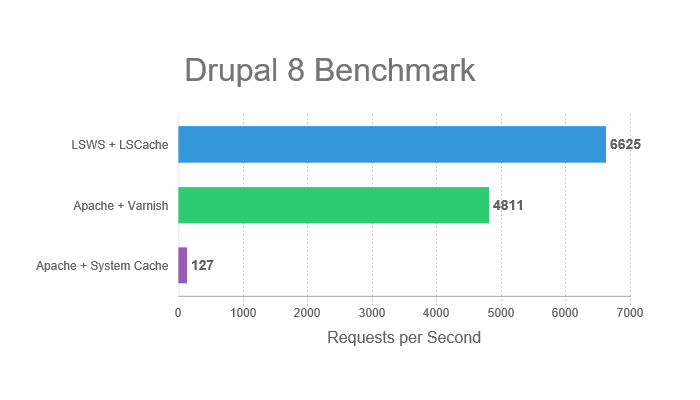
LiteSpeed Cache module for Drupal users works only on Drupal 8 and above (not the older versions).

If you are a Drupal user, you might already be aware that Drupal comes with its own native caching engine. If you are using LSCache, there is no need to turn off the native caching mechanism. LSCache automatically works in sync with the built-in cache system of Drupal 8.

Better Performance and Pagespeed with LiteSpeed Web Server and LiteSpeed Cache

However, unlike LiteSpeed Cache for WordPress, LiteSpeed Cache for Drupal does not currently have additional features such as crawler.

LiteSpeed Cache Drupal

Magento

Magento users can make use of the LiteMage cache extension for caching. Depending on whether you are using Magento 1.x or 2.x, you will need to pick the right version of the extension.

The LiteMage cache extension is fairly rich in terms of features and is also backed by a crawler script (that needs to be downloaded separately).

LiteSpeed Cache Magento

PrestaShop

PrestaShop currently does not have any cache module that can support both esi:include and esi:inline

LSCache is the only module that supports both of these options. This means the LSCache module can help your PrestaShop store run as fast as a static site!

Note that the LSCache plugin does support multiple storefronts in PrestaShop — this is especially useful if you are running a complex eCommerce mechanism in PrestaShop.

LiteSpeed Cache Prestashop

OpenCart

Many OpenCart users often find that the CMS is faster to operate, but the end users have trouble in terms of pagespeed. This is mainly because as the size of an OpenCart store rises, the database queries and code executions tend to rise manifolds. For a poorly optimized OpenCart setup, this can cause issues such as repeated database queries which will slow down the overall website.

LiteSpeed Cache plugin for OpenCart can take care of all of such problems. Here is how it describes its major benefit:

LiteSpeed Cache will automatically purge a page when the related product/category/information/manufacturer data has changed. You can set a longer cache expiration time to improve visitor experience, confident that the cache will be purged when relevant content changes.

LiteSpeed Cache OpenCart

XenForo

LiteSpeed Cache is available for both XenForo 1.x and XenForo 2.x

If you are hosting a XenForo site on VeeroTech hosting, it is strongly recommended to use SFTP or SSH to install the LSCache plugin. You can find more details at the following link:

LiteSpeed Cache XenForo

MediaWiki

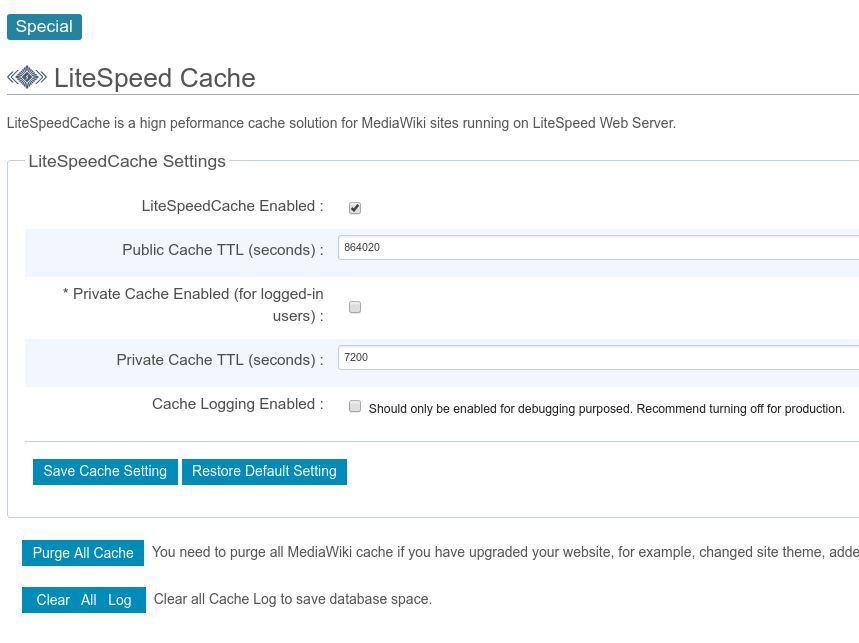
LiteSpeed Cache for MediaWiki sites requires MediaWiki 1.25 or higher. Since content on a wiki site is likely to change often, LiteSpeed Cache lets admins define custom purge rules to clear cache whenever content is updated.

Better Performance and Pagespeed with LiteSpeed Web Server and LiteSpeed Cache

Note that the private cache setting in this plugin is optional. Private cache is generally meant for logged-in users of your wiki.

LIteSpeed Cache MediaWiki

Conclusion

At this point, we have seen the various plugins that we can make use of to leverage the benefits of LiteSpeed Web Server for our websites.

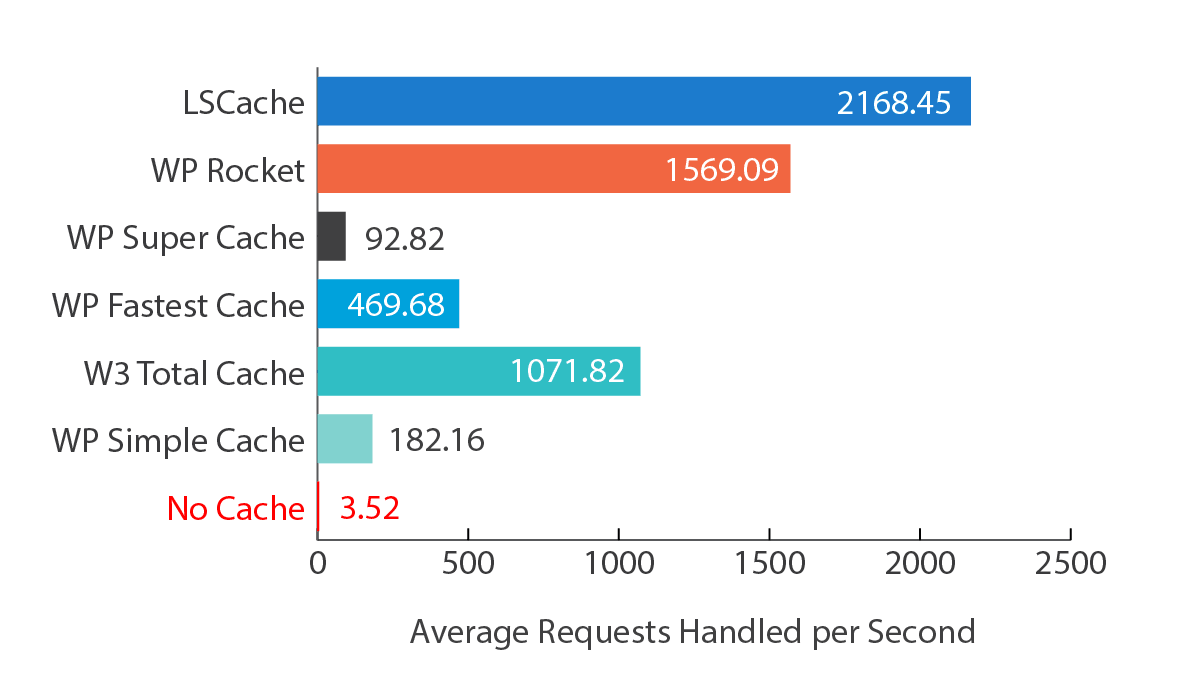
But the question is, why should you rely on LiteSpeed Cache at all? There are several caching plugins for WordPress, whereas Drupal comes with its own in-built caching tools! Similarly, CMS’s like Magento have various premium options that have a proven track record of great caching and speed enhancing performance.

Well, surely all of such plugins and extensions are amazing in their own right. However, LSCache works closely with the server-side architecture of LiteSpeed itself, thereby enabling it to leverage the server-centric caching mechanism. This is fairly identical to using Varnish or NGINX server-side caching — page-level caching of additional plugins is good to have, but it is not the most beneficial if there is no server-side cache system.

LSCache also has various other features, including the ability to minify code and requests. This means your website consumes lesser memory and can, in fact, run better in a shared environment. Even in case of a sudden spike or surge in traffic, LiteSpeed Cache can ensure that static pages are served to users and as many resources and objects are cached as possible. This will help maintain your site running in good health and ensure speedier performance.

If you have web hosting with VeeroTech, LSCache can improve your website’s performance. Try it an see! Still have doubts? Check out the LiteSpeed benchmarks.

Talk with LiteSpeed directly on their GoLiteSpeed Slack workspace.

If you have any questions simply open a support ticket and we will get it sorted in no time!

Interested in learning about our services feel free to Contact Us.