
What is PHP2Shell?
PHP2Shell is a pair of critical security flaws in the PHP programming language, disclosed and fixed on 21 October 2026. Both can allow an unauthenticated attacker to run their own code on a web server. Because the flaws are in PHP itself, they can affect any website running on PHP, including sites built with WordPress, Joomla, Drupal, Laravel and WooCommerce. [1][2]
The two vulnerabilities are:
| CVE-2026-109618 | CVE-2026-109619 | |
| Plain-English description | PHP can be forced to run out of memory while it is still reading an incoming request. The cleanup that follows trusts data that was never properly set up. | Data left over from one failed request can survive in memory and be used by the next request on the same PHP worker. |
| Technical name | Remote code execution via out-of-memory corruption | Remote code execution via stale global state |
| Severity | Critical, CVSS v4.0 9.2 | Critical, CVSS v4.0 9.2 |
| Login required? | No | No |
Sources: [1][3]
Security researchers have also reported that the flaws can be used to read sensitive data from a server’s memory, such as passwords or API keys, not only to run code [6].
Glossary
Remote code execution (RCE): An attacker on the internet can make your server run instructions of their choosing, such as installing malware or reading your database.
CVSS v4.0: The standard 0–10 scale for rating vulnerabilities. 9.0 and above is “Critical.”
PHP worker: A process on the server that runs PHP code. In common setups such as PHP-FPM and Apache with mod_php, workers are reused for many visitors in a row, which is why leftover data from one request can matter for the next.
Why this one is different from a typical WordPress vulnerability
Most website security news is about a single plugin or theme. PHP2Shell is different in three ways.
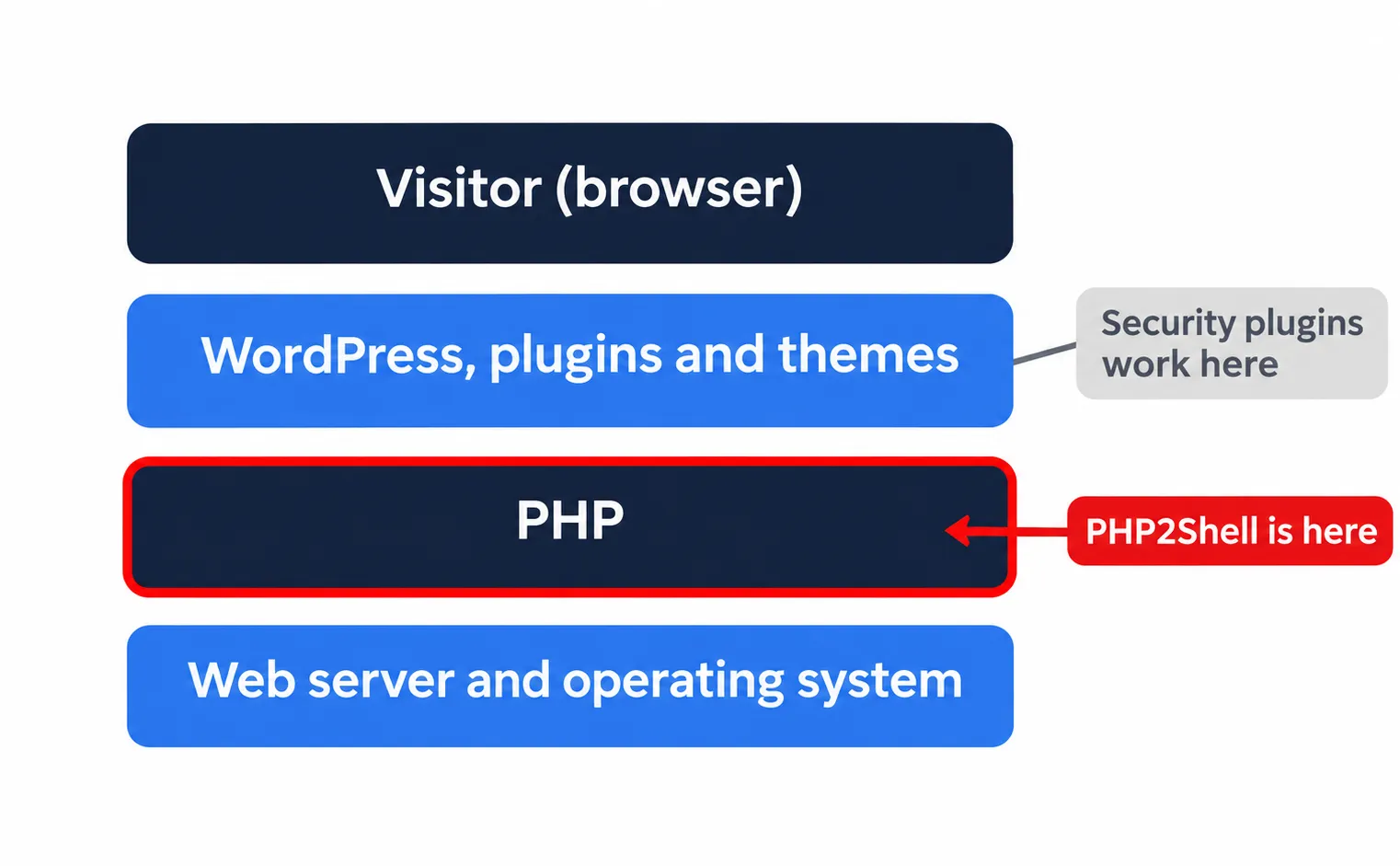
- It sits below your website. The flaws are in the language your site is written in, not in WordPress or a plugin. PHP’s advisory describes a demonstrated attack, on servers using Apache’s mod_php, that is triggered before any of the site’s own code runs [1]. A security plugin inside WordPress may never get a chance to see it.
- Updating WordPress does not fix it. Only an updated PHP build fixes it. On VeeroTech’s managed plans, we install it. On a self-managed server, you do.
- No setting fully protects you. PHP published some temporary configuration changes that reduce the risk, but its release notes are blunt: “There are no complete mitigations, updating is the only safe choice.” [5]
The PHP project says every PHP installation that serves web requests is affected, whatever the server setup: PHP-FPM, Apache with mod_php, php-cgi, FrankenPHP or LiteSpeed. It considers Apache with mod_php the highest-risk setup [1].
How big is it? Wiz, one of the research teams involved, has described the flaws as affecting about 70% of the internet [6]. That figure reflects how widely PHP is used, not how many sites have been attacked. Palo Alto Networks reported more than 22.6 million internet-facing instances that are potentially vulnerable, based on its own scanning [7].
How PHP2Shell came to light
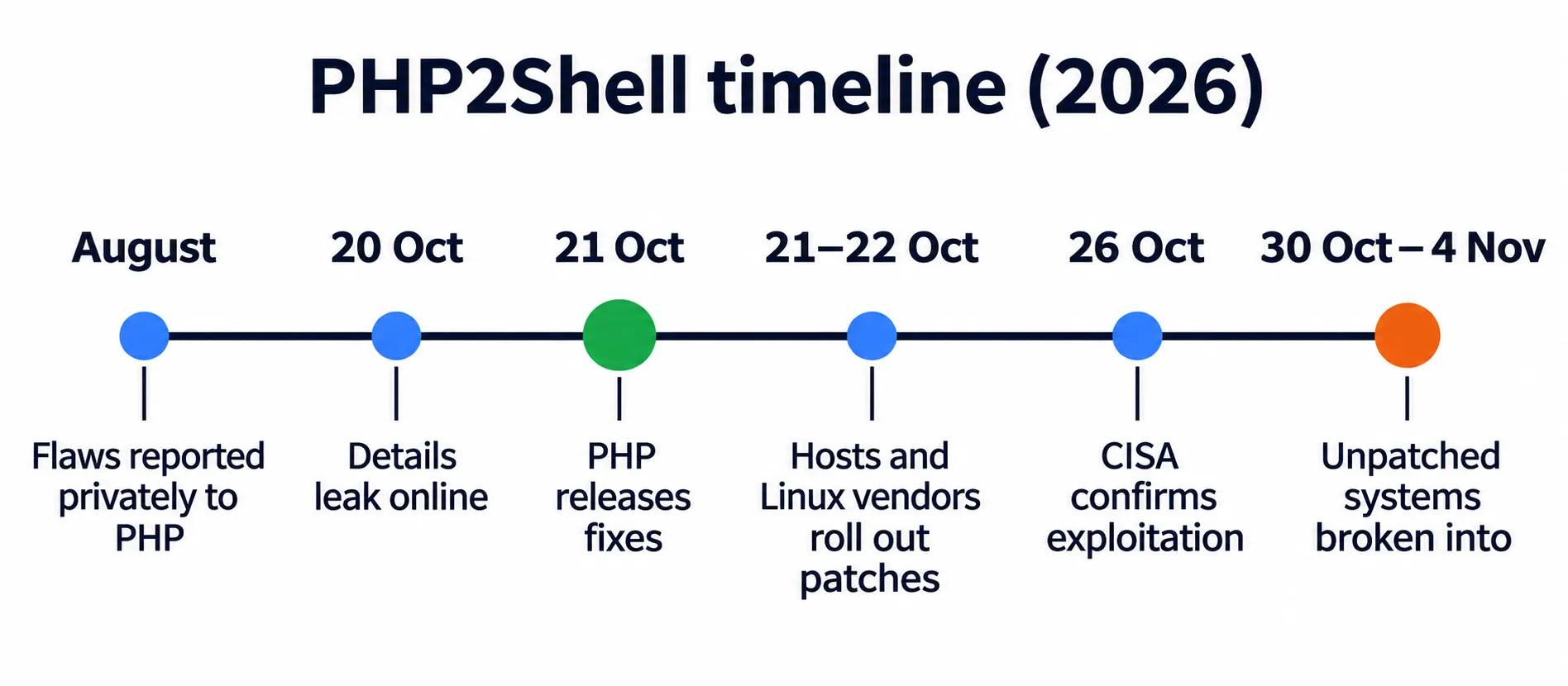
Researchers at Calif, using an OpenAI model, found and reported the flaws to the PHP security team in August 2026. Wiz Research found and reported them independently later that month, also with the help of AI models [6][8][13][14]. PHP prepared fixes with Linux distributions and hosting platforms ahead of a coordinated public disclosure planned for 22 October [4][9].
Details leaked online on 20 October, two days before that date. PHP responded the same day by bringing the release forward, and published the fixes on 21 October [1][4][9].
| Date (2026) | What happened |
| August | Researchers report the flaws privately to PHP |
| 20 October | Details leak online; PHP brings the security release forward to 21 October |
| 21 October | PHP releases 8.5.12, 8.4.27, 8.3.36 and 8.2.35; security firms report attempts to exploit the flaws |
| 21–22 October | Hosting providers and Linux distributions roll out patched builds |
| 26 October | CISA adds both flaws to its list of vulnerabilities known to be exploited |
| 30 October – 4 November | Attackers use PHP2Shell to break into unpatched security gateways (reported by Check Point on 12 November) |
Sources: [1][4][9][10][15][17]
Is PHP2Shell being exploited?
Yes. Security companies including watchTowr, Patchstack and Cloudflare reported attempts to exploit the flaws from the day the fixes were released [9][10][11].
- 26 October: the US cybersecurity agency CISA added both flaws to its Known Exploited Vulnerabilities catalog, meaning it has evidence of real-world exploitation [15].
- 29 October: Palo Alto Networks reported attackers using PHP2Shell against internet-facing management interfaces of its own firewall products, and said it had verified the attackers’ tools [7].
- 12 November: Check Point reported that attackers had used PHP2Shell to break into a couple of dozen unpatched Check Point security gateways between 30 October and 4 November. In a few cases the attackers caused damage. Fixes for those devices had been available since 23 October [17].
How easy the flaws are to exploit depends on the server setup, and many early attempts failed: Wiz reported on 27 October that some tools sold as “PHP2Shell exploits” actually relied on separate flaws [16]. But the Check Point cases show that attacks do succeed against systems that were not updated.
In practice: attackers are actively targeting unpatched servers, so patching should not wait.
Is there anything else to watch?
On 23 October, PHP announced a related flaw, CVE-2026-115560, that the 21 October releases don’t fix [1][15].
- It only affects sites with an unusual combination of PHP settings and application code, so PHP considers it unlikely in practice and will fix it in its next regular release.
- Until then, PHP suggests turning off one feature,
upload_progress.enabled, in the server’s PHP configuration. This is the same setting PHP recommended as a temporary measure for PHP2Shell.
Which PHP versions are affected and fixed?
| PHP version | Status | Fixed version |
| PHP 8.5 | Supported | 8.5.12 |
| PHP 8.4 | Supported | 8.4.27 |
| PHP 8.3 | Supported | 8.3.36 |
| PHP 8.2 | Supported until 31 December 2026 | 8.2.35 |
| PHP 8.1 and older | End of life | No official release. PHP published minimal source fixes for 7.4, 8.0 and 8.1 for people who build PHP themselves; most servers get fixes from their host, Linux distribution or a long-term support vendor. |
Sources: [3][5]
Why the version number isn’t the whole story. Hosting platforms often apply the fix to their existing builds without changing the version number. For example, CloudLinux, which supplies PHP on many shared hosting servers, released patched builds whose version numbers stay below PHP’s official fixed versions [12]. So “PHP 8.3.35” on a hosting account can be a patched build. The reliable way to know is to ask your host or, if you manage your own server, to check the package changelog. On VeeroTech, see the next section.
Why we still recommend moving off old versions. PHP 8.1 and older are no longer maintained by the PHP project, and PHP 8.2 stops receiving security fixes on 31 December 2026 [5]. On VeeroTech, older versions keep getting security patches from CloudLinux (see the next section), but they miss performance improvements, and current plugins and themes increasingly need newer PHP. On servers without that kind of support, old versions stay exposed to future flaws. We recommend using the latest PHP version your website supports. Test your site after switching, since older plugins and themes may not support the newest version.
What VeeroTech has done
Patched PHP on every managed plan. We installed the patched PHP builds on all shared, Managed WordPress, reseller (cPanel and DirectAdmin), semi-dedicated and Managed VPS servers as soon as they reached our vendors’ stable update channels. Our PHP comes mainly from CloudLinux, which released its patched packages over several hours from the evening of 21 October (UTC) [12], and we rolled them out over the same period.
Every selectable PHP version is covered. This includes every version you can choose in your control panel, from PHP 5.2 through 8.5. Because CloudLinux backports the fix, the version number shown in your control panel may not change. That is expected. CloudLinux keeps patching end-of-life PHP versions from 5.2 onward through its TuxCare ELS (Endless Lifecycle Support) program, which is why older versions are covered too [18].
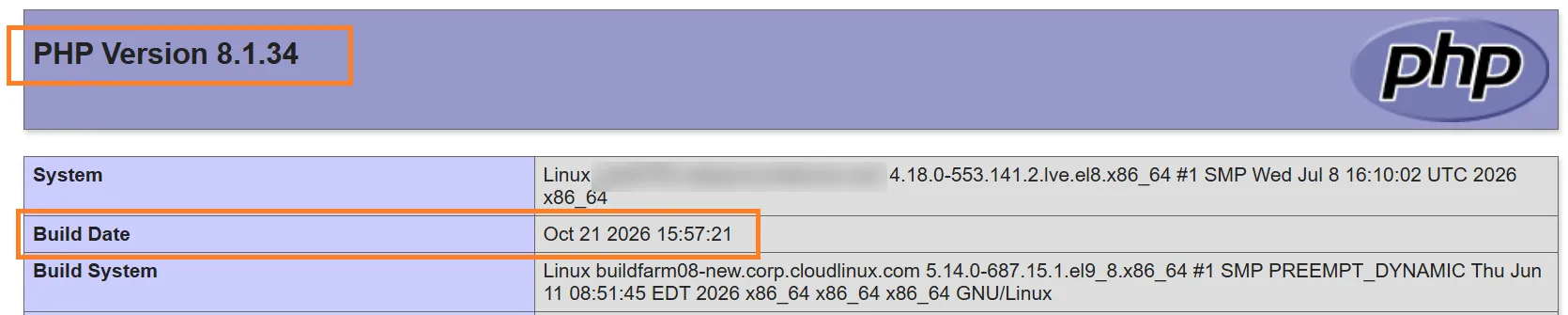
PHP 8.1 is end of life with the PHP project, but this PHP 8.1 build on a VeeroTech server was built by CloudLinux on 21 October 2026, the day the PHP2Shell fixes were released. The version number alone (8.1.34) doesn’t show that.
A firewall stopgap while patches rolled out. Our servers run Imunify360, whose web application firewall received ModSecurity rules targeting known PHP2Shell attack patterns. Those rules were in place as a stopgap while the PHP updates were installed.
Self-managed VPS. On a self-managed VPS, you control the server software, so updating PHP is your responsibility. See the next section.
Firewall rules help, but they are a temporary shield, not a fix. Even with them in place, the PHP update is what closes the hole [1][12].
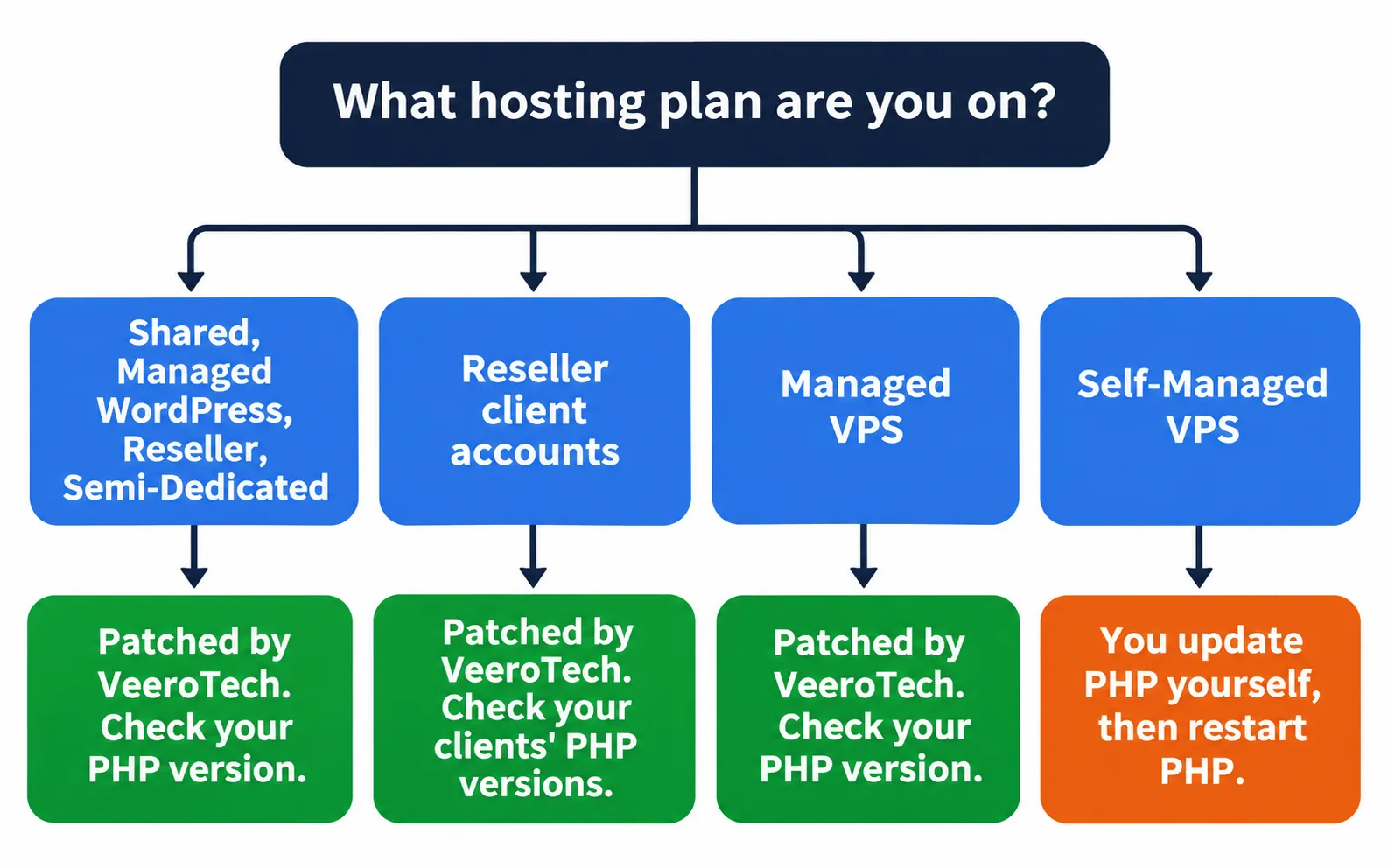
What you should do, by plan type
| Your plan | Who updates PHP? | What you should do |
| Shared, Managed WordPress, Reseller, Semi-Dedicated | VeeroTech (done) | Nothing for the patch. Check which PHP version your site uses and switch to the latest version it supports, especially if it’s on PHP 8.1 or older. How to check: cPanel → · DirectAdmin → |
| Reseller (your clients’ accounts) | VeeroTech (done) | Check your client accounts too. Any account on PHP 8.1 or older should be moved to a supported version. |
| Managed VPS | VeeroTech (done) | Nothing for the patch. Check your sites’ PHP versions as above. |
| Self-Managed VPS | You | Update PHP yourself and restart PHP. VeeroTech support does not manage software inside a self-managed server. See the steps below. |
If you’re on a self-managed VPS
You have full control of the server, which means the update is your responsibility. In short:
- Update every PHP installation on the server to a fixed build, including any second PHP version installed by your control panel.
- Restart PHP (PHP-FPM, Apache or LiteSpeed). A patch isn’t active until the old PHP processes are gone.
- Confirm the fix through your package changelog, not just the version number.
If you’d rather not manage server updates yourself, on a Managed VPS we apply PHP updates for cPanel and DirectAdmin for you.
Signs something might be wrong
Patching closes the door, but it doesn’t tell you whether someone got in before it closed. These are general signs of a compromised website, not signs specific to PHP2Shell. Contact support if you notice any of them:
- Admin users in WordPress (or another CMS) that you didn’t create
- PHP files you don’t recognise in your website folders, especially in upload directories
- Unexpected scheduled tasks (cron jobs) in your control panel
- Your site redirecting visitors elsewhere, or a sudden jump in resource usage or outgoing email
If you have any reason to think your site was compromised:
- Contact support before deleting anything. Note what you found (usernames, file names, dates).
- Restore from a clean backup taken before the problem started, if you have one. See How to use JetBackup and Best practices for web hosting backups.
- Change your passwords and keys: hosting, database and CMS admin passwords, and any API keys stored on the site. These flaws can expose data held in server memory [6].
- Not sure which PHP version your site uses? Follow our guide for cPanel or DirectAdmin.
- Questions, or something looks wrong on your site? Open a support ticket and include your domain name.
Changing passwords alone doesn’t make a compromised site clean. Anything an attacker left behind also has to be removed.
Frequently asked questions
Does updating WordPress fix PHP2Shell?
No. PHP2Shell is a flaw in PHP, the language WordPress runs on, not in WordPress itself. Updating WordPress, plugins or themes does not fix it. The fix is an updated PHP build, which your host installs on managed and shared hosting. On a self-managed server, you install it yourself.
Do I need to do anything on VeeroTech shared hosting?
No action is needed for the patch. VeeroTech has installed patched PHP builds on shared hosting servers for every PHP version you can select. We do recommend using the latest PHP version your site supports, because newer versions are faster and better supported by plugins and themes, and PHP 8.2 reaches end of life on 31 December 2026.
Is my site safe if it runs PHP 8.1 or older?
The PHP project no longer releases fixes for PHP 8.1 and older. Hosting platforms and Linux vendors can backport the fix to these versions, and on VeeroTech every selectable version from PHP 5.2 to 8.5 has the fix. CloudLinux keeps patching these versions through its TuxCare ELS program, so they stay secured on VeeroTech. Moving to a supported PHP version is still the better long-term choice for speed and plugin compatibility.
Is PHP2Shell being exploited?
Yes. Security companies reported exploitation attempts from the day the fixes were released, and on 26 October 2026 CISA added both flaws to its list of known exploited vulnerabilities. In November, Check Point reported that attackers had broken into unpatched systems using PHP2Shell. Attackers are actively targeting unpatched servers, so updating promptly matters.
Does a firewall fully protect me?
No. Web application firewall rules can block known attack patterns and buy time, but they do not fix the underlying flaws in PHP. The PHP project states that updating is the only complete fix.
Can a website scanner tell me if I’m patched?
Not reliably. Hosting platforms often apply the fix without changing the PHP version number, so an outside scanner that reads the version can report a patched site as vulnerable, or the reverse. Ask your host to confirm, or check your package changelog if you manage your own server.
Why is it called PHP2Shell?
The researchers named it. In security, a “shell” usually means command-line access to a server, so the name points to what the flaws can lead to: an attacker going from a web request to running commands on the server.
Need help?
Sources
[1] PHP Group. (2026, October 20–23). Advance notice, security advisory for CVE-2026-109618 and CVE-2026-109619, and informational advisory on session upload progress. https://www.php.net/archive/2026.php
[2] GitHub Security Advisories, php-src. GHSA-w8hw-w9fx-j79w and GHSA-6wmf-4rv5-p3rp. https://github.com/php/php-src/security/advisories/GHSA-w8hw-w9fx-j79w · https://github.com/php/php-src/security/advisories/GHSA-6wmf-4rv5-p3rp
[3] CERT-EU. (2026, October 21). Security Advisory 2026-018: Critical Vulnerabilities in PHP. https://cert.europa.eu/publications/security-advisories/2026-018/
[4] SecurityWeek. (2026, October). PHP2Shell patches land as first exploitation attempts hit sensors. https://securityweek.com/php2shell-patches-land-as-first-exploitation-attempts-hit-sensors
[5] PHP Group. (2026, October 21). PHP 8.5.12, 8.4.27, 8.3.36 and 2.35 release announcements. https://www.php.net/archive/2026.php · https://github.com/php/php-src/releases/tag/php-8.5.12
[6] Wiz Research. (2026, October 21). PHP2Shell: AI uncovers critical RCE vulnerabilities. https://wiz.io/blog/php2shell-php-rce
[7] Palo Alto Networks Unit 42. (2026, October 21; updated 29 October). Threat brief: Critical vulnerabilities in PHP. https://unit42.paloaltonetworks.com/cve-2026-109618-cve-2026-109619/
[8] Google Cloud. (2026, October). Responding to core PHP vulnerabilities CVE-2026-109618 and CVE-2026-109619. https://cloud.google.com/blog/products/identity-security/responding-to-core-php-vulnerabilities-cve-2026-109618-cve-2026-109619
[9] watchTowr. (2026, October 22). PHP2Shell FAQ. https://watchtowr.com/intelligence/php-cve-2026-109618-faq/
[10] Recorded Future. (2026, October 21). PHP2Shell exploitation. https://www.recordedfuture.com/blog/php2shell-vulnerability-exploitation
[11] Tanium. (2026, October). PHP2Shell: Responding to CVE-2026-109618 and CVE-2026-109619. https://www.tanium.com/blog/php2shell-responding-to-cve-2026-109618-and-cve-2026-109619
[12] CloudLinux. (2026, October 21–22). PHP CVE-2026-109618 and CVE-2026-109619: package status. https://blog.cloudlinux.com/php-cve-2026-109618-and-cve-2026-109619
[13] Calif. (2026, October 21). PHP2Shell. https://calif.io/php2shell/
[14] OpenAI. (2026, October 21). Coordinated disclosure of critical vulnerabilities. https://openai.com/index/coordinated-disclosure-of-critical-vulnerabilities/
[15] Canadian Centre for Cyber Security. (2026, October 21–27). AL26-026: Critical vulnerabilities impacting PHP (Updates 1 and 2: CVE-2026-115560; CISA KEV listing on 26 October). https://www.cyber.gc.ca/en/alerts-advisories/al26-026-critical-vulnerabilities-impacting-php-cve-2026-109618-cve-2026-109619
[16] Wiz Research. (2026, October 27). PHP2Shell: exploitation attempts and remediation trends. https://www.wiz.io/blog/php2shell-exploitation-so-far
[17] Check Point. (2026, November 12). Security advisory: Active exploitation of PHP2Shell and local privilege escalation. https://blog.checkpoint.com/security/security-advisory-active-exploitation-of-php2shell-and-local-privilege-escalation/
[18] TuxCare. Endless Lifecycle Support for PHP: security patches for end-of-life PHP versions from 5.2. https://tuxcare.com/extended-lifecycle-support/php-els/
If you have any web hosting questions please feel free to reach out to us. We're happy to help.
Our Guiding Principles